

TL;DR:
- Cloud backup cost optimization means reducing backup‑related storage, compute, and migration costs, while ensuring data remains secure and recoverable.
- The biggest cost drivers are storage tiers, data‑migration fees, and retention policies that keep data longer than necessary.
- Proven strategies include data‑lifecycle management, deduplication and compression, automatic tiering, and use of cost calculators to forecast spend.
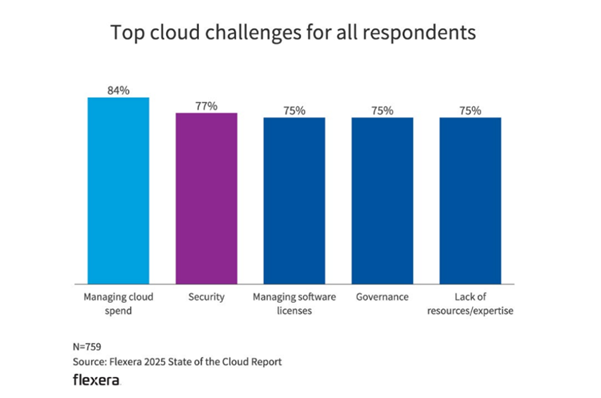
Cloud costs keep climbing, and backup storage is often one of the biggest culprits. According to Flexera’s 2025 State of the Cloud Report, managing cloud spend remains the number‑one challenge for 84% of organizations. It’s a reminder that even the most cloud‑savvy teams struggle to control data protection expenses.
That’s where Veeam comes in. By combining automation, tiering, and smart policy design, organizations can cut cloud backup costs and without sacrificing performance, recoverability, or compliance.
What is Cloud Backup Cost Optimization?
Cloud backup cost optimization is the practice of reducing unnecessary expenses across your backup infrastructure, ranging from how data is stored to how often it’s moved, without compromising your ability to recover quickly.
Think of it as the FinOps of data protection: Balancing financial accountability with IT performance.
For example, a team might discover that 60 days of backups are sitting in high‑performance storage even though only the past seven days are ever accessed. By migrating older backups to a lower‑cost archive tier and automating retention policies, they can cut monthly storage fees by up to 70%.
When done right, optimization doesn’t mean “doing less.” It means doing smarter by aligning your data protection strategy with the actual business value of your data.
Understanding Cloud Backup Costs
Before you can optimize backup spend, you need to understand where it actually comes from. Cloud backup costs are shaped by how, where, and how long you store data.
Here’s a quick breakdown of the most common cost components:
| Cost Component | Description |
| Storage Costs | Fees charged for storing backups across different tiers: Hot, cool, and archive. Hot tiers are faster but more expensive; archive tiers are slower but much cheaper. |
| Compute Costs | The resources used for processing backup jobs, restores, and integrity checks. These can add up quickly in high‑frequency or large‑scale environments. |
| Data Migration Costs | Also called ingress and egress fees, these apply when you move backup data between regions, tiers, or cloud providers (for example, AWS, Azure, or Google Cloud). |
| Backup Software Licensing | Subscription or usage‑based costs for backup and recovery tools that manage cloud workloads. |
Even small tweaks in these categories can yield big savings. For instance, simply reducing the retention of daily backups from 90 days to 30 days can lower storage costs by more than 60%. Likewise, using compression and deduplication can shrink backup data volumes before they ever hit cloud storage.
If you’re not sure where to start, take advantage of modelling tools like the Veeam Pricing Calculator to forecast how data size and retention policies affect your total monthly spend.
For a real‑world example, the Total Economic Impact™ (TEI) Study shows how one enterprise saved $2 million by optimizing its backup architecture with Veeam + AWS. This is a clear proof point that smarter management pays off.
What are the Main Strategies for Cloud Backup Cost Optimization
Once you understand where your cloud backup costs originate, the next step is to build a strategy that reduces spend while maintaining strong data protection.
Effective optimization happens in three phases: Planning, Implementing, and continuous optimization. Each phase builds on the previous one, gradually tightening efficiency without sacrificing recoverability.
Planning: Backup Assessment and Alignment
A successful cost optimization strategy starts long before the first backup runs.
The planning phase is all about assessment and alignment. You evaluate what data you have, where it lives, and how long you actually need to keep it.
Key Actions During Planning | |
| 1. Audit your current backup workloads. | Identify redundant data, over‑retained backups, and inactive workloads that still consume premium storage. |
| 2. Map data sensitivity and value to storage tiers. | Mission‑critical workloads require fast recovery and hot storage; test or archival data can move to colder, cheaper tiers. |
| 3. Establish retention policies based on business need, not habit. | Many organizations discover they’re keeping backups far longer than compliance requires, driving up monthly bills. |
| 4. Forecast future data growth and backup frequency. | Use historical trends and cloud cost calculators to model how backup data will scale over time. |
| 5. Connect cost planning with recovery objectives. | Balance Recovery Time Objectives (RTOs) and Recovery Point Objectives (RPOs) against budget constraints: The faster the recovery, the higher the cost. |
A little foresight here can translate into major savings later.
By planning retention limits and tier transitions before data is ever written to cloud storage, you avoid the costly mistake of “set‑and‑forget” backups that quietly accumulate expense.
Cost‑Effective Cloud Storage Options
When optimizing backups, storage selection is one of the most impactful decisions you can make. Different classes of cloud storage offer varying levels of performance, availability, and cost. Aligning each workload with the right tier prevents unnecessary overspend.
| Storage Class | Typical Use Case | Relative Cost | Access Speed |
| Hot Storage | Frequently accessed or mission‑critical backups | $$$ | Fast |
| Cool Storage | Backups older than 30 days, moderate access needs | $$ | Moderate |
| Archive Storage (Cold) | Long‑term retention, compliance, disaster recovery scenarios | $ | Slow |
This tiered approach provides for high‑speed recovery of active data while keeping long‑term retention affordable. Cloud providers often automate these transitions, so once configured, savings continue month after month.
Snapshots vs Backups
Native snapshots are typically the go-to method for protecting cloud-hosted resources, whether they are manually created and managed, scripted, or orchestrated with another tool. Snapshots afford us the ability to achieve low RPOs as they can be taken frequently, as well as low RTOs to overcome data loss scenarios quickly.
- Snapshots are point‑in‑time copies of running virtual machines IVMs) or cloud instances. They enable rapid recovery but remain tied to production storage, which makes them limited and expensive to retain.
- Backups, on the other hand, are independent compressed copies stored in cost‑optimized locations, designed for durability and efficiency.
However, from a cost lens, you can see above that the volumes snapshots are stored on are among the most expensive cloud storage options. A true backup can be made from these snapshots, compressed, and then stored on more cost-effective object storage to meet compliance, retention, and budgetary requirements.
Best‑Practice Note
Retain enough snapshots for short‑term rapid recovery, but don’t keep months of them when a backup archive would do.
For a deeper explanation, see Snapshots vs Backups: What’s the Difference?
Leverage Cost Calculators
Even if you’re not actively using backup optimization tools, always run the numbers before finalizing retention or tiering policies. Every major cloud provider, including Veeam, offers calculators that estimate monthly costs based on data size, frequency, and storage class.
Quick Tip:
Use a provider’s calculator to model how backup data grows over time. Even small changes in retention (for example, 30 days instead of 90) can prevent unpleasant billing surprises.
Tools like the Veeam Pricing Calculator give visibility into how compression, deduplication, and storage tiering translate into real savings.
Implementing Cost Optimization Strategies
Once planning is complete, the next step is execution: Turning your strategy into automated, scalable actions.
Data Lifecycle Management
Data lifecycle management means controlling how data moves through its lifetime, from creation to archival or deletion, to ensure cost efficiency and compliance.
In cloud backup, this often translates to tiering data based on age and access frequency.
For example:
- Keep the most recent 30 days of backups in a hot tier for fast recovery.
- Migrate older backups to an archive tier to cut storage costs by up to 70%.
You can learn more about practical lifecycle strategies in the Hybrid Cloud Data Lifecycle Webinar, which explores how automation and tiering can dramatically reduce cloud‑backup spend.
Data Deduplication and Compression
Two of the most effective techniques for lowering backup storage costs are deduplication and compression.
- Deduplication removes duplicate data blocks before they’re written to storage, keeping only unique pieces.
- Compression reduces file sizes to minimize the total amount of data stored.
Together, these can reduce storage requirements by 30–60% without any compromise to data integrity or recovery performance.
Data Backup Optimization
After planning and implementing lifecycle strategies, the next step is optimization. This is an ongoing process of refining your backup environment to maximize efficiency, reliability, and cost control. Optimization ensures your strategy evolves with your data growth, storage behavior, and recovery needs.
Automated Backup Policies
Automation is key to maintaining consistency and preventing unnecessary cloud spend. By defining clear backup tiers and retention rules, you remove guesswork and enforce best practices automatically.
Here’s an example of policy tiering that balances cost and performance:
| Tier | Description | Policy Example |
| Tier 1 – Critical Production | Hourly snapshots + daily backups | 30‑day short‑term on hot storage, long‑term to archive |
| Tier 2 – Standard Workloads | Daily backups | 7‑day hot storage, then archive/cold storage (Veeam Vault) |
Tier 3 – Dev/Test or Low‑Priority | Weekly backups | 14‑day retention, no long‑term archive |
Automating these transitions cuts manual oversight and ensures data flows seamlessly between tiers, protecting what matters most while optimizing cost.
Monitoring and Optimization Practices
Once automated policies are in place, monitoring and tuning keep your backup environment efficient over time. Optimization is a continuous feedback loop.
Recommended metrics and practices:
- Storage utilization alerts: Detect when hot‑tier usage exceeds thresholds so you can move data to lower‑cost tiers.
- Retention‑policy audits: Regularly verify that backups align with current compliance and business needs.
- Anomaly detection: Set up alerts for sudden spikes in backup size or transfer activity, signs of misconfiguration, or data growth that could inflate costs.
- Restore‑time tracking: Measure recovery performance to confirm that cost‑savings adjustments haven’t impacted RTO/RPO targets.
- Monthly cost reviews: Compare projected spend (from calculators) against actual billing to identify trends early.
Maximize Discount Opportunities
Much like anything you buy these days, the more you purchase, the better the price per unit. This holds true for not only the data protection software used for protecting cloud, but the cloud resources themselves. AWS, Azure, and Google all offer commit programs to a predetermined annual expenditure that results in contractual discounts on consumed resources, similar to an enterprise agreement. As you migrate to and grow within the cloud, forecast your spend routinely to not only avoid bill shock, but to negotiate volume-based discounts early.
Also worth noting here are the differing types of compute instances not just from a power perspective but also pricing structure. Workloads with consistent utilization typically benefit from reserved instance pricing. Those with consistent utilization but with predictable times of increased performance requirements benefit from auto scaling, and workloads that are dynamic and short-lived typically benefit from on-demand instances.
Ready to Scale Your Hybrid Cloud? Watch Now:
FAQs
1. What is cloud backup cost optimization?
It’s the process of reducing unnecessary cloud backup expenses by managing retention, tiering, compression, and data‑movement policies, all without sacrificing recovery or compliance.
2. How can organizations reduce cloud backup costs without risking data loss?
By automating lifecycle management, using object storage for older backups, and applying deduplication and compression to minimize cloud storage footprint.
3. What’s the difference between snapshots and backups for cost management?
Snapshots provide rapid recovery but are expensive to retain long‑term. True backups are optimized for cost efficiency and durability. The best approach is to use both strategically, short‑term snapshots, long‑term backups.
4. How does Veeam help automate and optimize cloud backup spend?
Veeam automates lifecycle transitions, applies deduplication and compression, and provides accurate cost modelling tools like the Veeam Pricing Calculator. Together, these features help organizations forecast and control spend proactively.