

Key Takeaways:
- Backup is the process of creating secure, independent copies of your data.
- Recovery is the process of restoring that data when something goes wrong, whether it’s accidental deletion, corruption, or a ransomware attack.
- Both are essential for business continuity: backups provide resilience, while recovery ensures fast return to operations.
- Modern solutions extend beyond simple file copies, offering granular restores, instant VM recovery, and immutable storage to defend against today’s threats.
- The Veeam Data Platform unifies backup and recovery, delivering protection for physical, virtual, SaaS, and cloud-native environments under one consistent framework.
When people hear the words backup and recovery, they often think they’re interchangeable. In reality, they’re two sides of the same coin: one protects your data before disaster strikes, and the other gets it back after. Understanding the difference is more than a matter of definitions; it’s a cornerstone of building a resilient IT strategy.
A backup on its own doesn’t guarantee business continuity. You could have terabytes of data safely copied, but without the ability to recover it quickly and cleanly, operations still grind to a halt. On the flip side, recovery isn’t possible without reliable backup data as a foundation. Together, they form the backbone of modern business continuity and disaster recovery (BCDR) planning.
In this guide, we’ll break down exactly what backup and recovery mean, why both are critical, the different types of backup strategies, and how advanced recovery techniques —from instant VM restores to immutable backup repositories — are shaping cyber-resilient enterprises today.
Backup and Recovery: What’s the Difference and Why Both Are Critical for Business Continuity
At a high level, backup is the act of protecting your data, while recovery is the act of restoring it when needed. It sounds simple. But in practice, the difference has big implications for how organizations design their IT strategy.
- Backup is proactive: it’s the scheduled, methodical creation of copies of your files, applications, and workloads. Backups are the insurance policy that ensures a clean version of your data exists outside your production environment.
- Recovery is reactive: it’s the process you rely on after something has gone wrong, whether that’s a natural disaster, human error, a failed patch, or a cyberattack. Recovery is about speed and precision: how quickly can you bring systems back online, and can you restore them to a state you trust?
Why does this distinction matter for business continuity? Because downtime is expensive. Every hour without access to critical applications means lost revenue, regulatory risk, and damage to customer trust. Backup gives you resilience, but recovery defines how long you stay down or whether you get back up at all.
That’s why modern business continuity strategies focus on both sides of the equation: maintaining Recovery Point Objectives (RPOs) that dictate how often data is backed up, and Recovery Time Objectives (RTOs) that determine how quickly you can return to operations. Together, these metrics shape how IT leaders balance performance, cost, and risk.
When backup and recovery are treated as one unified process, organizations can build confidence that no matter what happens, their data and applications remain available, secure, and compliant.
What Is Data Backup and Recovery?
At its core, data backup and recovery is the discipline of protecting digital information by creating independent copies and restoring them when the original is lost, corrupted, or compromised. While the two terms are often paired together, each plays a distinct role:
- Data backup is the process of creating consistent, retrievable copies of files, databases, or entire systems, typically stored on separate infrastructure (local disks, tape, object storage, or the cloud). The goal is to safeguard against data loss from accidents, hardware failures, or malicious activity.
- Data recovery is the process of using those backups to restore information and get systems running again after an incident. Recovery may involve rolling back a single file to an earlier state or bringing up an entire virtual machine in minutes to minimize downtime.
In practice, backup and recovery work together as part of a BCDR strategy. Modern platforms go beyond simple file copies, enabling:
- Granular recovery of individual objects or attributes.
- Instant VM recovery that spins workloads back up directly from backup storage.
- Immutable repositories that prevent ransomware from altering or deleting backups.
- Orchestrated recovery workflows that automate complex failover processes.
The goal is not just to “have a backup,” but to ensure fast, reliable recovery at scale. In today’s threat landscape, organizations need to plan for both: the clean copy that keeps data safe, and the tested recovery process that ensures the business stays running.
Backup vs. Recovery
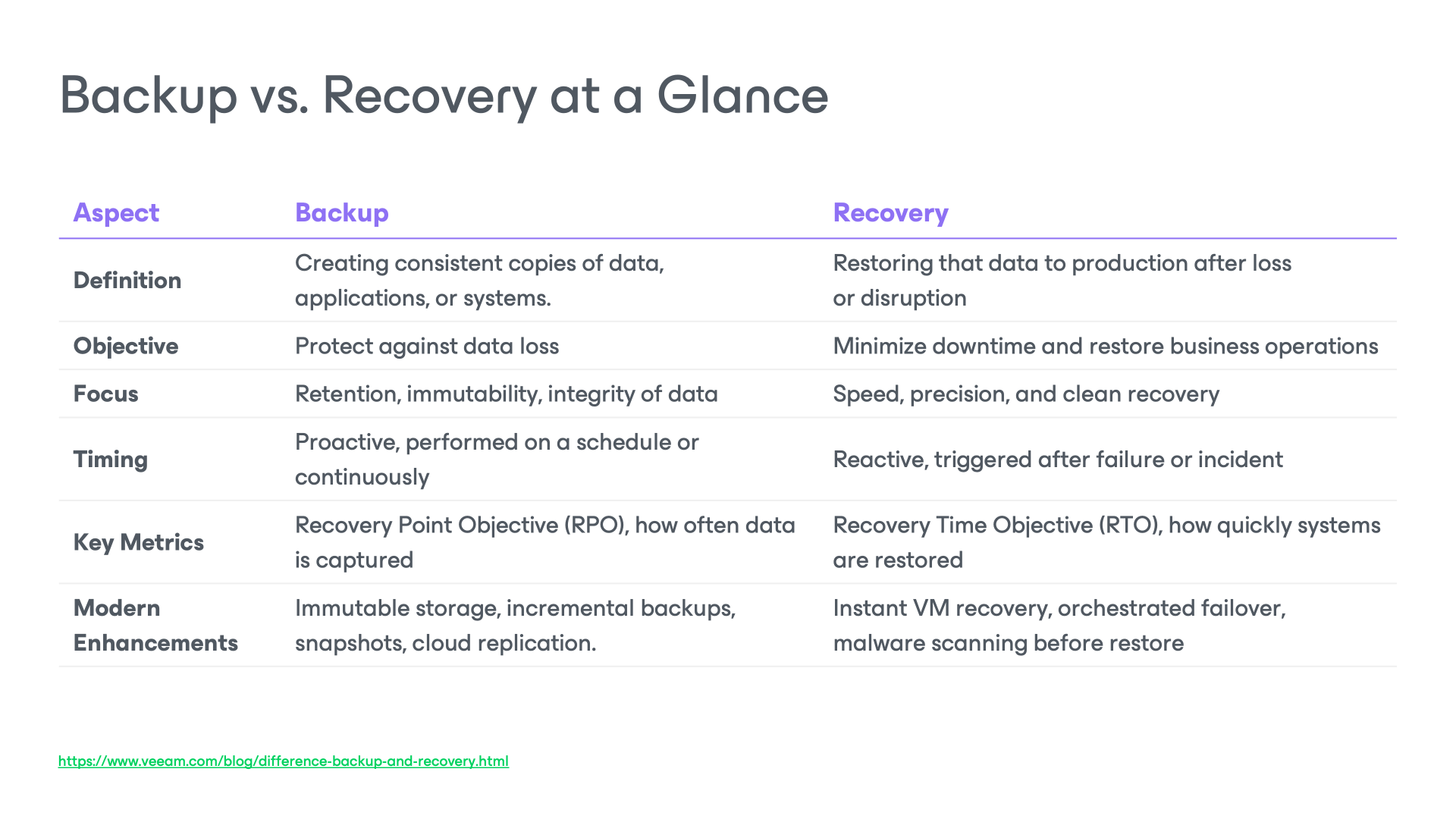
Although closely linked, backup and recovery solve different problems. A backup is about creating the copy, while recovery is about putting that copy back into action.
Both are essential, but they measure success differently. Backup focuses on retention and data integrity; recovery focuses on time-to-restore and operational resilience.
Types of Data Backup & Recovery
Not all backups are created equal. Different methods balance speed, storage use, and recovery needs in different ways. Understanding these backup types helps IT teams design a strategy that matches business goals, whether it’s regulatory compliance, cost efficiency, or ultra-fast recovery.
Full Backups
A full backup captures a complete, independent copy of all selected data: files, virtual machines, or application workloads.
Active Full Backup
This method reads every piece of data directly from the source and writes a comprehensive backup to the target.
Pros: The resulting backup is straightforward and reliable, making restores fast and dependable.
Cons: It’s resource-intensive, impacting production I/O and consuming bandwidth, and typically longer in duration.
Synthetic Full Backup
A synthetic full backup constructs a full backup from existing backup data, specifically, the most recent full backup plus subsequent increments, without reading all data from the source again.
Pros: Reduces strain on production systems and network bandwidth. Mimics a regular full backup and resets the backup chain, which simplifies restore operations.
Cons: Requires more processing power on the backup repository to merge data. If any increment in the chain is corrupted, it can affect recovery.
Incremental Backups
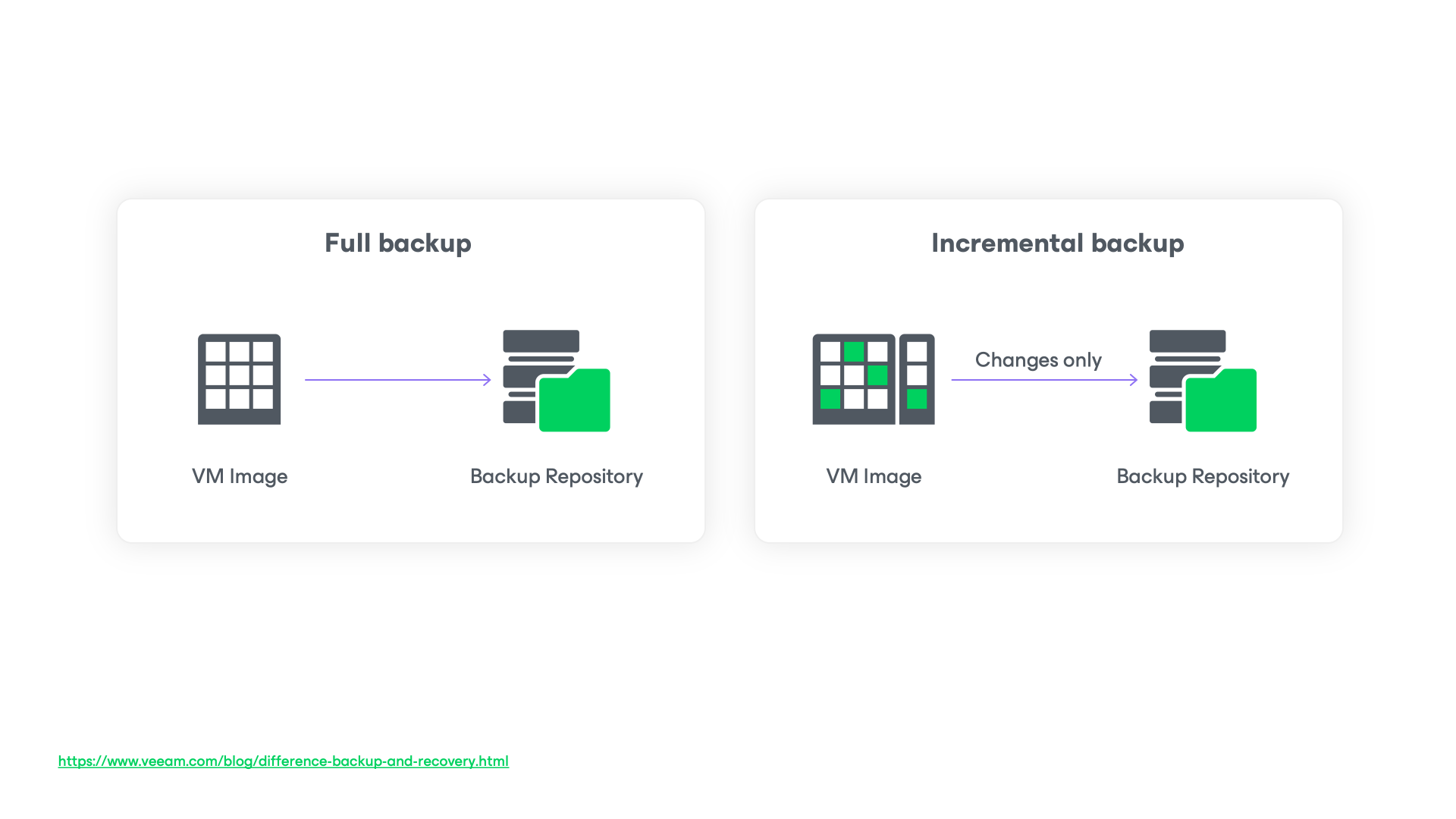
An incremental backup saves only the data that has changed since the last backup (full or incremental).
Pros: Fast to run, storage-efficient, reduces network load.
Cons: Recovery may be slower, as multiple increments may need to be processed.
Best for: Daily or hourly protection, modern environments. Veeam’s Backup & Replication leverages Changed Block Tracking (CBT) for efficiency.
Differential Backups
A differential backup captures all changes since the last full backup.
Pros: Restores require two sets, the last full backup and the most recent differential.
Cons: Differential backup is a legacy method that grows larger with every cycle until the next full backup, consuming more storage and network resources. Over time, this makes it inefficient for enterprises at scale, especially when modern alternatives like incremental or synthetic fulls deliver faster performance and better resource utilization.
Fast Bulk Restore
A bulk recovery method that restores multiple workloads simultaneously, reducing downtime in disaster scenarios.
With Veeam: Instant VM Recovery technology lets you run multiple VMs directly from backup storage while production systems are being restored in the background.
Best for: Large-scale outages, ransomware events, or site-level failover scenarios.
Volume Recovery
Restoring an entire storage volume, such as a disk partition, back to its original state.
Best for: Scenarios where a whole disk is corrupted or lost, but the OS and applications need to be quickly restored.
Virtual Machine Disk Recovery
Focused on restoring VMDK/VHDX disk files for virtual machines.
With Veeam: Disks can be restored directly to an existing VM without full system downtime.
Best for: Storage corruption or partial VM failures.
Bare Metal Recovery
Bare-metal recovery restores an entire physical server or endpoint to a new machine, even with different hardware.
With Veeam Agent: You can recover to physical, virtual, or even cloud instances.
Best for: Hardware failures, migrations, or disaster recovery where rebuilding from scratch isn’t feasible.
Instant Volume Mounts
The ability to mount a backup volume instantly without waiting for full extraction.
With Veeam: Mount volumes directly from backup repositories to verify data or run workloads temporarily.
Best for: Quick access for testing or verifying recovery points.
Instant Snapshot Recovery
Recovery directly from storage snapshots without full backup transfer.
Best for: Organizations using storage arrays that support snapshot integration.
With Veeam: Works with enterprise storage systems for lightning-fast recovery of VMs, databases, and files.
File Recovery
Allows browsing and restoring individual files from backups.
With Veeam: Granular recovery lets you pull back a single document, email, or object without restoring entire systems.
Best for: Everyday incidents like accidental deletions or corrupted files.
Full System Recovery
Restores an entire system, including OS, apps, configs, and data, back to a working state after major failures or ransomware attacks.
With Veeam: Image-based backups let you recover full machines to the same or new hardware, physical or virtual, without manual rebuilds.
Best for: Catastrophic failures where the entire environment must be restored quickly and reliably.
Recovery Objectives and Best Practices
When designing a backup and recovery strategy, two metrics define success:
- Recovery Point Objective (RPO): How much data can your business afford to lose? RPO is measured as the maximum allowable time between backups. For example, an RPO of 15 minutes means you can tolerate losing at most 15 minutes of data.
- Recovery Time Objective (RTO): How quickly do systems need to be restored after an outage? An RTO of 1 hour means operations must resume within 60 minutes of a failure.
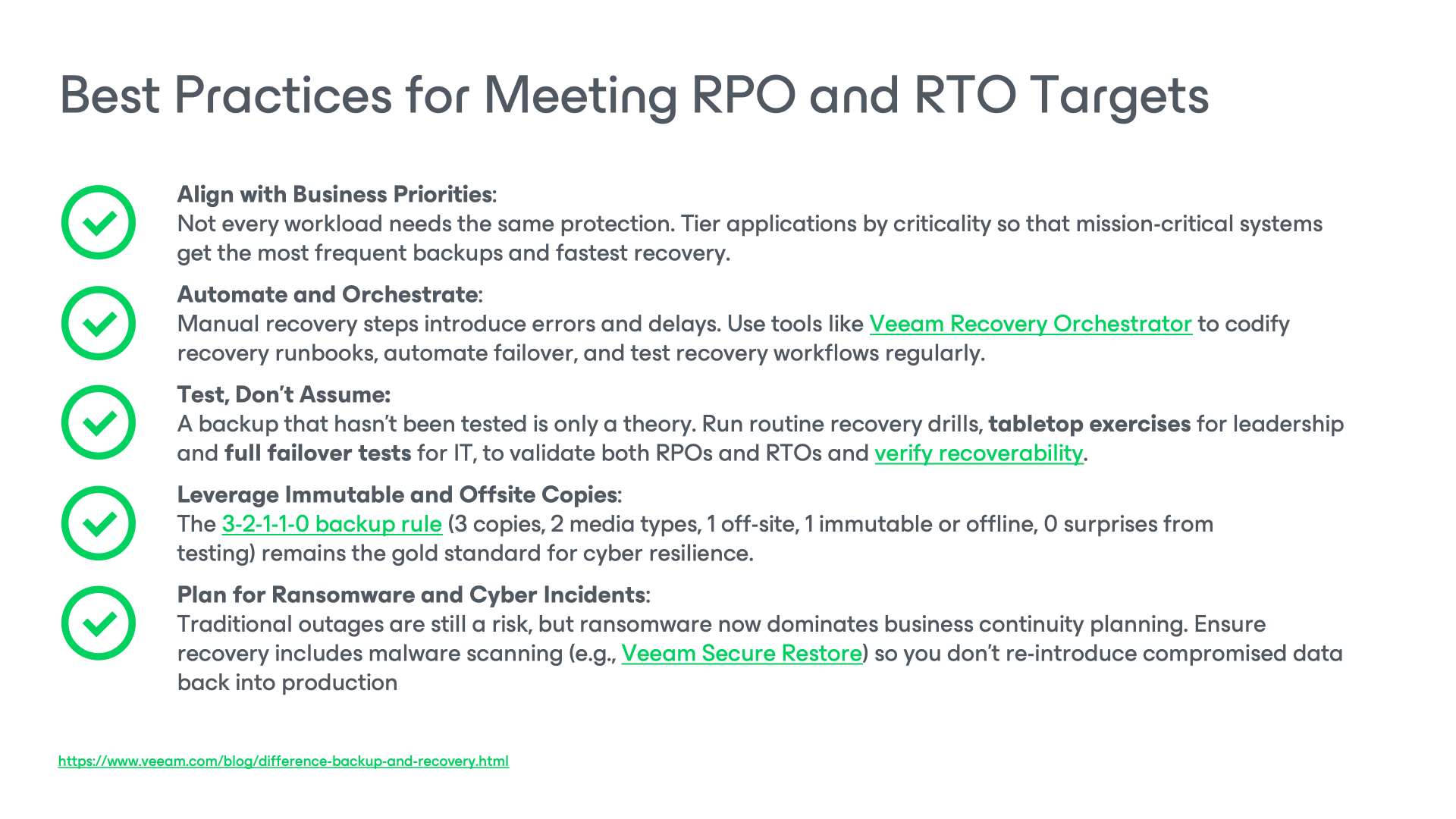
These metrics guide IT leaders in choosing the right technologies and workflows. Too often, organizations focus only on creating backups without measuring whether they can restore them within acceptable RPO and RTO windows.
Why It Matters
Meeting RPO and RTO isn’t just an IT exercise. It directly impacts revenue, compliance, and customer trust. An hour of downtime in a financial system, a healthcare app, or a public service can have far-reaching consequences. By building recovery objectives into the heart of your backup strategy, you ensure that data protection translates into real business continuity.
Ready to strengthen your business continuity plan?
Explore how the Veeam Data Platform brings together immutable backups, orchestrated recovery, and cyber resilience in one solution. At the end of the day, protecting data is only half the battle. Recovering it with confidence is what keeps your business moving forward.
Frequently Asked Questions
1. What’s the difference between backup and data protection?
- Backup is about creating independent copies of your data for restoration.
- Data protection covers the broader strategy, including access controls, encryption, and data retention, to prevent unauthorized access and maintain data integrity.
- Backup is one critical component of a data protection framework.
2. How do backup and disaster recovery (DR) differ?
Backup focuses on creating copies of data to restore lost or damaged files. Disaster recovery (DR) encompasses broader measures, such as infrastructure failover and real-time replication, to keep your systems operational during major disruptions. You need both backup and DR for true resilience.
3. Can I rely on recovery tools without backups?
No. Recovery tools only work if there’s a valid backup to restore from. If data is deleted, overwritten, or encrypted by ransomware, no recovery tool can help, unless there’s a properly stored, independent backup.
4. Is a snapshot the same as a backup?
Not quite. Snapshots capture a point-in-time state of a system, but they rely on the original storage and can affect performance. Backups create independent copies stored separately, ideal for long-term recovery and disaster protection.
5. What are RPO and RTO, and why do they matter in backup and recovery planning?
- RPO (Recovery Point Objective) defines how much data loss is acceptable (e.g., 15 minutes).
- RTO (Recovery Time Objective) defines how quickly systems must be restored after an incident. These metrics guide how often you back up data and how fast you can recover it.
6. Do I still need backup if my workloads run in the cloud?
Yes. Cloud providers like AWS, Microsoft Azure, and Google Cloud secure the infrastructure, but protecting your data is your responsibility under the shared responsibility model. Native cloud snapshots don’t protect against accidental deletion, misconfigurations, insider threats, or ransomware. Regulations like GDPR or HIPAA also require independent, verifiable backup copies to prove compliance. You need a dedicated backup solution secure your workloads and make sure they can be restored quickly.
