

Key Takeaways:
- Identity Management governs user access and permissions across cloud and on‑prem systems. It’s the gateway to enterprise security.
- Common Vulnerabilities: Weak passwords, missing MFA, excessive privileges, orphaned and non‑human identities, and misconfigurations create openings for attackers
- Attack Tactics: Phishing, brute force, and AI‑driven social engineering target credential weaknesses to gain access and move laterally
- Resilience with Veeam: Veeam Data Platform enables backup and point‑in‑time recovery for identity systems, turning prevention into full cyber continuity
Every day, more than 600 million identity‑based attacks target users across cloud and SaaS environments, and an increasing number of breaches now begin with compromised credentials. Attackers now log in instead of breaking in, which makes Identity and Access Management (IAM) the new perimeter of defense.
Identity Management controls who can access critical applications like Microsoft 365, Salesforce, and other connected systems, making it one of the most important layers in enterprise data. But when permissions are misconfigured or credentials stolen, the results can be catastrophic, including unwanted access, data loss, and tenant‑wide lockouts.
As part of a cyber resilience strategy, Veeam helps organizations back up and recover identity data so they can restore operations after misconfigurations or attacks. It’s a capability that fills the gaps left by native IAM recovery tools.
What Is Identity Management, and Why It Matters
Identity Management is the system that defines who a user is and what they can access across an organization’s applications and data. It acts as the gatekeeper for platforms like Microsoft 365, Salesforce, and other connected systems, verifying identities and enforcing permissions. When enforcing policies are misconfigured or credentials are stolen, attackers can bypass controls entirely, leading to unauthorized access, data loss, and organization‑wide lockouts.
Here’s why identity management has become a top priority for security and operations teams:
- Attackers target identity systems first because compromising one account often gives them access to lateral movements across your entire organization
- A single admin credential can be used to change permissions, create new accounts, or lock out entire teams
- Small misconfigurations, such as an incorrect conditional access policy, can cause widespread outages or expose data
- Identity management is both a security and a business operations issue
What Are Common Identity Management Vulnerabilities
Even the most advanced identity systems can fail if basic controls are overlooked. Most breaches don’t start with zero‑day exploits but with weak credentials, excessive permissions, or simple misconfigurations. Understanding these common identity management vulnerabilities helps teams close the gaps before attackers find them.
1. Weak or Reused Passwords
- Still the most exploited identity weakness worldwide
- Attackers use brute force and credential-stuffing to guess or reuse passwords across accounts
- Password fatigue often leads users to repeat credentials between systems
- Fix it: Enforce strong password policies, implement password managers, or move to passwordless authentication for high‑value accounts
2. Lack of Multi‑Factor Authentication (MFA)
- Accounts without MFA are the easiest targets for attackers
- One stolen password can unlock an entire environment if MFA isn’t enforced
- Many organizations still skip MFA for service accounts or legacy apps
- Fix it: Require MFA everywhere, including admin, API, and non‑human accounts; and use phishing‑resistant methods like FIDO2 or authenticator apps
3. Over‑Privileged Accounts
- Admin or service accounts with broad permissions are prime attack targetsOnce compromised, they allow privilege escalation and policy manipulation
- Fix it: Apply the principle of least privilege; grant only the access users need and review it regularly
4. Orphaned Accounts and Unmanaged Credentials
- When employees leave or roles change, their accounts often remain active
- Attackers look for these forgotten identities to gain undetected access
- Fix it: Automate deprovisioning, perform regular account audits, and remove unused credentials immediately
5. Non‑Human Identities (Service and API Accounts)
- For every human identity, there may be 40 to 50 non‑human identities that connect systems, apps, and APIs
- These accounts often lack MFA, monitoring, or expiration policies
- Smaller third‑party apps or connectors can expose vulnerabilities if not secured
- Fix it: Inventory all non‑human identities, assign ownership, and monitor their activity continuously
6. Identity Misconfigurations
- Misconfigured IAM policies can cause tenant‑wide outages or open access to sensitive data
- A single error in a conditional access policy can lock out every user in the organization
- Fix it: Back up IAM configurations, verify changes, and use tools like Veeam’s compare‑and‑restore for Entra ID, to roll back to a known‑good state quickly
Pro Tip:
Vulnerabilities often overlap. For example, an orphaned admin account without MFA and with excessive permissions creates a perfect storm for attackers. Combining strong access controls with identity backups and recovery ensures both prevention and resilience.
How Attacks Happen: Tactics Exploiting Identity Weaknesses
Identity exploitation follows a predictable pattern: Find a credential, use it to gain access, and move laterally until sensitive data or systems are compromised. Understanding this attack chain helps security teams recognize early warning signs and build resilience at every step.
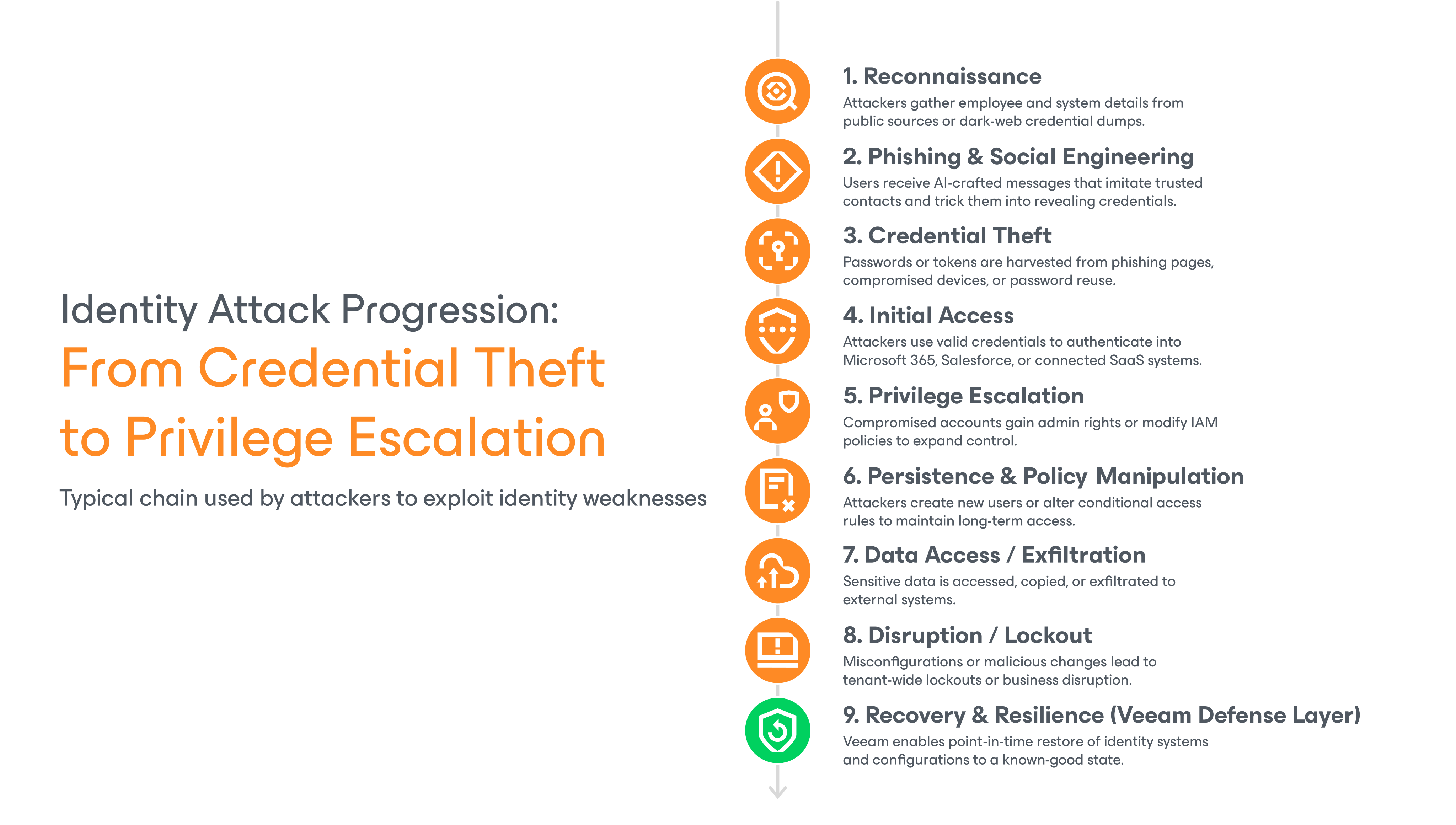
1. Phishing and Credential Theft
Phishing remains the most common way attackers steal credentials. AI‑generated messages now make phishing much more convincing. Attackers can now utilize even more sophisticated means, such as deepfake attacks to mimic managers, vendors, or internal systems with alarming accuracy.
- Emails or messages appear to come from trusted sources, prompting users to click links or share login details
- Once credentials are captured, attackers log in directly to SaaS portals like Microsoft 365 or Salesforce
- Defense: Combine user awareness training with phishing‑resistant MFA and identity threat detection
2. Brute Force and Password Spraying
These attacks exploit weak or reused passwords by automatically testing thousands of login combinations. They succeed when MFA is missing or account lockout policies are misconfigured.
- Attackers use automated tools to test common passwords across multiple accounts
- Credential-stuffing reuses stolen passwords from unrelated breaches
- Defense: Strong password enforcement, passwordless authentication, and continuous monitoring for failed login attempts
3. Exploiting Orphaned, Privileged, and Non‑Human Accounts
Once inside, attackers look for high‑value accounts with persistent or excessive permissions. Non‑human identities, such as service and API accounts, often fly under the radar yet hold powerful access rights.
- Attackers exploit inactive or over‑privileged accounts to move laterally
- Forgotten API keys or service identities can grant broad data access
- Defense: Regularly audit all accounts, enforce least privilege, and monitor non‑human identities for anomalies
4. Session Hijacking and MFA Bypass
When MFA is implemented, attackers shift to stealing session tokens or launching man‑in‑the‑middle attacks.
- They intercept authentication tokens from browsers or compromised endpoints
- Attackers then reuse those tokens to impersonate legitimate users
- Defense: Secure session management, short token lifetimes, and endpoint protection that detects token theft
5. Privilege Escalation and Policy Manipulation
After gaining access, attackers attempt to increase their control by modifying IAM policies or creating new admin roles.
- A compromised admin can grant themselves higher privileges or disable MFA requirements
- Misconfigurations can be used intentionally to hide malicious access
- Defense: Continuous policy backups and comparisons to ensure the rollback to a safe configuration is possible
Key Insight:
Identity attacks are trust. Whether through phishing, forgotten accounts, or misconfigured policies, attackers rely on human error and system complexity. Building cyber resilience means pairing strong prevention with rapid identity recovery.
Best Practices to Protect Identities
Strong identity management builds resilience. Attackers will always look for weak passwords, orphaned accounts, or misconfigured policies. The following best practices help organizations strengthen their defenses and recover quickly if identity systems are compromised.
Here are 10 best practices to protect identities and strengthen IAM:
| 1. Use Strong, Unique Passwords or Passwordless Access | • Enforce long, complex passwords or adopt passwordless authentication for high‑value accounts • Use enterprise password managers to prevent reuse and reduce credential fatigue |
| 2. Enable Multi‑Factor Authentication (MFA) Everywhere | • Require MFA for all users, including admins, service accounts, and APIs • Opt for phishing‑resistant MFA methods like FIDO2 keys or authenticator apps |
| 3. Apply the Principle of Least Privilege | • Grant users only the access they need to perform their roles • Review permissions regularly and remove elevated rights when no longer required |
| 4. Deprovision Inactive and Orphaned Accounts Promptly | • Automate account removal when employees leave or roles change • Schedule regular audits to detect orphaned identities, especially non‑human ones |
| 5. Secure the Identity Infrastructure with Backup and Recovery | • Back up identity data and configurations to restore access if misconfigurations or attacks occur • Follow Veeam’s 3‑2‑1‑1‑0 backup rule: Three copies of data, two media types, one off‑site, one immutable, and zero recovery errors |
| 6. Monitor and Audit Access Activity | • Enable continuous logging for sign‑ins, privilege changes, and policy updates • Investigate unusual login patterns, especially from new locations or outside business hours |
| 7. Educate Users on Phishing and Social Engineering | • Train employees to recognize and report suspicious messages or login prompts • Reinforce that attackers often imitate internal teams or executives to harvest credentials |
| 8. Deploy Identity Threat-Detection and Response (ITDR) | • Use ITDR tools to detect anomalies in authentication, permissions, and identity behavior • Integrate detection alerts with SIEM or SOC workflows for faster remediation |
| 9. Regularly Test and Audit IAM Policies | • Perform routine configuration reviews and penetration testing to uncover gaps • Compare IAM settings against compliance frameworks like NIST SP 800‑63 or Microsoft’s recommended baselines |
| 10. Plan for Resilience, Not Just Prevention | • Preventive controls reduce risk, but recovery ensures business continuity • With Veeam, organizations can quickly restore IAM objects, access policies, and configurations after a breach |
Final Thoughts
Identity is now one of the front lines of cybersecurity. Attackers can sign in with stolen or misconfigured credentials. That’s why protecting identity systems is as critical as protecting data.
Strong identity management reduces risk, but resilient recovery ensures operations continue even after an attack or outage. When misconfigurations lock users out or breaches compromise credentials, Veeam helps organizations restore access and recover IAM policies to a known‑good state — and fast.
For teams building cyber resilience across Microsoft 365, Salesforce, and other SaaS environments, Veeam delivers the confidence to recover what matters most: identity, access, and trust.
FAQs
Identity Management (IAM) is the system that verifies who a user is and controls what they can access across business applications and data. It ensures the right people have the right permissions at the right time.
It’s easier to steal or trick a user into revealing credentials than to breach a network directly. Once attackers gain a valid login, they can move through systems undetected and access sensitive data.
Start with weak passwords, missing multi‑factor authentication (MFA), excessive admin privileges, and orphaned or non‑human accounts. These are the fastest paths for attackers to gain access.
Watch for logins from unusual locations, repeated failed sign‑ins, unexpected MFA prompts, or unauthorized changes to user permissions and access policies.
Veeam backs up identity configurations and enables point‑in‑time restore for Microsoft Entra ID (Azure AD), so organizations can quickly recover after misconfigurations or attacks, maintaining access and business continuity.
