

Key Takeaways:
- Ransomware now targets both data and leverage. Attacks often combine file encryption with data theft and extortion.
- Backups are a primary target. In Sophos’ 2024 survey, 94% of ransomware victims said attackers attempted to compromise backups, and 57% said those attempts succeeded.
- Microsoft 365 is high-impact. A single Entra ID compromise can expose Exchange Online, SharePoint, OneDrive, and Teams.
- Retention helps, but it isn’t the same as recovery. Native retention/versioning may support limited rollbacks, but it doesn’t create an independent, immutable backup.
- Fast recovery requires preparation. Harden identity (MFA, conditional access, and least privilege) and maintain tested, off-platform backups you can restore quickly.
Ransomware remains one of the most damaging cyber threats to modern businesses, and Microsoft 365 (formerly Office 365) environments are a leading target. With millions of users and connected services like Exchange Online, SharePoint, OneDrive, and Teams, attackers see Microsoft 365 as a direct path to an organization’s most valuable data.
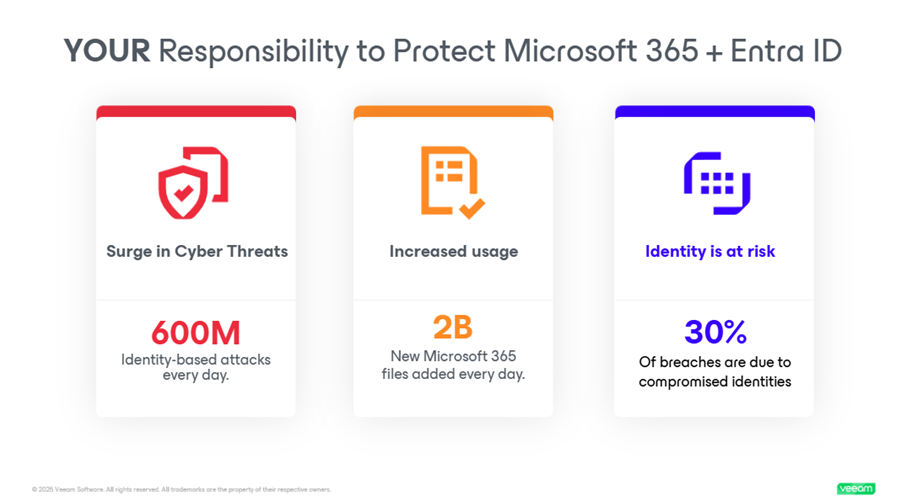
Today’s ransomware is more than encryption. Attackers focus on identity compromise and extortion, stealing sensitive information and threatening to publish it unless a ransom is paid. Many of these attacks start with Entra ID, the identity layer that controls access to every Microsoft 365 app. Industry data shows that identity‑based attacks have doubled year over year, and roughly one‑third of breaches involve stolen credentials.
This guide explains why Microsoft 365 is targeted, how Microsoft 365 ransomware attacks work, what you can do to prevent them, and how to recover fast when prevention isn’t enough.
Why Microsoft 365 Is a Prime Target for Ransomware
Microsoft 365’s popularity is both its strength and its Achilles’ heel. With millions of users worldwide, it’s a platform that many are familiar with, but this popularity also makes it a lucrative target for cybercriminals. Here are some reasons why Microsoft 365 is particularly vulnerable to ransomware attacks:
- Widespread adoption: Microsoft 365 is used by a diverse range of organizations, ranging from small businesses to large enterprises. This popularity makes it fertile ground for attackers who want to cast a wide net.
- Integrated services: One of Microsoft 365’s selling points is its suite of integrated services like Outlook for email, OneDrive for cloud storage, and SharePoint and Teams for collaboration. While this integration improves the user experience, it also offers multiple entry points for ransomware to infiltrate an organization’s network.
- User behavior: Often, the weakest link in cybersecurity is human error. Phishing scams that target Microsoft 365 users often appear as legitimate communications from Microsoft, tricking users into revealing their login credentials.
- Identity as a single point of failure (Entra ID): Microsoft 365 is an identity-driven platform. It means if attackers compromise Entra ID credentials or tokens, they can gain broad access across Exchange Online, SharePoint, OneDrive, and Teams. Many organizations still underuse protections like multi-factor authentication (MFA), conditional access, and sign-in risk monitoring, which makes it easier for ransomware (and related extortion activity) to spread.
- High-value data: Organizations often store sensitive and valuable data in Microsoft 365’s cloud services. This high-value data is attractive to cybercriminals who can demand higher ransoms for encrypted data.
- Complexity of the environment: Microsoft 365’s diverse range of services can make it challenging for IT departments to continually monitor every aspect of their environment. This complexity can lead to security gaps that attackers can exploit.
- Target for spear phishing: Given the corporate usage of Microsoft 365, it’s a common platform used to launch spear-phishing attacks. These are highly targeted attacks that often involve extensive research on the victim and are more challenging to detect than regular phishing attacks.
- Zero-day vulnerabilities: Like any other software, Microsoft 365 is not immune to zero-day vulnerabilities. These are security flaws unknown to the vendor and are thus unpatched, providing another avenue for ransomware attacks.
Understanding these vulnerabilities and the reasons why Microsoft 365 is a frequent target for ransomware attacks can help organizations and individuals take proactive steps to secure their environments.
Microsoft 365 uses a shared responsibility model: Microsoft is responsible for securing and operating the cloud service, while you are responsible for securing how your organization uses it, especially identity, access, configuration, and recoverability. This matters in ransomware scenarios because attackers don’t need to “break Microsoft 365” to cause damage; they often succeed by abusing valid accounts, permissions, and configuration.
Here’s a practical way to think about that split:
| Microsoft is responsible for… | You are responsible for… |
| Running and securing the underlying cloud infrastructure and service | Securing Entra ID identities, admin roles, and access policies (MFA, conditional access, and least privilege) |
| Service availability and platform operations | Configuring Microsoft 365 securely (sharing, permissions, external access, and app consent) |
| Baseline security capabilities in the platform | Defining protection requirements (RPO/RTO), and ensuring you can recover when incidents happen |
| Native retention/recycle-bin style features and tooling | Maintaining an independent backup and regularly testing restores to prove recovery readiness |
The critical gap: Microsoft provides availability commitments for the service, but your organization still needs a plan to reliably recover your content (mail, files, sites, chats) on your timelines.
Retention isn’t backup. Version history, recycle bins, and retention policies can help with limited rollbacks, but they don’t create an independent copy under your control. They may not cover every recovery scenario you’ll face during an attack.
For deeper guidance, see:
- Shared responsibility explained: https://www.veeam.com/blog/office365-shared-responsibility-model.html
- Microsoft-native security/compliance/monitoring overview: https://www.veeam.com/blog/microsoft-365-native-security-compliance-monitoring.html
- Microsoft data protection guide: https://www.veeam.com/blog/microsoft-data-protection-guide.html
How Microsoft 365 Ransomware Works
Ransomware targeting Microsoft 365 operates much like any other ransomware but focuses on the unique aspects of the Microsoft 365 environment. Once ransomware infiltrates your system, it spreads, encrypting files stored in OneDrive, SharePoint, and even emails in Outlook. It can even originate from your on-premises Exchange or SharePoint environments and spread to your Microsoft 365 environment.
The ransomware encryption is usually so robust that it’s nearly impossible to decrypt the files without having the unique key, which is held by the attacker. A ransom note then appears, demanding payment in exchange for the decryption key.
The encryption process is quick, often taking just minutes to encrypt hundreds or thousands of files. Modern ransomware variants also come with evasion techniques that allow them to bypass traditional antivirus solutions. Some advanced types even have data exfiltration capabilities, meaning they can steal sensitive data before encrypting it, which adds data breaches to the list of concerns.
The ransom demanded can vary widely depending on the attacker’s assessment of how much the encrypted data is worth to you. For organizations, the ransom can go up to millions of dollars. Individual users may face demands in the range of hundreds to thousands of dollars. Paying the ransom is generally discouraged by cybersecurity experts and law enforcement agencies, since it doesn’t guarantee the retrieval of files and further incentivizes attackers.
Identity is now a primary target. With Entra ID serving as the gateway to all Microsoft 365 apps and data, attackers increasingly focus on compromising credentials and tokens instead of just files. A successful Entra ID breach can disable multi-factor authentication, create backdoor administrative accounts, or grant persistent access to mailboxes and cloud storage. Protecting Entra ID through strong MFA, conditional access, and least-privilege policies helps to prevent ransomware from moving freely across the Microsoft 365 environment.
Next, we’ll look at the most common ways attackers gain access and how many modern ransomware incidents combine encryption with data theft and extortion.
Common Attack Vectors
Understanding how ransomware gets into Microsoft 365 can help in crafting effective preventive measures. Here are some common attack vectors:
- Phishing emails: This is one of the most common methods. Attackers send emails posing as legitimate entities, tricking users into clicking malicious links or downloading infected attachments. Visually, these emails often look like they’re from Microsoft, which makes them difficult to distinguish from genuine communications.
- Credential stuffing: In this method, attackers use previously-leaked usernames and passwords to gain unauthorized access to Microsoft 365 accounts. Once in, they can use that compromised identity in Entra ID to access mail, files, and collaboration services and potentially escalate privileges or persist long enough to deploy ransomware or stage extortion activity.
- Exploit kits: These are software packages designed to find and exploit vulnerabilities in your system. If your Microsoft 365 suite or the underlying operating system has unpatched vulnerabilities, exploit kits can deliver ransomware into your system.
- Remote Desktop Protocol (RDP) attacks: Poorly secured RDPs can be an entry point for ransomware. Attackers can brute force their way into an RDP session and deploy ransomware manually.
- Drive-by downloads: Merely visiting a compromised website can result in ransomware being downloaded onto your system, although this is less common for Microsoft 365 ransomware.
- Social engineering attacks: These involve manipulating individuals into divulging confidential information, like login credentials, which are then used to deploy ransomware.
- Insider threats: Though less common, disgruntled employees with access to Microsoft 365 can intentionally deploy ransomware as an act of sabotage.
Encryption and Data Theft (Often Called “Double Extortion”)
Modern ransomware incidents often involve two parallel outcomes: Attackers disrupt operations by encrypting or corrupting data and then increase pressure by stealing sensitive information and threatening to leak it (a pattern commonly called “double extortion”).
In a Microsoft 365 context, that can look like:
- Data encryption/corruption that spreads through synced locations (e.g., OneDrive/SharePoint) or shared collaboration spaces.
- Unauthorized access and data download from email, SharePoint sites, OneDrive folders, or Teams-connected content after an identity compromise.
- Recovery sabotage, where attackers try to delete or disable what you’d rely on to restore quickly. Sophos found that 94% of ransomware victims said attackers attempted to compromise backups, and 57% said those attempts succeeded.
This is why ransomware defense can’t stop at “prevent encryption.” You also need controls that reduce how much data an attacker can access, along with independent, protected backups (ideally immutable) so recovery remains possible even if a tenant admin account is compromised.
How to Prevent a Microsoft 365 Ransomware Attack
Prevention is the foundation of cyber resilience. While no environment is completely immune to ransomware, the right mix of identity controls, user awareness, and protected backups can dramatically limit exposure and speed recovery.
In Microsoft 365, protection starts with closing the most common entry points, like phishing and weak authentication, and continues with security controls that limit blast radius and preserve clean recovery points.
Why Identity Security Matters for Microsoft 365 Ransomware
Microsoft 365 is an identity-driven platform. If attackers gain access to Entra ID, they may be able to access (and abuse) Exchange Online, SharePoint, OneDrive, and Teams, even without “breaking” the service itself. That’s why identity hardening is essential to ransomware prevention and containment.
Key identity protections to prioritize:
- Protect Entra ID (Identity and Access Management), the gateway to all Microsoft 365 applications and data. Strengthen it with multi‑factor authentication (MFA), conditional access policies, and sign‑in risk monitoring. Regularly review admin roles and remove unused accounts to reduce exposure.
- Multi-factor authentication (MFA): Enabling MFA adds an additional layer of security by requiring two or more verification methods: A password, a smart card, a fingerprint, or a text to your phone. This makes it more difficult for attackers to gain access to your account, even if they have your password.
- Least-privilege access: Limit user permissions to only what is needed to perform specific tasks. This minimizes potential damage from a ransomware attack by restricting what files ransomware can encrypt.
- Monitoring and logging: Keep detailed logs and monitor them for suspicious activity. Early detection can minimize possible damage.
Security Controls and Best Practices
Use these controls to reduce the likelihood of compromise, limit how far an attacker can go, and ensure you can recover quickly:
- Regular backups: Consistently back up your data and ensure that the backups are not connected to your network. Many ransomware variants try to encrypt backup files to prevent recovery. For a practical overview, see Office 365 Backup For Dummies.
- Immutable backup copies: Ensure you have immutable backup copies that cannot be altered or encrypted by ransomware. This provides a failsafe recovery point, ensuring that you can restore your data even if your primary backups are compromised.
- Endpoint protection: Use advanced endpoint protection solutions that go beyond traditional antivirus programs. These solutions can detect and block ransomware attacks in real time.
- Email filtering: Implement advanced email filtering solutions that can detect and block phishing emails, which are the most common entry point for ransomware.
- Security awareness training: Educate employees about the dangers of phishing emails and how to recognize them. A well-informed user is less likely to click on a malicious link or download a suspicious attachment.
- Incident response plan: Have a well-documented and regularly updated incident response plan. Make sure all employees know what steps to take if they suspect a ransomware attack.
- Regular audits and penetration testing: Regularly audit your Microsoft 365 environment for security gaps and conduct penetration testing to identify vulnerabilities.
- Network segmentation: Divide your network into segments so that if ransomware infects one part of the network, it won’t necessarily be able to spread to other areas.
- Software restriction policies: Implement software restriction policies to prevent the execution of programs from common ransomware locations, such as temporary folders.
- Remote Desktop Protocol (RDP) restrictions: If RDP is not needed, it should be disabled. If it is needed, using strong, unique passwords and MFA can enhance security.
The Importance of Regular Updates
Keeping every system up to date is one of the simplest and most effective defenses against ransomware. Attackers often exploit known software vulnerabilities, issues that patches already fix. When updates are delayed, those same flaws become easy entry points.
Microsoft releases frequent security updates for Microsoft 365 and related applications. These updates not only add new features but also close critical gaps that ransomware groups actively scan for. Running outdated versions of Exchange Online, SharePoint, or Teams will leave your organization exposed to exploits already cataloged by attackers.
Automated tools used by threat actors continuously search the internet for unpatched systems. A single missed update can flag your environment as vulnerable. Applying patches promptly reduces that visibility and strengthens your organization’s overall security posture.
Don’t stop with Microsoft 365. Keep operating systems, browsers, endpoint agents, and third‑party apps current across all devices. Many IT teams use centralized or automated update management to ensure consistency and speed across the environment.
Regular updates actively prevent compromise. By keeping software current, you close known weaknesses before attackers can use them, lowering your risk of a Microsoft 365 ransomware incident.
What to Do If You’re Attacked
Despite your best efforts in implementing preventive measures, there’s still always a risk of falling victim to a ransomware attack. Knowing what to do in the immediate aftermath can make a significant difference in mitigating damage, recovering data, and preventing further attacks. This section aims to provide a comprehensive guide of the immediate steps to take, and the data recovery options available.
Immediate Response Steps | |
| 1. Isolate affected systems | The first step is to disconnect the infected machine from the network to prevent ransomware from spreading to other systems. This includes both wired and wireless connections. |
| 2. Identify the ransomware | Knowing the type of ransomware you’re dealing with can help in determining the course of action. Some ransomware variants are more harmful than others, and some may even have publicly-available decryption tools. |
| 3. Contact authorities | It’s crucial to report the incident to law enforcement agencies. They may already have ongoing investigations into the ransomware variant or attackers and could provide guidance. |
| 4. Notify stakeholders | Inform internal stakeholders, including the IT department, management, and affected employees. If customer data is compromised, you may also need to notify customers, depending on jurisdictional data breach laws. |
| 5. Consult cybersecurity experts | Engage with cybersecurity professionals who can help analyze the attack, remove the ransomware, and restore systems. Reach out to your backup provider for support, as they may offer specific assistance for these scenarios. They can also help improve your security posture to prevent future attacks. |
| 6. Preserve evidence | Before removing the ransomware, make sure to document everything. This includes taking screenshots of ransom messages and preserving any related files. This evidence can be useful for law enforcement and any subsequent legal action. |
| 7. Assess the damage | Conduct an audit to understand the extent of the damage. Which files are encrypted? Is there any data exfiltration? |
| 8. Review backup status | Check the status of your backups to see if they are intact and up to date. Some ransomware variants also target backup files, so it’s crucial to verify their integrity. |
| 9. Implement communication plan | Keep all stakeholders updated on the situation and what steps are being taken. Clear communication can help manage the crisis more effectively. |
| 10. Review and update security policies | After the immediate crisis is over, review what went wrong and update your security policies accordingly to prevent future attacks. |
Data Recovery Options
- Restore from backup: The most straightforward recovery option is recovering your files from a backup. However, this is only possible if you have an up-to-date backup that is not connected to your network (and thus not encrypted by ransomware).
- Decryption tools: Some cybersecurity firms and independent researchers release decryption tools for certain types of ransomware. However, these are not available for all variants.
- Negotiation: While generally not recommended, some organizations opt to negotiate with the attackers, especially if the encrypted data is extremely critical and no backups are available. If you choose this route, it’s advisable to consult professionals experienced in ransomware negotiation.
- Data recovery software: Some specialized software can attempt to recover files deleted by ransomware as it encrypts your files. However, the success rate is not guaranteed and is generally lower than other methods.
- Consult cybersecurity experts: Some types of ransomware can be decrypted by experts using advanced techniques. However, this is often a time-consuming and costly process.
- Legal recourse: In some cases, especially involving high-value data, organizations may choose to pursue legal action against attackers, although the chances of success are generally low due to jurisdictional challenges.
By understanding these immediate steps and data recovery options, you can act swiftly and effectively if you ever find yourself a victim of a Microsoft 365 ransomware attack. While the experience is undoubtedly stressful, having a clear plan of action can help mitigate damage and potentially recover lost data.
Microsoft 365 Ransomware Recovery with Veeam
When all else fails, you need to make sure you can recover all your data quickly in the event of a ransomware attack, but that requires having the right Microsoft 365 backup solution in place. Veeam Data Cloud for Microsoft 365 is a simple, reliable, and flexible backup service integrated with Microsoft 365 backup storage to provide fast disaster recovery (DR) that’s optimized for large environments.
So, no matter how much data you need to recover, you can recover your entire Microsoft 365 environment quickly and effectively to ensure your organization can quickly bounce back to business as usual.
Take the Next Step Toward Resilient Microsoft 365 Security
Ransomware threats are evolving faster than ever, and Microsoft 365 tenants remain a prime target. The good news? Protecting your data doesn’t require guesswork — it requires awareness and action.
Start with the essentials: multi‑factor authentication, least privilege access, regular updates, and immutable backups. Strengthen those with advanced controls like conditional access, continuous monitoring, and tested recovery plans. Each layer reduces the chance that a single mistake becomes a full‑scale incident.scale incident.
When it comes to ransomware, knowledge is your first line of defense and recovery is your last. Understanding how attacks happen, and preparing for them, ensures your organization can respond quickly and confidently.
The final safeguard is having a dedicated backup and recovery platform that’s purpose‑built for Microsoft 365. Veeam Data Cloud for Microsoft 365 delivers backups and rapid, point‑in‑time restores so data can be recovered in minutes, not days. By integrating directly with Microsoft 365 Backup Storage, Veeam enables large‑scale, bulk restores without throttling. The result is fast, reliable recoveries, even for complex or high‑volume datasets.
Ready to see what modern Microsoft 365 ransomware protection looks like?
FAQs
No. Microsoft 365 offers retention versioning and many other native capabilities which support resilience and compliance, but it doesn’t create separate, immutable backups. These native tools can’t prevent encryption or data deletion. To recover after a ransomware attack, you need independent, off‑platform backups that can restore files, mailboxes, and Teams data quickly and safely.
Retention keeps deleted or previous file versions for a set period of time within Microsoft 365. Backup creates a separate, immutable copy of that data on another platform. Retention helps with short‑term recovery; backup ensures full data protection and restoration even if accounts, mailboxes, or files are compromised.
Yes. Ransomware groups increasingly target Entra ID (formerly Azure Active Directory) because it controls identity and access for all Microsoft 365 apps and data. When attackers compromise credentials or tokens, they can disable security features, lock users out, or exfiltrate sensitive data. Protecting Entra ID with MFA, conditional access, and regular backups is essential to defend your Microsoft 365 environment from ransomware.
Your recovery objectives depend on how critical your Microsoft 365 data is and how much downtime your business can tolerate. A lower RPO reduces potential data loss, while a shorter RTO speeds up restoration. The goal is to balance both, ensuring data can be restored quickly, and operations resume with minimal disruption after an attack.
Immutable backups are write‑once, read‑many (WORM) copies that can’t be changed or deleted within a set time frame. Even if attackers gain access, they can’t alter or encrypt these backups. This ensures tamper‑proof recovery points that guarantee data integrity and ransomware resilience.
