

Key takeaways:
- Readiness. A tested ransomware recovery strategy is essential to minimize downtime and data loss.
- Immutable backups are non-negotiable. Secure, tamper-proof backup copies, both on-premises and in the cloud, allow for clean recovery without risk of reinfection.
- Recovery speed depends on preparation. Regular backup verification and disaster recovery (DR) orchestration practice reduces Mean Time to Respond (MTTR).
- Response must be immediate and coordinated. Isolating infected systems and activating incident response protocols within hours makes the difference between containment and catastrophe.
- Recovery doesn’t end with restore. Patching and system hardening are required to reestablish trust and prevent repeat compromise.
- Post-attack is a time to level up. Use recovery insights to implement stronger controls (e.g., multi-factor authentication (MFA), zero trust segmentation, and automated recovery testing) to build lasting resilience.
Ransomware attacks don’t just encrypt data. They compromise trust, stall operations, and threaten business continuity. In today’s threat landscape, the difference between days of downtime and fast, confident recovery often comes down to how well-prepared your recovery strategy is. With cyber extortion growing faster than ever in 2025, organizations need more than just backups, they need tested, orchestrated, and secure recovery plans.
That’s where Veeam comes in. Veeam is more than a backup provider, and offers a broader recovery strategy for data resilience. With features like immutable backups, threat detection, and orchestrated clean room recovery, Veeam helps organizations recover quickly, securely, and on their terms.
Whether you’re recovering from a major attack or tightening your cyber resilience strategy, this guide walks through practical, tested recovery approaches that are designed to minimize impact and maximize readiness.
What is Ransomware Recovery?
Ransomware recovery refers to the process of restoring data, systems, and operations after a ransomware attack has encrypted, deleted, or otherwise modified critical files. Unlike traditional data recovery, ransomware recovery involves added layers of complexity, such as verifying data integrity, ensuring malware is not reintroduced during restore, and managing compliance or legal obligations.
- From a technical standpoint, recovery often starts with: Identifying the point of compromise.
- Isolating affected systems.
- Validating clean backup copies.
Once safe restore points are verified, IT teams can begin the process of restoring infrastructure, workloads, data, and applications. Tools like immutable backup storage, threat detection, and orchestrated recovery plans are essential to doing this securely and quickly.
Recovery timelines can vary significantly based on an organization’s infrastructure preparedness. While some organizations recover within a few days by using tested plans and immutable backups, others may spend weeks rebuilding systems, especially if backups were tampered with or encrypted.
Having a recovery plan is not optional. Being ready means knowing exactly how, where, and when to restore, and making sure you’re not restoring malware along with your data.
How Long Does Ransomware Recovery Take?
Ransomware recovery isn’t one-size-fits-all and recovery timelines vary widely. It can take a few hours to several weeks, all depending on the attack’s complexity, backup readiness, and the size and complexity of your digital infrastructure.
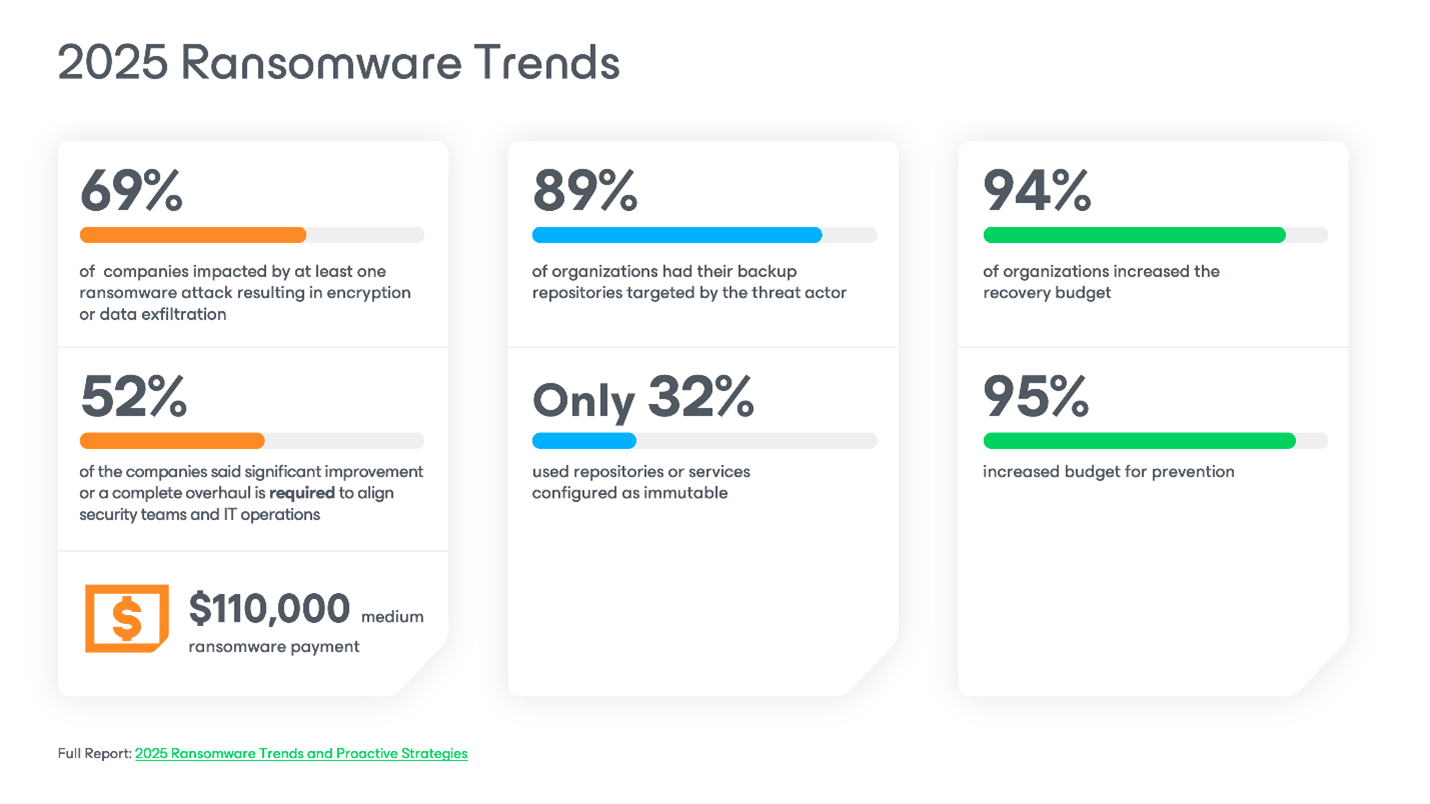
According to SQMagazine report, the average recovery time from a ransomware attack in 2025 is 24.6 days. Can your organization afford this downtime? Extended outage impacts more than just IT operations. It can halt critical services, delay customer operations, erode stakeholder confidence, and lead to contractual penalties and regulatory compliance issues. In most cases, the financial and reputational damage from prolonged recovery is greater than the initial ransom demand.
Key factors that influence recovery time:
- Backup health and immutability: Are backups verified, malware-free, and protected from tampering?
- Scope of impact: Was the attack isolated or did it spread laterally across the environment? Did encryption affect the operation of other interconnected systems?
- Recovery testing: Have you practiced recovery scenarios before? Were they manual or automated?
- Team coordination: Is there an incident response plan and cross-functional team that’s ready to execute?
- Tools and automation: Are you using capabilities like Clean Rooms and Veeam Orchestrator to automate recovery steps?
The faster you can identify clean recovery points and restore critical systems, the lower your cost of downtime, reputational damage, and operational disruption.
Best Practices for Ransomware Data Recovery
Building recovery into your defense strategy
A strong ransomware resilience strategy doesn’t stop at prevention; it ends with recovery. This is because no matter how advanced your security stack is, the possibility of compromise still exists. That’s why a robust, well-tested recovery plan is a core component of modern cyber resilience. It prepares your team so that when an attack does occur, they can act quickly, restore clean backups, and minimize disruption to business operations.
Ransomware data recovery focuses on restoring access to encrypted or damaged systems without propagating malware, reintroducing vulnerabilities, or losing critical data. It’s a discipline that requires both preparation and technical precision.
Implement Strong Ransomware Protection Measures
While this section focuses on recovery, recovery can’t succeed without having the right protection measures in place first. A comprehensive ransomware strategy includes layers of defense that keep data protected and ready for safe restore.
Here’s How to Approach it Holistically:
| Prevention | – Enforce MFA for all access. – Regularly patch and update all systems and applications. – Apply least-privilege access controls. |
| Backup Strategy | – Create multiple copies of your data across diverse locations. – Store at least one copy offsite and one copy as immutable or air-gapped. – Test backup integrity frequently with automated recovery. |
| Detection and Defense | – Monitor for abnormal file behaviors (e.g., mass encryption or deletions). – Enable alerting on suspicious login activity and system changes. – Run malware detection scans. – Use proactive threat detection tooling to identify suspicious or adversary activity such as Recon Scanner. – Correlate logs across environments. |
For a deeper dive into ransomware protection best practices, read this full guide to ransomware protection.
How to Create a Comprehensive Backup Strategy
When it comes to ransomware, backups are your last and most critical line of defense — but not just any backups.
A ransomware-ready backup strategy is intentional, layered, and built for resilience. It’s designed not only to recover data but to do so securely, cleanly, and confidently, without reintroducing threats or relying on pure luck.
Core Principles of a Resilient Backup Strategy:
- Immutability first: Store backups in immutable repositories so they can’t be altered or deleted by ransomware. Veeam is platform-agnostic with regard to the location of your backups, and can work with any environment for anywhere from on-premises hardened repositories to cloud-based storage. This includes Veeam Data Cloud Vault, which is managed and immutable by default.
- The golden rule: 3-2-1-1-0 backup rule:
A modernized take on classic best practices:
• 3 copies of your data
• 2 on different media
• 1 offsite
• 1 that is immutable, air-gapped, or offline
• 0 backup recoverability errors (verified through regular testing) - Backup verification and malware scanning: Run verifications and scan your backups to validate their integrity and detect malware before initiating recovery.
- Separation of control planes: Keep your production environment, backup infrastructure, and security controls segmented. This follows zero trust principles and ensures that even if one layer is compromised, backups remain intact and isolated.
- Automated orchestration and recovery testing: Periodic testing is essential.
Automate and document cleanroom restores and application-level testing so you’re not guessing under pressure.
To Build a Solid Backup Strategy:
- Diversify storage media: Don’t rely solely on local or cloud storage. We recommend using both.
- Apply immutability wherever possible: Keep at least one copy that can’t be altered for a set period of time, even by admins or anyone with internal credentials.
- Encrypt backups in transit and at rest: Store keys securely and separate from backup access.
- Run frequent restore tests: You need to know your data can be recovered cleanly and completely.
Monitor Your Systems for Infection or Intrusion
Early detection can significantly reduce the chances of a ransomware attack or reduce impact. Even before recovery begins, organizations must be vigilant about identifying infection points and containing the spread.
- Deploy endpoint detection and response (EDR) tools to flag anomalies.
- Monitor file system activity for encryption-like behavior or rapid changes.
- Track admin login attempts, remote desktop protocol (RDP) activity, and privilege escalations.
- Maintain a centralized logging system for visibility across infrastructure.
- Integrate your data resilience platform with SIEM and SOAR security tools.
When ransomware hits, your ability to identify clean recovery points, understand where the attack started, and execute recovery without reinfection is what sets resilient organizations apart from vulnerable ones.
Immediate Response Actions
What to Do the Moment Ransomware is Detected
When a ransomware attack strikes, time and coordination are everything. The actions taken in the first few hours can either contain the threat or allow it to spiral into a full-scale disaster. That’s why every organization should have a clear, tested incident response plan and a trained recovery team that’s ready to act.
This section walks through the essential first steps of a ransomware response, with a focus on isolation, assessment, and preparation for clean recovery.
1. Isolate Infected Systems
Isolate affected systems from the network both physically and logically. This prevents ransomware from spreading laterally to file shares, other endpoints, and backup targets.
- Disable wireless and wired connections
- Remove affected systems from VPNs
- Pause any scheduled backup jobs or replication tasks to avoid copying compromised data
2. Activate Incident Response Protocols
With containment underway, initiate your organization’s ransomware-specific incident response plan.
- Alert key stakeholders, including IT, security, legal, PR, and leadership
- Initiate predefined roles and communication workflows
3. Notify and Mobilize the Recovery Team
Bring together your internal response team and engage external partners with ransomware expertise.
- Ensure the 24/7 availability of critical decision-makers
- Maintain detailed documentation of actions and timestamps for compliance and forensic purposes
- Designate a liaison for cyber insurance, law enforcement, or regulatory bodies if needed
4. Verification and Assessment
Before restoring any systems, it’s critical to understand what you’re dealing with and how far the threat has spread.
- Scan systems for indicators of compromise (IOCs), file extensions, or suspicious processes
- Determine the ransomware strain and whether there are known decryptors (e.g., via NoMoreRansom.org)
- Check backup environments for tampering or encryption attempts
- Assess scope and impact: Which systems are affected? Is sensitive data involved? Was lateral movement detected?
Need External Expertise?
Coveware by Veeam offers a cyber extortion readiness and response retainer. It includes rapid assessment and forensics, negotiation with threat actors, settlement and decryption services. Learn more: Cyber Extortion Readiness and Response.
Data Recovery Procedures
Restoring Your Data Safely, Quickly, and With Integrity
Once a ransomware threat is contained and clean backups are verified, the recovery process begins, and the way you restore matters. Each scenario, whether it’s a full virtual machine (VM) restore or a single file recovery, requires a specific approach that’s tailored to minimize downtime and data loss while maintaining security.
1. Restore from Immutable Backups
Immutable backups are one of the most effective safeguards in ransomware recovery. Since they cannot be altered or deleted for a specified retention period, they provide a reliable foundation for clean recovery.
Steps for Safe Immutable Restore:
- Identify the latest clean recovery point based on anomaly detection, logs, and timestamps.
- Scan backups for malware using threat detection tools before initiating restore.
- Restore data to an isolated recovery environment first (e.g., a cleanroom) to validate integrity.
- Once validated, restore into production following a phased and prioritized process.
2. Use Snapshots and VM Replicas
Snapshots and replicas provide faster recovery for virtual environments, reducing downtime for mission-critical systems.
Best Practices:
- Use incremental snapshots to restore systems to a pre-infection state within minutes.
- Restore from offline or air-gapped replicas to prevent the risk of reintroducing malware.
- Always verify snapshot integrity and isolate replicas before bringing them online.
3. Perform File-Level Recovery
Sometimes the ransomware impact is isolated, affecting only a subset of files or folders. In these cases, file-level recovery can restore operations quickly without full system reinstallation.
Technique Overview:
- Mount backups in a secure, sandboxed environment.
- Use granular recovery tools to browse and extract specific files or directories.
- Perform malware and anti-virus scans on restored files before reintroducing them to production.
- Validate file permissions and ownership to avoid access issues post-recovery.
System Restoration and Rebuilding
Reconstructing a Secure, Stable Environment After Compromise
Recovering individual data sets is only part of the picture. Ransomware can corrupt system files, change configurations, and create backdoors. A methodical approach to system restoration ensures that operations resume securely and without reintroducing vulnerabilities.
Clean Infected Systems Before Reinstallation
Any compromised machine, whether physical or virtual, must be treated as high-risk.
- Wipe affected systems or rebuild them from trusted, verified images.
- Avoid reusing potentially tampered system volumes or pre-attack configuration files.
- Verify BIOS/UEFI settings and firmware integrity on physical hardware.
Re-Establish Network Connections and Permissions
Restored systems should not immediately rejoin production networks.
Steps to Follow:
- Bring systems online in a quarantined VLAN or isolated clean room environment.
- Revalidate access control lists (ACLs), firewall rules, and security groups.
- Rotate all credentials, especially for admin, service, and backup accounts.
- Rejoin domain services only after passing security scans and validation checks.
Test Restored Systems for Security and Stability
Before marking your recovery as complete, conduct comprehensive testing:
- Run performance benchmarks to ensure restored services meet operational expectations.
- Verify application interdependencies, data consistency, and transactional integrity.
- Check logging, monitoring, and alerting systems for normal behavior.
- Conduct final malware and vulnerability scans across the restored infrastructure.
A rushed system restoration may bring operations back online but without full confidence in integrity and safety. Every step must be deliberate, verified, and documented.
Post-Recovery Security Enhancements
Don’t Just Recover; Reinforce.
A successful recovery marks the end of one chapter, but also the beginning of a stronger cybersecurity posture. Post-recovery is the best time to harden systems, close gaps, and implement security upgrades based on lessons learned.
Implement MFA
Credential compromise is a leading cause of ransomware incidents. MFA reduces the risk of unauthorized access, even if credentials are exposed.
- Enforce MFA on all admin accounts and remote access services.
- Extend MFA requirements to backup consoles, cloud platforms, and VPNs.
- Use hardware tokens or app-based authenticators for higher assurance.
Conduct Vulnerability Assessments and Security Audits
Proactive security assessments reveal the weaknesses that allowed the attack to happen. They help prevent recurrence and should not be overlooked.
- Scan your environment for unpatched systems, misconfigurations, and open ports.
- Use both internal and third-party audits to evaluate infrastructure and access controls.
- Implement security best practices and correct failed audit items.
Patch and Update All Systems
Ransomware often exploits known unpatched vulnerabilities.
To Strengthen Defenses:
- Implement a centralized patch management process with regular cadence.
- Prioritize updates based on CVSS scores and exploitability of software vulnerabilities.
- Extend patching from apps to firmware, hypervisors, and network appliances.
Resilience is a journey. Post-recovery efforts are where good IT teams become great cybersecurity defenders.
Expert Tips You Shouldn’t Overlook
| #1: Use a Staging Environment for All Restores | Never restore directly into production, no matter how confident you are in the backup. Create a staging or cleanroom environment where restored systems and data can be scanned, validated, and tested in isolation. This extra step helps prevent reinfection from dormant malware embedded in backups. |
| #2: Treat Encryption Keys Like Crown Jewels | Your ability to recover encrypted backups hinges on key management. Store backup encryption keys and credentials in an offline, access-controlled vault (e.g., HSM, secrets manager). Rotate keys regularly and ensure they’re not accessible from systems that could be compromised during an attack. |
| #3: Automate Recovery Testing | Don’t wait for a ransomware attack to find out your recovery workflow is broken. Use orchestration tools or scripts to automate restore validation, including boot verification, application testing, and malware scanning. Schedule these tests weekly or after major changes in your infrastructure. |
| #4: Monitor Backup Behavior as an Attack Signal | Unusual patterns like sudden backup size changes, skipped jobs, or unusual login patterns, may indicate the threat actor’s activity. Integrate backup telemetry into your SIEM or XDR platform to enhance early detection. |
Ransomware Recovery is Where Cyber Resilience is Proven
The real test of any cybersecurity strategy isn’t whether you can prevent every attack, it’s whether you can recover without hesitation, without compromise, and without long-term damage. Ransomware recovery isn’t just about getting systems back online. It’s about doing so with speed and confidence that your data is clean, your environment is secure, and your business can keep moving.
Because when, not if, ransomware strikes again, your ability to recover quickly is what defines your resilience.
Download our Ransomware Recovery Guide to learn more
Frequently Asked Questions
- What should be the first step for an IT manager when a ransomware attack is detected?
Immediately focus on assessment and isolate infected systems to prevent further spread. Then activate your incident response plan, notify key stakeholders, and preserve logs for forensic analysis. - How frequently should backups be tested for integrity and usability?
Backups should be tested at least monthly, with critical systems verified more frequently. Automated, scheduled testing ensures backups are both complete and recoverable when needed. - How can system administrators ensure the immutability of backups?
Use storage solutions that support immutable or write-once read-many (WORM) settings. Configure retention policies and separate the backup control plane from production systems to prevent tampering. - What configurations are recommended for optimizing security in a mixed-OS environment?
Implement centralized identity management, enforce least privilege access, keep systems patched, and segment your networks. Use consistent logging and monitoring across all environments. - What are the potential financial impacts of a ransomware attack, and how can they be mitigated?
Impacts include downtime costs, ransom payments, legal fees, and reputation damage. Mitigate risk through robust recovery planning, cyber insurance, and regular risk assessments. - How can a CFO justify the budget for ransomware prevention and recovery measures?
Frame it as risk management. Compare the cost of downtime and data loss to the investment in prevention. Use real-world breach data and ROI models to support the business case.