

Key Takeaways:
- Downtime and data loss can derail operations, damage customer trust, and create lasting business impact.
- Common backup mistakes, from skipped restore tests to relying on a single location, leave data vulnerable and recovery uncertain.
- Modern threats demand a modern backup strategy with immutability, air‑gapping, and off‑site resilience built‑in.
- Aligning backup processes with business continuity goals ensures critical data is always protected, accessible, and ready to restore.
Downtime and data loss are far more expensive than most organizations realize.
From ransomware attacks that lock you out of critical systems to human errors that delete vital records, a single backup failure can cost millions in lost revenue, regulatory fines, and brand damage.
According to the ITIC report, for 90% of companies, the average cost of hourly downtime is more than $300,000. For enterprises, this hourly cost ranges from $1 million to over $5 million.
Plus, that’s before you factor in the reputational damage, lost customer trust, and missed business opportunities that follow.
The problem is the avoidable mistakes that leave backups vulnerable or unusable when you need them most. Relying on outdated strategies, skipping restore tests, or storing backups in a single location all increase your risk.
Why Backup Mistakes Are So Costly
Backup mistakes can halt your business entirely. When backups fail or can’t be restored quickly, the consequences ripple through every part of the organization, including:
- Revenue loss: Sales teams can’t access customer data. Orders can’t be processed. Manufacturing stalls.
- Regulatory fines: Losing regulated data or failing to meet retention requirements can trigger major penalties.
- Customer trust erosion: Extended downtime damages your reputation, and customers may look elsewhere.
- Operational disruption: Even internal processes like payroll or inventory management grind to a halt without access to critical systems.
These costs compound quickly. Industry studies show that ransomware recovery averages 21 days, and every day businesses spend offline increases the chance of permanent customer churn.
The root cause? Many organizations still rely on legacy systems, single backup locations, and untested processes. This leaves them exposed to advanced threats and unprepared for recovery. Modern threats move fast and often match the pace of technology innovation. Without a modern backup strategy, your business is always one step behind.
The Most Common Backup Mistakes
Even with the most advanced backup solutions, regular testing is required to make sure they perform as expected when it matters most. Across industries, we see the same critical mistakes repeated. Each one leaves organizations exposed to costly downtime, data loss, and compliance risks. Let’s break down the most common pitfalls and what they mean for your business.
1. Not Periodically Testing Backups or Restores
A backup is only as good as its ability to be restored, and yet, many organizations assume their backups will work without ever testing them. It’s a risky bet. Hardware changes, software updates, misconfigurations, and even unnoticed corruption can render a backup unusable when disaster strikes.
The result? Recovery takes far longer than planned or fails entirely, leading to extended downtime and potential permanent data loss. In regulated industries, this can also trigger compliance violations and fines.
Best practice: Test both the backup process and the restore process regularly, not just once a year. Make sure your backups meet recovery time (RTO) and recovery point objectives (RPO), and validates that all critical systems and data can be brought back online quickly.
How Veeam Data Platform + Veeam Vault helps:
- Automated backup verification: Veeam Data Platform offers built‑in SureBackup technology to automatically test and verify backups in an isolated environment.
- Immutable, off‑site copies: Veeam Vault stores validated backups in a logically air‑gapped, immutable state to ensure they remain clean and recoverable even if production is compromised.
- Rapid restore options: Together, Veeam Data Platform and Veeam Vault enable fast recovery to on‑premises or cloud infrastructure, offering flexibility and minimizing downtime and disruption.
2. Relying on Legacy or Single Backup Locations
Storing all backups in one place, especially on outdated infrastructure, creates a single point of failure. This means that if that location is compromised by a cyberattack, hardware failure, or even a natural disaster, every copy of your data could be lost. Legacy systems also often lack modern safeguards like encryption, immutability, and advanced access controls, leaving backups vulnerable to tampering or deletion.
This “all eggs in one basket” approach is especially risky in today’s threat landscape, where attackers target both production and backup data. Without off‑site and logically separated storage, the chance of a complete data loss event increases dramatically.
Best practice: Follow the 3‑2‑1‑1‑0 rule, keeping at least three copies of your data, on two different media, with one copy off‑site, one copy offline or immutable, and zero backup recovery errors. This ensures resilience against localized failures and broad‑scale attacks.
How can Veeam Data Platform and Veeam Vault helps:
- Off‑site storage: Veeam Vault keeps backups logically air‑gapped from production systems and stores them in a write‑once, read‑many (WORM) state to prevent unauthorized changes or deletions.
- Separation of environments: Off‑site storage in Veeam Vault ensures your recovery data is physically and logically isolated from the infrastructure it protects.
- Seamless integration with Veeam Data Platform: Backups created and managed in Veeam Data Platform can be automatically written to Veeam Vault, which combines orchestration and monitoring with secure, durable storage.
3. Misconfigured Backup Policies
Backup policies define what is protected, how often it’s captured, where it’s stored, and how long it’s retained. When those policies are misconfigured, whether due to human error, outdated settings, or failure to align with compliance requirements, your critical data may not be backed up at all or may be purged before it’s needed.
The impact can be severe, including missing data during a recovery, extended downtime while teams scramble to locate files, or regulatory penalties if mandated information is unavailable. In many cases, errors aren’t discovered until an incident occurs.
Best practice: Establish clear, documented backup policies that align with regulatory standards and business requirements. Automate enforcement where possible, and review configurations regularly to ensure they still meet recovery objectives and compliance rules.
How Veeam helps prevent misconfiguration:
- Policy-based automation: Veeam Data Platform allows administrators centrally define backup and retention rules to reduce the risk of manual mistakes.
- Compliance-ready retention controls: Built-in capabilities help ensure data is kept for the correct duration to meet industry and regulatory standards.
- Secure, unalterable copies: Even if a policy is mistakenly changed, backups stored in Veeam Vault remain immutable and recoverable to protect against accidental or unauthorized alterations.
4. Ignoring Immutable or Air‑Gapped Backups
Modern threats like ransomware actively seek out and encrypt or delete backups to block recovery. Without immutability and logical air‑gapping, a single breach can compromise every copy of your data.
Immutable backups are stored in a write‑once, read‑many (WORM) format, meaning they cannot be altered or deleted within a set retention period. Air‑gapped backups are physically or logically separated from production systems, making them inaccessible to attackers who breach the network. Ignoring either of these safeguards leaves an open path for threat actors to destroy your recovery options.
Best practice: Maintain at least one immutable, air‑gapped copy of your data and store it in a location that’s isolated from production systems. This ensures that even in the worst‑case scenario, a clean backup is available for recovery.
How Veeam builds in these safeguards:
- Immutable storage by design: Backups written to Veeam Vault are automatically stored in WORM format, which prevents unauthorized modification or deletion.
- Logical air‑gap from production: Veeam Vault keeps recovery data in a separate environment with controlled access, reducing exposure to attack.
- Orchestration and monitoring: Veeam Data Platform manages backup workflows and validates their integrity so you know your protected copies remain clean and ready to restore.
5. Lack of Monitoring and Alerts
Backups aren’t a “set it and forget it” process. Without continuous monitoring and timely alerts, issues like failed backup jobs, missed schedules, or signs of ransomware can go unnoticed until recovery is needed. However, by then, it can be too late. In some cases, attackers remain in compromised environments for months before detection.
Effective monitoring helps identify anomalies early. Alerts provide the opportunity to respond quickly and fix small problems before they escalate into costly outages or data loss.
Best practice: Use a centralized monitoring dashboard with automated alerts that flag failed jobs, unusual activity, or potential security incidents. Review reports regularly to ensure your backups meet recovery objectives and compliance requirements.
How Veeam keeps you informed:
- Real‑time visibility: Veeam Data Platform offers a centralized view of backup and recovery operations, making it easy to track status across environments.
- Proactive alerts: Built‑in notifications flag errors, unusual activity, or threats so teams can take immediate corrective action.
- Recovery readiness assurance: With Veeam Vault storing immutable, air‑gapped copies, alerts about compromised production backups don’t mean disaster. A clean, recoverable copy is always available.
6. Human Error in Backup Processes
Even with strong policies and technology in place, human mistakes remain one of the leading causes of backup failure. From accidentally deleting backup files to mislabelling datasets or skipping scheduled jobs, small oversights can have major consequences. In high‑pressure situations, these errors are often amplified, leading to incomplete restores or extended downtime.
Reducing human error is about minimizing manual intervention and building safeguards into the backup process. Automation, clear workflows, and role‑based access control (RBAC) all help ensure that backups are created, stored, and maintained correctly without relying solely on individual actions.
Best practice: Standardize backup procedures, limit manual changes, and use automation wherever possible to maintain consistency and reduce risk. Regular training also helps teams stay aligned with best practices and evolving security requirements.
How Veeam helps eliminate mistakes:
- Automated workflows: Veeam Data Platform orchestrates backup jobs according to defined policies to reduce the need for hands‑on adjustments.
- RBAC: Restricting backup management to authorized personnel helps prevent accidental deletions or changes.
- Managed storage protection: Veeam Vault provides a fully managed, immutable backup environment, removing the need for manual handling and ensuring protected copies remain untouched until they’re needed for recovery.
7. Not Planning for Disaster Recovery and Compliance
A disaster recovery (DR) plan is a documented, tested process for restoring systems and data in a way that meets business continuity goals and regulatory requirements. Without it, recovery efforts are often chaotic, slow, and incomplete. It can leave critical systems offline and expose the organization to compliance violations.
In regulated industries such as finance, healthcare, and manufacturing, failing to meet retention and recovery obligations can result in significant fines, legal liability, or loss of certification. Even outside regulated sectors, the inability to restore operations quickly can cause lasting damage to customer trust and revenue.
Best practice: Build a DR plan that defines recovery objectives, outlines responsibilities, and includes regular testing. Make sure that your plan accounts for compliance mandates and data sovereignty requirements and update it as infrastructure or regulations change.
How Veeam supports DR and compliance readiness:
- Recovery orchestration: Veeam Data Platform streamlines the execution of DR plans, reducing downtime and ensuring processes run as intended.
- Compliance‑aligned retention: Policy controls help meet industry standards for data retention and access logging.
- Secure off‑site protection: With Veeam Vault storing immutable, air‑gapped copies, recovery data remains compliant and protected from both cyberthreats and accidental changes.
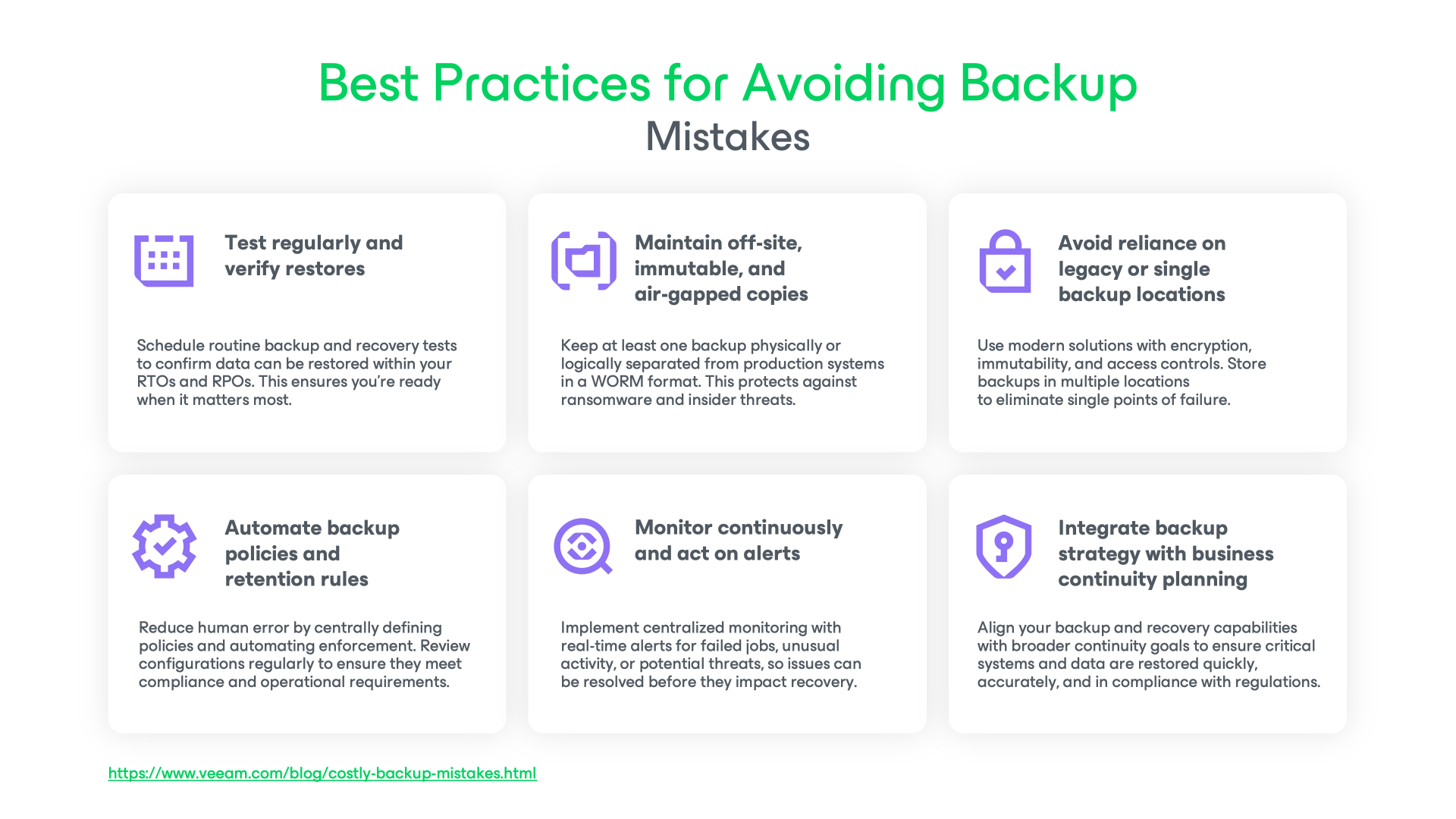
Best Practices for Avoiding Backup Mistakes
Every backup mistake has a cost, whether it’s lost data, extended downtime, or compliance penalties. The good news is that these risks can be significantly reduced with a disciplined approach to backup and recovery. The following best practices can help ensure your strategy is resilient and aligned with business needs.
Take the Next Step Toward Resilient Data Protection
Avoiding backup mistakes means building a data protection strategy that keeps your business running through any disruption. With Veeam Data Platform and Veeam Vault working together, organizations gain the automation, immutability, air‑gapping, and recovery orchestration needed to meet business continuity goals and compliance requirements.
Whether you’re modernizing legacy backup infrastructure or strengthening your ransomware recovery plan, the right tools make best practices easier to implement, and far more effective.
Learn more and start de‑risking your backup strategy:
FAQs
The most common backup mistake is failing to test restores regularly. A backup that hasn’t been verified may be incomplete, corrupted, or incompatible with current systems. Without testing, you won’t know if your data can be recovered until disaster strikes.
Backups should be tested on a regular schedule, quarterly or whenever there are significant changes to systems or data is recommended. Testing should confirm that backups meet your RTOs and RPOs, and that all critical systems can be restored quickly and reliably.
Yes. In regulated industries, losing required data or failing to meet retention rules can trigger substantial penalties. Misconfigured policies, incomplete coverage, or untested restores can all result in non‑compliance.
Follow the 3‑2‑1‑1‑0 rule and keep at least three copies of your data, on two different media types, with one copy off‑site, one copy offline or immutable, and zero backup recovery errors. Using solutions like Veeam Data Platform and Veeam Vault makes it easier to meet these standards with automation, monitoring, and secure off‑site storage.
Related Resources:
E-Book: 8 Steps to Derisk Cloud Storage for Data Resilience
Webinar: Secure Off-Site Backup in Seconds
Explore Veeam Vault: 9 Must-Haves for Offsite Cloud Storage
Offsite Storage Resilience Assessment: How Resilient is Your Offsite Storage?