

- Veeam Data Cloud
- Salesforce Backup
Veeam Data Cloud for Salesforce
Secure Your
Salesforce Data
Resilience for Salesforce data, files, and metadata
- Effortless, customizable backup & fast recovery
- Three-layer encryption & service-level immutability
- Simple, inclusive pricing with unlimited storage

Benefits
More Than Just a Backup
Your Salesforce data, your responsibility. Secure your Salesforce environments with Veeam Data Cloud, a single cloud platform from the industry leader that unifies resilience for all SaaS apps and data.
Purpose-Built for Salesforce
Veeam Data Cloud simplifies data protection, security, and recovery to keep your business running. Plus, its advanced data management and monitoring features help you maintain compliance with confidence while reducing TCO.

Eliminate Downtime
Maintain productivity with automated, high-frequency backup and precise, fast recoveries of data and dependencies.
Mitigate Risks
Secure all your data while maintaining compliance through access control, encryption, and data masking.
Unlock Value
Leverage archiving, unlimited storage and sandbox seeding to lower TCO, all included in one predictable price.
Why Back Up Salesforce
Protecting Data is a Shared Responsibility
Organizations rarely think about backing up their Salesforce data until it is too late. Eventually, there will be some sort of incident - an accidental deletion, data loader mishap, or integration error - that will cause business-critical data loss. When this happens to you, how quickly will you be able to recover?
Protecting Salesforce is a Shared Responsibility. Even though Salesforce manages the infrastructure, it is your responsibility to protect your organization from Salesforce data loss and corruption. So, why not use a trusted industry leader like Veeam to keep your business running?
Protecting Salesforce is a Shared Responsibility. Even though Salesforce manages the infrastructure, it is your responsibility to protect your organization from Salesforce data loss and corruption. So, why not use a trusted industry leader like Veeam to keep your business running?
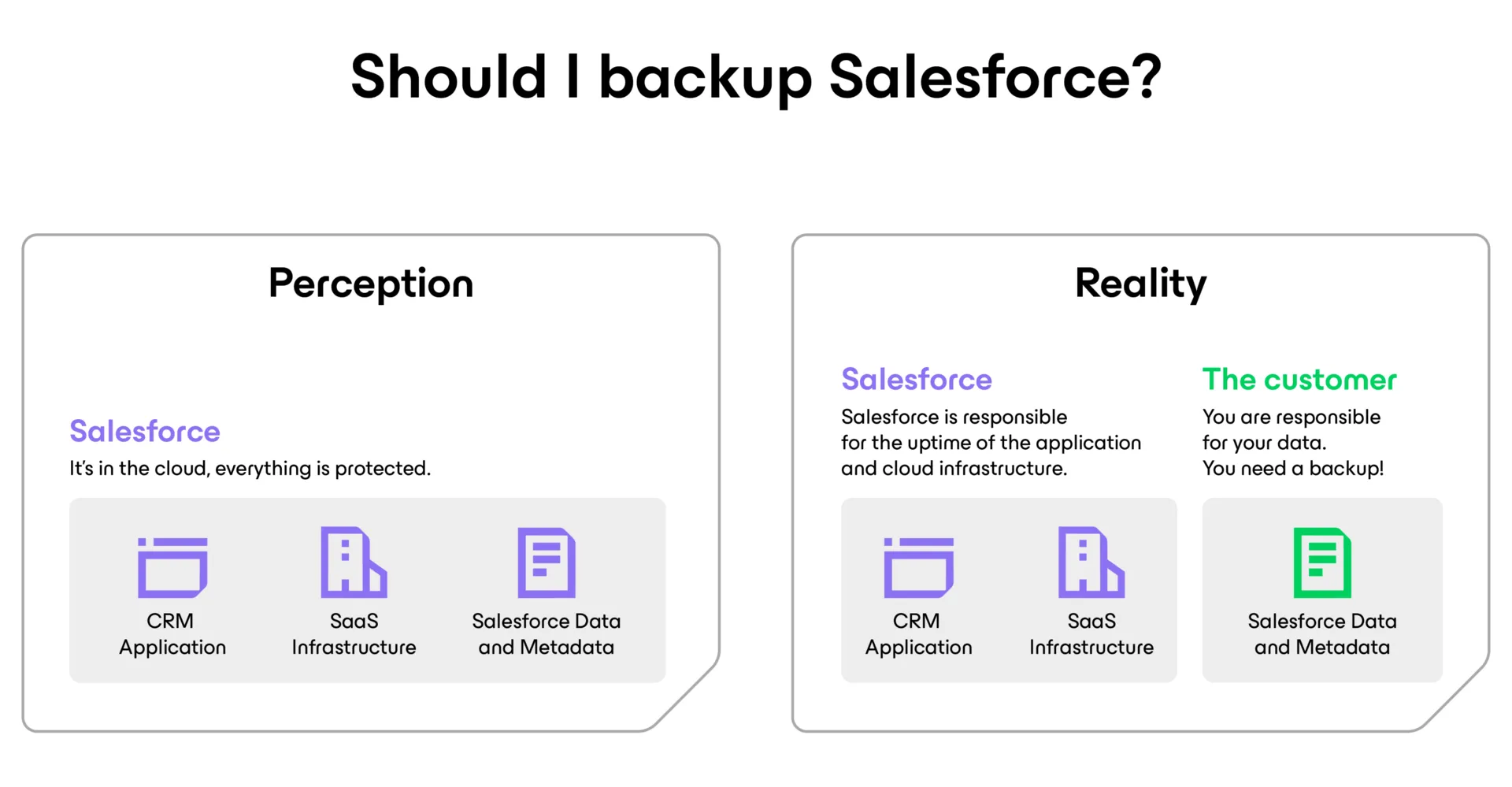
Salesforce backup perception versus reality. You need to back up Salesforce data and metadata.
Capabilities
Built for Salesforce
Confidently protect, secure, and manage your valuable Salesforce data with a unified cloud platform that features:
Data Archiving
Meet compliance requirements while freeing up Salesforce storage with included data archival.
Access Controlled
Eliminate vulnerabilities from over-privileged users and external threats through RBAC, MFA, and SSO.
Frequent Scheduling
Minimize data loss with automated backup, fully customizable to your schedule, at no additional cost.
Unlimited Storage
Maximize spend for innovation with predictably low pricing that includes unlimited storage.
Encryption
Three-layer security with host, database, and configuration encryption plus AWS BYOK for full data control.
Granular Compare and Restore
Easily search, compare, and restore records and metadata quickly while keeping hierarchies intact.
Safe Sandbox Seeding
Leverage production-fresh data in sandboxes for dev/test, training, and more.
Data Masking
Ensure data security and privacy by masking sensitive information when seeding sandboxes.
Multi-Org Management
Protect data, metadata, and files across multiple organizations from a single, unified solution.
HOW IT WORKS
Get Hands-On Right Here, Right Now
Discover how to securely protect and recover your Salesforce data, metadata, and files with this interactive demo.
Pricing & Packaging Options
Veeam keeps licensing simple and aligned with your Salesforce usage, so you only pay for what you need. Choose the option that fits your business best, with annual and multi-year subscription options designed to scale as you grow.
Veeam Data
Cloud for Salesforce
$4.17 USD
Per Salesforce user/month billed annually
Protect Salesforce data effortlessly with Veeam’s automated, secure SaaS backup solution.
- Salesforce
Advanced Plus
$5.00 USD
Per M365 user/month billed annually
(Covering all Salesforce and Entra ID users)
Centralize and optimize backup
management, reduce vendor complexity,
and boost operational efficiency.
management, reduce vendor complexity,
and boost operational efficiency.
- Salesforce
- Entra ID
- Microsoft 365
Premium Plus
$8.50 USD
Per M365 user/month billed annually (Covering all Salesforce and Entra ID users)
Access advanced protection for multiple workloads with seamless integration and premium support.
- Salesforce
- Entra ID
- Microsoft 365
Feature Comparison
Veeam gives you the flexibility to choose how you want to protect your Salesforce data. It is available as a Service or as self-managed, software-only options.
Veeam Data Cloud
for Salesforce
for Salesforce
Fully customizable backup scheduling
Granular compare and restore
Sandbox seeding
Data archiving
Unified management with other SaaS apps
All-inclusive pricing
Unlimited storage
Archive visualization

Resources
Salesforce Backup
Insights and Trends

Key Scenarios for
Safeguarding
Salesforce Data
A five-minute report on how easy it is for Salesforce data to be deleted.
Salesforce Resilience Best Practices Guide
The ultimate guide to safeguarding and building your Salesforce environment.
Securing Salesforce Data in a World of Unstoppable Threats and Integration Risks
Learn how to build resilient systems that protect the data, detect anomalies, and recover quickly.
Identity Under Attack
Modern attackers don’t break in. They log in. Read how your whole data ecosystem could be affected.
FAQs for Salesforce Data Backup
Does Salesforce back up your data?
Salesforce recommends that customers implement their own comprehensive backup strategy as part of their data management and security model. Although Salesforce maintains internal copies of data for its own disaster recovery processes, these backups are not intended for customer restoration and do not include full metadata. For complete protection, organizations should use a dedicated backup solution such as Veeam Data Cloud for Salesforce.
How can you back up and recover your Salesforce data?
Using a third-party solution like Veeam ensures that you maintain full ownership and control of your Salesforce data and metadata. Veeam provides automated, continuous backups and granular restore options, helping organizations meet strict Recovery Point Objectives (RPOs) and Recovery Time Objectives (RTOs).
What is the difference between Salesforce data and metadata? Why must you back up and restore Salesforce metadata?
Salesforce data includes your records such as Accounts, Contacts, Leads, Opportunities, Cases, files, and more. Salesforce metadata includes configuration and customization settings like custom objects, fields, page layouts, profiles, permissions, automation, reports, dashboards, and code (Apex, Visualforce). Because metadata defines how your Salesforce environment functions, backing up both data and metadata is essential to ensure complete recovery after accidental changes, deletion, corruption, or misconfigurations.
What Salesforce Clouds do you support?
Veeam Data Cloud for Salesforce supports all major Salesforce Clouds, including but not limited to Sales, Service, and Experience. For details on your specific environment, contact a Veeam sales specialist.
How long is data stored in the Salesforce recycle bin?
Deleted records remain in the Salesforce Recycle Bin for 15 days before being permanently removed. Metadata cannot be restored from the Recycle Bin and must be manually recreated. Additionally, if a record was modified before deletion, only the most recent version can be recovered. These limitations make a dedicated backup and recovery solution essential for protecting business-critical data.
Is archiving included with the standard Foundation license?
What kind of Salesforce licenses should be considered when purchasing Veeam?
Archiving is part of our new “Advanced” offering. With data archiving, customers can avoid extra storage costs in Salesforce and maintain their existing storage limits. This feature allows users to transfer historical data and files from Salesforce to their chosen backup repository efficiently.When considering licensing for Salesforce backup solutions, it is important to include all Salesforce users as well as Salesforce Platform users, click here to read more.
Do I need to license all my Salesforce users?
The service is licensed per active Salesforce user, and only users with specific Salesforce user licenses count toward your purchased subscription. For more information, see this Veeam article.
How will I know my system is secure using Veeam?
With Veeam , your data is protected through Single Sign-On (SSO) for streamlined, secure access, Multi-Factor Authentication (MFA) to prevent unauthorized logins, and advanced encryption in transit and at rest, ensuring your system stays secure from cyber threats and breaches.
What edition of Salesforce do I need to use Veeam?
Salesforce provides four different editions of Salesforce Sales Cloud and Service Cloud. These include Essentials, Professional, Enterprise, and Unlimited editions. Only Salesforce Enterprise and Unlimited editions include the APIs that are needed to create Salesforce backups for your Salesforce environment. Veeam requires that organizations use either the Enterprise or Unlimited edition of Salesforce. The Professional edition can also be used with the API add-on.
Can I back up my Salesforce data to AWS, Azure, or another cloud?
Yes. Veeam Backup for Salesforce allows you to deploy and store backups on-premises, in AWS, Azure, or any other cloud. This gives organizations full control over data location, security, and compliance requirements while maintaining complete ownership of their Salesforce data.
How often can I back up my Salesforce data?
With incremental sync and flexible scheduling, Veeam enables backups as frequently as every few minutes, depending on Salesforce API limits. You can customize schedules and retention policies at the object level and automatically detect new fields and objects to ensure complete, up-to-date protection.
Does Veeam Backup for Salesforce and Veeam Data Cloud for Salesforce include support?
Yes. Veeam Data Cloud for Salesforce and Veeam Backup for Salesforce include 24/7/365 support. The Community Edition provides best-effort email support.
Does Veeam Data Cloud truly offer unlimited storage?
Veeam provides a Fair Use Policy designed to ensure fair and reasonable use of the Services by Veeam under the Veeam Data Cloud Service Agreement. For more information on data allowance and excessive use, click here to view the policy.
Explore the latest news from Veeam
Data Trust and Resilience Report 2026
Build faster, more resilient recovery with this report