すべてのVeeam Backup & Replicationのアクティビティを停止する方法
| KB ID: | 2991 |
| Product: | Veeam Backup & Replication | 9.5 | 10 | 11 | 12 | 12.1 | 12.2 | 12.3 | 12.3.1 | 12.3.2 | 13 | 13.1 |
| Published: | 2019-08-26 |
| Last Modified: | 2025-02-19 |
| Languages: | EN |

Cheers for trusting us with the spot in your mailbox!
Now you’re less likely to miss what’s been brewing in our knowledge base with this weekly digest

問題が発生しました。
時間をおいて、再度お試しください
目的
解決方法
Veeam Backup ServerでのVeeamアクティビティの停止Stopping Veeam Activity on Veeam Backup Server
- Veeam Backup & Replication Consoleを開きます。
- すべてのジョブをDisable(無効化)します。
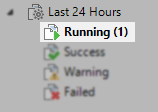
どのジョブがすでに無効化されているかをメモしておき、後で再度有効化する必要のないジョブを確認しておきます。 - 実行中のタスクをすべて停止します。過去 24 時間の "Running" セクションを確認します。
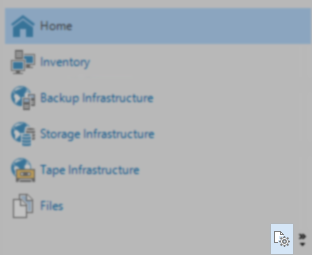
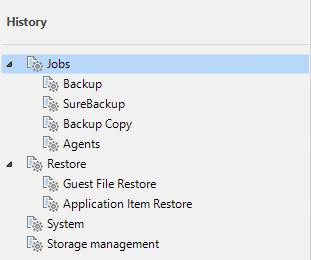
補助的な手段として、履歴(History) ビューに切り替え、各ノードの実行中のタスクを確認します。
- Veeam Backup & Replication Consoleを閉じます。
- 次のコマンドでVeeam Backup Server上のすべてのVeeamサービスを停止します。
Get-Service Veeam* | Stop-Service -Force他のバックアップインフラストラクチャコンポーネントサーバーでのVeeamアクティビティの停止
注意: コンポーネントサーバー上でVeeamサービスを停止すると、そのサーバーが関与しているタスクが終了します。そのため、このセクションのアクションは以下のいずれかの処理の後にのみ実行することをお勧めします:
- Veeam Backup & Replication内でコンポーネントサーバーを使用しているタスクがないことを確認します。
または - Veeam Backup Server上のすべてのVeeamアクティビティを停止します。
手順Procedure
(バックアッププロキシ、バックアップリポジトリ、WANアクセラレータ、Hyper-Vホストなど)
- Windowsベースのコンポーネントサーバーの場合:
Get-Service Veeam* | Stop-Service -Force- Linuxベースのコンポーネントサーバーの場合:
sudo systemctl stop veeam* --all(オプション)Veeam Backup & Replication構成データベースの停止
このステップはオプションで、構成データベースをオフラインにする必要があるシナリオはほとんどありません。
重要な注意:
- このセクションはPostgreSQLではなく、Microsoft SQLを使用するVeeam Backup & Replication環境にのみ関連します。
- 一部のVeeam Backup & Replicationサービスは構成データベースへの接続を必要とします。データベースがオフラインの場合、それらのサービスは起動に失敗します。
- Veeam Backup & Replicationをアップグレードする場合、データベースをオフラインにしないでください。アップグレードインストーラはアップグレードを実行するために構成データベースにアクセスできる必要があります。また、アップグレード完了後、インストーラはVeeamサービスの起動を試みますが、構成データベースがオフラインの場合、サービスは起動できず、アップグレードは失敗します。
手順
- Configuration Database Connection Settingsユーティリティを開いて、構成データベースの場所を特定します。
このツールは通常、使用するデータベースを変更するために使用されますが、このツールを起動すると、その直後に、現在構成されているデータベース接続の詳細が表示されます。 - 次の SqlCmd スクリプトのServerName, InstanceNam, database-nameを環境に合わせて修正した上で実行します:
SqlCmd -E -S ServerName\InstanceName -Q "ALTER DATABASE database-name SET OFFLINE"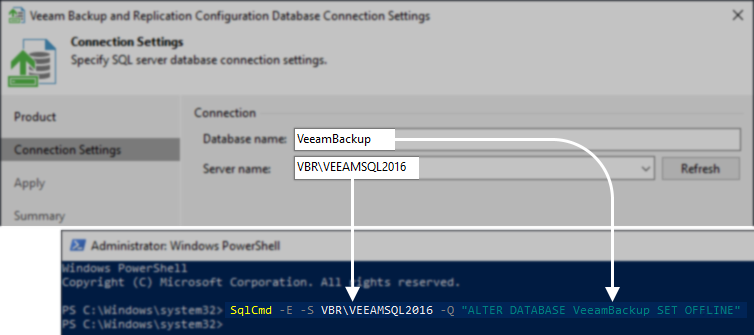
すべてのVeeam Backup & Replicationアクティビティの開始
上記の手順を逆に行い、すべてを実行状態に戻します。
備考:
- 構成データベースをオフラインにした場合、他のステップの前にオンラインにする必要があります。
- サービスの停止に使用したすべてのCLIコマンドは、"stop "を "start "に置き換えることで再利用できます。
- また、手動ですべてのVeeamサービスを起動する代わりに、サービスを停止したVeeam Backup Serverと関連するコンポーネントサーバーを再起動することもできます。
If this KB article did not resolve your issue or you need further assistance with Veeam software, please create a Veeam Support Case.
To submit feedback regarding this article, please click this link: Send Article Feedback
To report a typo on this page, highlight the typo with your mouse and press CTRL + Enter.
Spelling error in text

ありがとうございました。
フィードバックを受信しました。内容を確認させていただきます。
問題が発生しました。
時間をおいて、再度お試しください
You have selected too large block!
Please try select less.
KB Feedback/Suggestion
このフォームは、ナレッジベースに対するご意見専用となっております。ソフトウェアでお困りの場合は、サポートケースを作成してください。
ありがとうございました。
フィードバックを受信しました。内容を確認させていただきます。
問題が発生しました。
時間をおいて、再度お試しください