

Key takeaways
- Egress fees apply when data leaves a cloud provider’s network. Moving data in is usually free, and that asymmetry is built into cloud economics.
- The major clouds charge roughly $0.085 to $0.12 per GB for internet egress after a small free tier, and rates shift by region, destination, and volume.
- Backup and disaster recovery (DR) take the biggest hit because restores, failover tests, and cross-cloud replication move huge volumes at once.
- API call and retrieval fees stack on top of egress, which makes DIY cloud backup storage hard to forecast.
- Veeam Data Cloud Vault bundles storage, API calls, and restore egress into one per-TB price, so recovery doesn’t come with a surprise bill.
Your restore worked. Then the bill arrived.
An egress fee is the charge a cloud provider applies when data leaves its network, and for backup teams it tends to show up at the worst possible moment. Pull 50 TB back from Amazon Simple Storage Service (Amazon S3) after an outage, and the internet egress line alone can top $4,000. That’s before you count a single API call.
Every major provider charges egress fees, and rates vary by provider, region, and destination. For Backup Admins and Cloud Architects, that unpredictability shapes real decisions: where backup repositories live, how often you test DR, and how far you take a multicloud strategy.
Here’s how egress fees are calculated, what the major providers charge, and how all-inclusive storage like Veeam Data Cloud Vault makes backup storage costs predictable again.
What is an egress fee?
An egress fee is what a cloud provider charges to move data out of its network. It’s billed separately from storage and compute, while ingress is free or close to it, so egress is easy to overlook when you design a backup target.
Egress charges typically apply when data moves:
- To the public internet, such as restoring backups on-premises.
- Between regions, such as replicating backup copies.
- Between availability zones, which some providers bill each way.
- To another cloud provider, such as copying backups between hyperscalers.
The asymmetry is deliberate. Providers absorb ingress costs to attract data, then meter it on the way out.
How are egress fees calculated?
Most providers bill egress per gigabyte after a monthly free allowance, with rates that step down as volume grows. Here’s what restoring from cloud backup storage to your data center costs at standard US rates:
| Restore size | Billable GB (after 100 GB free) | Estimated egress cost |
| 5 TB | 4,900 GB | ~$441 |
| 50 TB | 49,900 GB (tiered) | ~$4,290 |
| 200 TB | 199,900 GB (tiered) | ~$13,800 |
Estimates use decimal units (1 TB = 1,000 GB) and published Amazon Web Services (AWS) tier rates.
The final number depends on destination, provider, region, and monthly volume tier.
The same math applies to DR testing. A quarterly test that restores 50 TB on-premises adds up to roughly $17,000 a year in egress alone. Testing more often improves confidence but raises the bill. The Advanced edition of Veeam Vault removes that trade-off with unlimited retrieval built for testing and clean rooms.
Egress gets the headlines, but it’s rarely the only meter running. Many DIY and public cloud storage options also charge per request. On Amazon S3 Standard, write requests (PUT, COPY, POST, and LIST) and read requests (GET) are each billed per 1,000, and backup jobs can generate millions of requests a month.
Colder tiers add retrieval fees and early deletion charges if data leaves before a minimum storage period. Together, these small line items make bills hard to forecast, especially in the month you need to recover.
Veeam Vault includes read and write API calls in its per-TB price. Even low-cost archive tiers carry terms to plan around: Veeam Data Cloud Vault Archive has a 180-day minimum and bills retrieval separately, which is why it’s built for long-term retention, not everyday recovery.
Why egress fees hit backup and DR harder than most workloads
Everyday application traffic is small, steady, and predictable. Backup and DR traffic is large, infrequent, and bursty, exactly the pattern that produces the biggest egress bills. The pain concentrates in a few moments:
- Full-environment restores after an outage.
- DR failover tests that spin up a full replica environment.
- Ransomware recovery, when bulk restores can’t wait.
- Cross-cloud replication as part of a multicloud strategy or the 3-2-1-1-0 Rule.
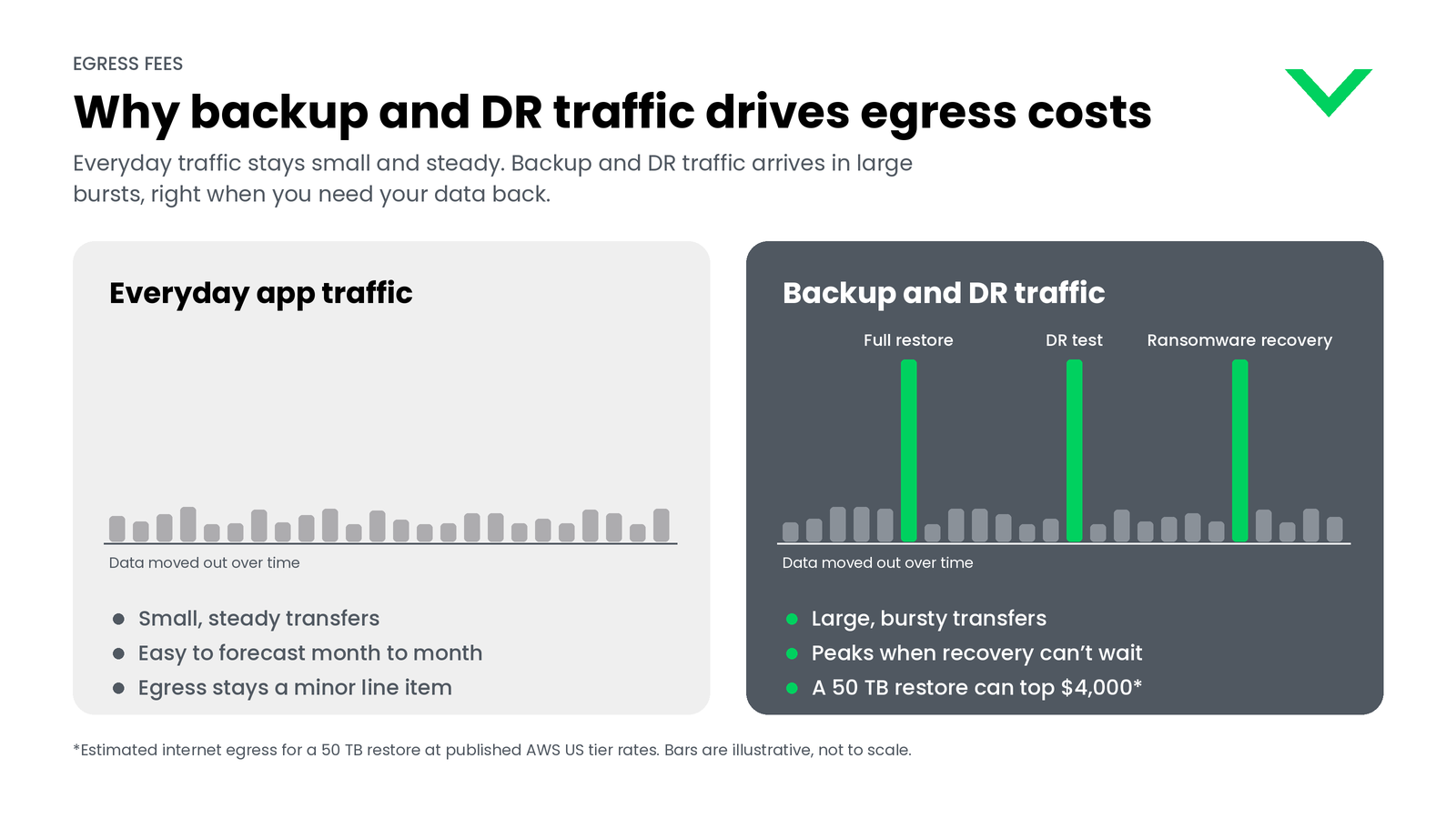
Egress stays invisible during normal operations, then spikes when you need data back fastest and can least afford to hesitate over cost.
Compare egress fees by provider
Every major cloud charges egress, but free allowances, starting rates, and cross-region treatment differ. Here’s how published list prices compare for US and EU regions.
| Provider | Free monthly tier | Internet egress (first tier) | Inter-region or cross-cloud |
| AWS (Amazon S3, Amazon Elastic Compute Cloud (Amazon EC2)) | 100 GB, shared across services and regions | $0.09/GB for the first 10 TB | About $0.02/GB between US regions; $0.01/GB each way across availability zones |
| Microsoft Azure | 100 GB | $0.087/GB for the first 10 TB | Billed between regions; virtual network peering priced separately |
| Google Cloud | 1 GB (Premium Tier); 200 GB (Standard Tier) | $0.12/GB Premium; $0.085/GB Standard | Priced by source and destination region |
| Snowflake | Same-region transfers are free | About $90/TB to the internet or another cloud (AWS US East) | From $20/TB between US regions on the same cloud |
| Cloudflare R2 | 10 GB of storage plus a free operations allowance | $0 | $0 egress; per-operation fees still apply |
AWS and Azure tier down with volume, and Azure also bills traffic between virtual networks, even within the same region. Google Cloud’s cheaper Standard Tier trades some performance for price, as our Google Cloud pricing guide explains. Snowflake charges for cross-region and cross-cloud replication.
Treat these as November 2026 list prices and confirm with each provider before you budget.
How to reduce egress fees in backup and multicloud architectures
You rarely eliminate egress entirely, but architecture choices shrink it. Start with the industry-standard levers:
- Serve frequently accessed data through a CDN, which often has lower rates.
- Compress and deduplicate before data moves. Fewer bytes out means a smaller bill.
- Consolidate regions to avoid unnecessary inter-region hops.
- Use private connectivity for large, recurring transfers. Gateway endpoints keep backup traffic to Amazon S3 off the public internet.
Then add backup-specific decisions:
- Place backup repositories deliberately, close to the workloads they protect.
- Tier aging backups. Keep recent, recovery-critical backups on Veeam Vault Foundation or Advanced, and let data past its recovery window tier automatically into Vault Archive.
- Scope DR tests to critical systems.
- Be selective about cross-cloud replication. Reserve it for workloads that truly need it.
These choices help you control cloud backup costs. Zero-egress object storage, such as Cloudflare R2, is another option for secondary copies.
Egress in container and Kubernetes backup environments
Kubernetes backups create their own egress patterns: etcd snapshots, persistent volume backups, and cross-cluster replication. Automated policies generate this traffic, so monitor data movement by cluster and destination.
Veeam Kasten sends Kubernetes backups straight to Veeam Vault, so stateful apps don’t add an unpredictable line item. Learn more about Kubernetes data protection here.
Building egress costs into hybrid and multicloud planning
Plan for egress from day one, not after migration. Before you pick a backup target, map where data moves during a restore, a DR test, and a cross-cloud copy, then price each path.
Next, match storage to how likely you are to restore. Hybrid cloud designs keep a local copy for fast, routine restores. Recovery-ready cloud copies belong on storage with included retrieval, while compliance retention, such as seven-year records and GFS backups, fits an archive tier. Teams that plan this way get predictable budgets and more resilient backups.
Predictable backup storage costs with Veeam Data Cloud Vault
DIY and public cloud storage meter every step separately. Veeam Vault takes a different approach: fully managed, immutable, encrypted cloud storage with one flat price per TB that covers storage and read and write API calls. On its recovery editions, restore egress is included too, so your bill looks the same in a quiet month as it does after a full restore.
Pick the edition by how often you expect to bring data back:
| Edition | Best for | Retrieval and restore egress |
| Advanced | Mission-critical recovery, DR testing, and clean rooms | Unlimited |
| Foundation | Everyday backup and recovery | Included within fair use |
| Archive | Long-term retention of cold data and GFS backups | Billed separately (180-day minimum retention) |
Foundation and Advanced are available on Microsoft Azure and AWS and plug directly into Veeam Data Platform and Veeam Kasten. Vault Archive runs on Azure, where aging backups tier automatically from Veeam Vault, so recovery-ready and retention-ready data live on one platform that supports the 3-2-1-1-0 Rule.
Explore Veeam Data Cloud Vault and see what predictable backup storage looks like.
Frequently asked questions
Most major clouds charge roughly $0.085 to $0.12 per GB for internet egress after a monthly free allowance, with lower rates at higher volumes. Exact cost depends on provider, region, destination, and volume tier.
5GB egress means 5 GB of data transferred out of a cloud provider’s network. On AWS and Azure, that falls inside the 100 GB monthly free tier. Above it, at $0.09 per GB, 5 GB costs about $0.45. Terabyte-scale restores are where costs climb.
You can rarely avoid egress fees entirely, but repository placement, scoped DR tests, compression, CDNs, and private connectivity minimize them. The closest thing to avoiding them is storage that includes or waives egress, such as Cloudflare R2 or the recovery editions of Veeam Data Cloud Vault.
No. Amazon S3 charges tiered internet egress, starting at $0.09 per GB after 100 GB free each month. Cloudflare R2 charges no egress and bills for storage and operations instead.
1. Tag backup and DR resources in your cloud accounts.
2. Pull data transfer line items for those tags from billing reports.
3. Model upcoming restores and DR tests with the per-GB math above.
4. Add API and retrieval fees for a complete picture.
Not on its recovery editions. Foundation includes restore egress within fair use, and Advanced includes unlimited retrieval, both in one per-TB price with read and write API calls. Vault Archive, designed for long-term retention, bills retrieval separately.