

There will be another outage.
I realize that’s not exactly Nostradamus-level forecasting, especially lately.
Maybe a cloud provider goes down. Maybe somebody pushes a bad update. Maybe ransomware gets through. Maybe an AI agent with perfectly valid credentials does something unanticipated.
The specific cause matters enormously to the people investigating it. To the business, though, the questions are the same, regardless of the cause: What do we need up and working immediately? How quickly can we trust and validate it when it comes back?
Resilience doesn’t just mean “do we have backups?” or “is the DR plan updated?” I’ve spent much of my career helping organizations harden their environments and prepare for the worst. Like so many things in life, it’s easy to make resilience more complicated than it needs to be.
Let me boil it down into 10 simple resilience rules to follow:
Rule #1: Everything can’t be mission critical
Ask 20 application owners whether their application is critical. Congratulations, you now have 20 critical applications. Stopping here isn’t prioritization; it’s just avoiding conflict.
This is where the concept of a minimum viable company or business becomes useful. It means defining the smallest collection of business capabilities that are necessary to continue operating and meeting your most important customer, safety, legal, and regulatory obligations.and regulatory obligations.
“Process customer orders” is a capability. SAP is an application. “Pay employees” is a capability. Payroll software is an application. “Communicate with patients” is a capability. Microsoft 365 might be one of several technologies underneath it.
The minimum viable recovery contract
For each of your five most critical business capabilities, bring the CIO, COO and business owner together and agree on five things:
| Decision | What must be agreed upon |
| Business outcome | What must customers or employees still be able to do? |
| Minimum acceptable service | How much capacity is enough and for how long? |
| Dependencies | Which identities, networks, applications, data, people, and third parties must work? |
| Trusted data | What is the minimum data required, how current does it need to be, and how will it be validated? |
| Proof and ownership | Who authorizes resumption, and what demonstrates that the capability works? |
Rule #2: Understand who is accountable for what
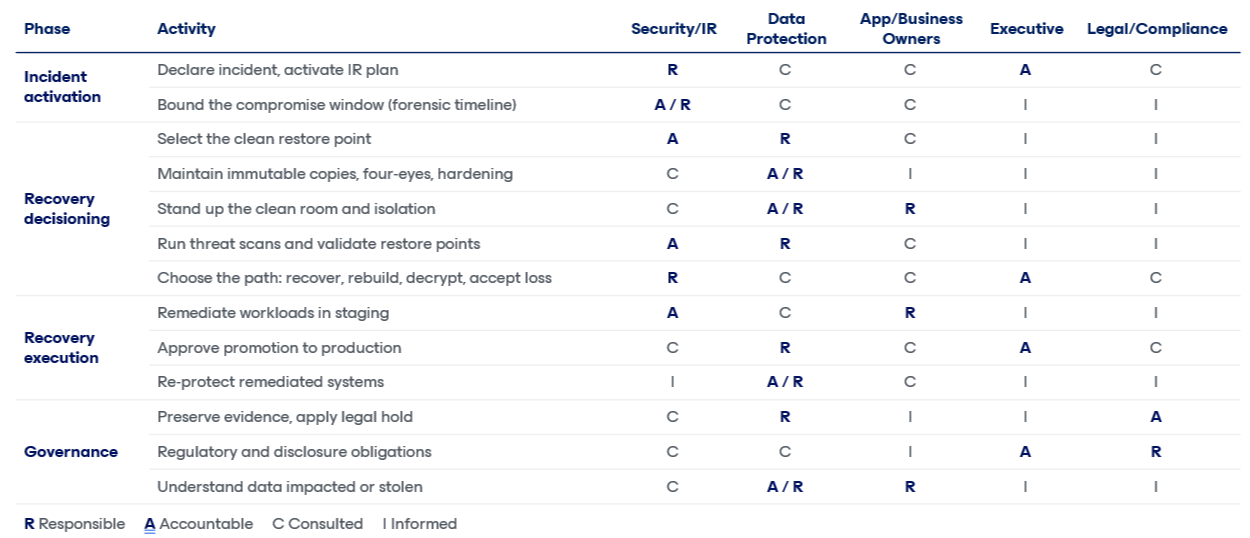
Recovery is a team sport. Knowing who is responsible, accountable, consulted, and informed creates better recovery outcomes.
For example, a common mistake I see is assuming the data protection team will choose a restore point in a ransomware attack and restore it back to production all on their own. Ultimately, the security team is accountable for determining what restore point is clean, and the data protection team is responsible for executing that.
Another typical example is legal hold. Yes, the data protection team is responsible for retaining that data for X period of time, but the legal and compliance team is accountable for defining what data and how long you need to keep it.
Rule #3: There are two recovery clocks
Traditional recovery metrics tend to measure the part IT controls: Restore was started at 10:02, the virtual machine (VM) powered on at 10:37, and the job completed successfully.
Meanwhile, the application team may spend six more hours reconnecting dependencies, validating data, restoring identities, and determining whether anyone can actually use the system.
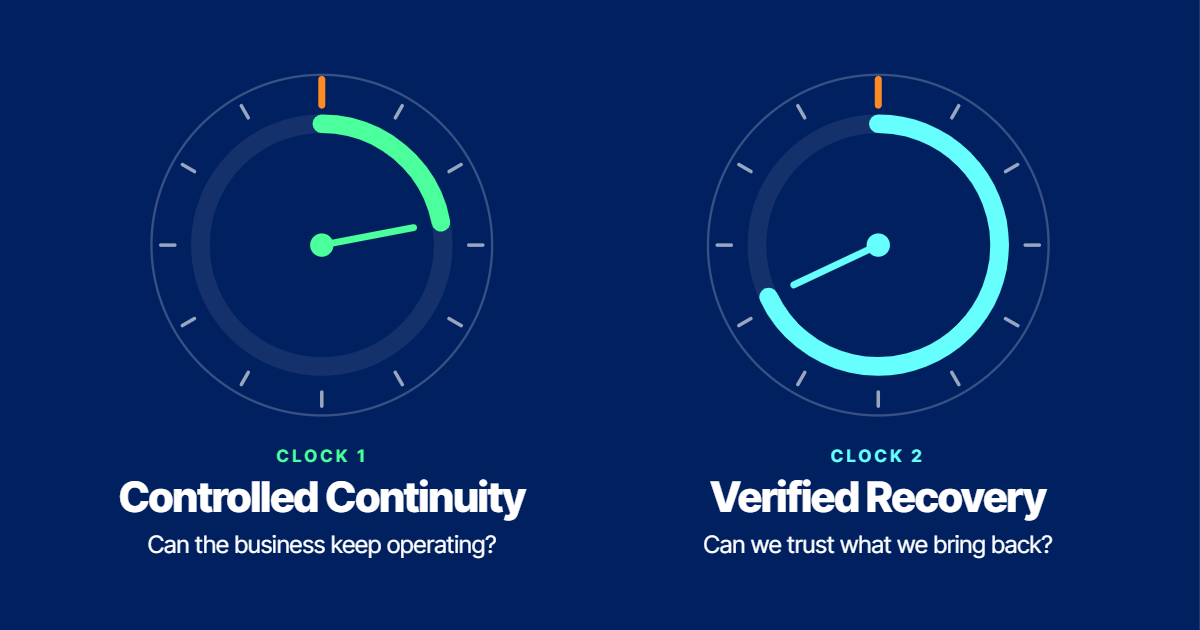
The business does not care when the restore is finished; it only cares when somebody can work again. This means resilience needs two clocks:
Clock 1: Time to controlled continuity
How long until the business can safely perform its essential work at the agreed minimum level?
Clock 2: Time to verified recovery
How long until the required systems, services, and data are restored to a trustworthy state?
A retailer may achieve controlled continuity in four hours by restoring payment, current inventory, order intake, and limited fulfillment at 20% capacity. Full verified recovery of the normal ERP environment might take another 32 hours.
Choose an application and measure these two clocks. Does it change your RTO reported to the business? How do these clocks change for an infrastructure outage vs a cyber outage?
Rule #4: Know which data is worth stealing and stop keeping what isn’t
Here’s an uncomfortable truth about modern extortion: The attacker often knows your data better than you do. They’ve had weeks to look around. They know which file share holds the HR records, which database has the customer list, and which forgotten SharePoint site has a spreadsheet somebody built in 2019 and never deleted.
Coveware by Veeam saw data exfiltration in 71% of its Q3 2026 cases. When theft is the objective, the first questions after an incident aren’t technical. They are: What did they take? Whose data was it? Who has to be told, and how soon?
That’s why data security and data resilience are turning into the same conversation. Before the incident, you want to know:
- Where your sensitive data actually lives, including the copies nobody remembers making.
- Who and what can access it, including service accounts and AI agents.
- What you could delete tomorrow, because nobody needs it anymore.
That last one is underrated. Seven years of files nobody has opened since the last reorg isn’t an asset, it’s inventory for an extortionist. The cheapest data to protect is the data you no longer keep.
Resilience used to mean getting your data back, but now, it also means knowing what it would cost if somebody else had it.
Rule #5: Assume the attacker already has valid credentials
For years, the picture of a hacker involved somebody “breaking in.” That description is getting less useful. Today, the more uncomfortable scenario is somebody logging in.
Coveware by Veeam continues to see social engineering, remote access, and compromised credentials as major paths into victim environments. Recent threat research has documented autonomous and semi-autonomous penetration-testing frameworks such as ARTEX and CAIRN being used to automate parts of intrusion activity and rapidly exploit vulnerabilities.
The European Commission offers a timely reminder as ARTEX was attributed as a tool leveraged during their November 19 cyberattack. They confirmed a cyber campaign involving open-source penetration testing tools and said several applications had been deliberately taken offline as a protective measure. Most had since been restored, while the investigation continued.
AI makes mediocre attacks persistent, cheap, and fast. Attackers don’t have to invent a brilliant technique if they can try ordinary techniques against a thousand systems while your team is asleep.
This makes the boring fundamentals even more important. Patch quickly, use phishing-resistant multi-factor authentication (MFA) where practical, isolate privileged identities, segment critical infrastructure, apply least privilege access, and protect recovery systems as though attackers will eventually find them.
The lesson is not that AI suddenly made attackers more sophisticated. It just made persistence cheap: Thousands of attempts, multiple targets, continuous operation, and minutes or hours between opportunity and impact instead of days.
Rule #6: Recovery priority changes with time
Criticality isn’t static. Payroll might tolerate an outage on Tuesday, but that becomes a very different conversation on Friday.
A manufacturing reporting system might wait 24 hours, but the production control system that’s feeding it probably cannot. Customer communications might survive an hour. Regulatory reporting may tolerate a day. Eventually those clocks reverse.
So, I like asking the business to answer four questions:
- What must work in the first four hours?
- What must work by day one?
- What must work by day three?
- What breaks the company by day ten?
Rule #7: Your recovery architecture needs more than one answer
People love arguing about the “best” recovery technology: Backups, replication, continuous data protection (CDP), snapshots, immutable copies, air gaps, and granular restore.
They are all correct in the right circumstance. This means they’re all wrong when applied to every incident.
| Failure | What’s wrong | Best response |
| Infrastructure failure | The platform is unavailable, but the data is trustworthy. | Fail over or run elsewhere. |
| Cyber compromise | The environment cannot be trusted. | Contain, identify a clean restore point, then recover into an isolated and controlled environment. |
| Bad automated or AI-driven change | A limited set of data or configurations is wrong. | Reverse exactly what changed while preserving legitimate work. |
| Provider outage | The platform itself is not yours to recover. | Operate around it until the provider restores service. |
No backup vendor can restore a cloud provider’s underlying service while that service is unavailable. Sometimes resilience means finding another way for the business to work while somebody else restores the platform.
In the recent Microsoft 365 outage, was your disaster recovery (DR) plan on SharePoint? Did you have MFA codes only being sent to email? Plan for the unthinkable and ensure you always have access to your data even if the service is down.
Rule #8: Separate recovery from production
If the credentials that administer production can also destroy your recovery copies, you don’t really have two environments. You have one failure domain with nicer diagrams.
Recovery infrastructure deserves separate thinking. This includes:
- Independent administrative identities
- MFA and multiple-person authorization for destructive operations where available
- Identity that’s protected and recovery that’s tested
- Immutable and offsite copies
- Multiple recovery paths that go beyond backup, including replication, snapshots, and CDP where appropriate
- A decoy backup environment, because backups are the first thing attackers hunt
- Monitoring backup configuration and deletion
- Alerts on unexpected restores for potential data exfiltration
If stolen credentials allow somebody to restore the executive file share or HR repository somewhere else, that “restore” isn’t recovery. It’s exfiltration with excellent documentation.
Rule #9: Know what changed
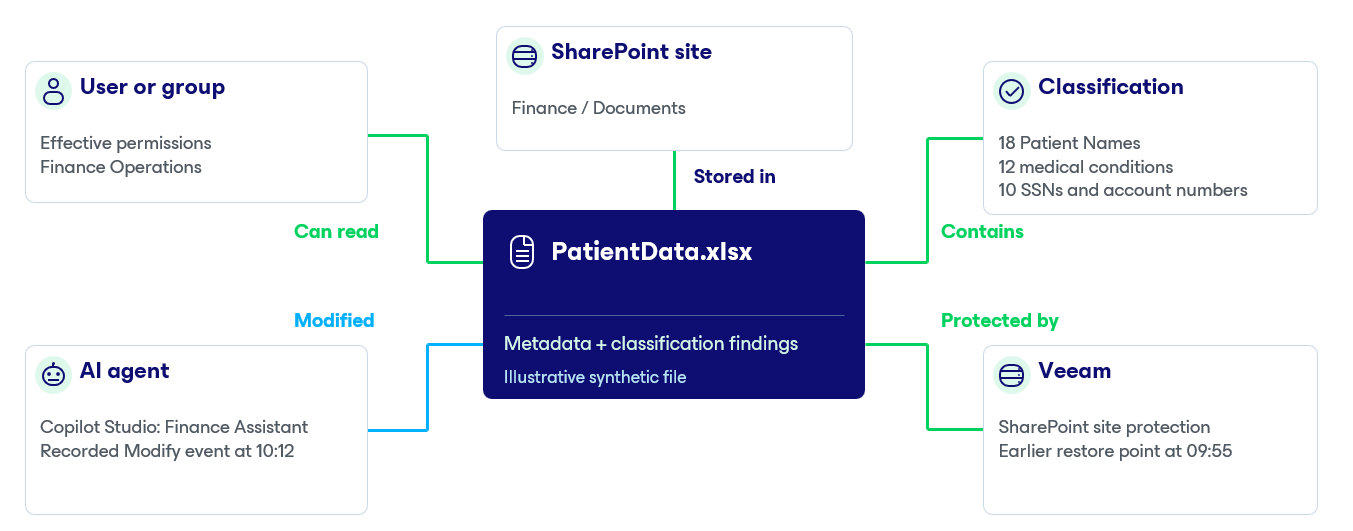
This may become the defining resilience problem of the AI era. For years, the most important recovery question was: When was our last good copy? Increasingly, another question comes first: What did it touch?
Imagine an AI agent that’s authorized to manage files in Microsoft 365. Say something goes wrong and it changes 10,000 of them.
Everything is available and up. Every monitoring dashboard may be green. And the latest backup may also contain every bad change, because the backup system did exactly what you asked it to do.
The best recovery isn’t automatically “go back to 2 a.m.” Employees, customers, and other applications may have made thousands of legitimate changes since then.
The better answer is:
- Identify the agent or identity.
- Establish exactly what it accessed.
- Revoke the access.
- Distinguish the bad changes from legitimate ones.
- Restore only what needs to be restored.
- Preserve everything else.
Rule #10: Build your recovery environment before you need it
Almost every recovery plan contains a sentence like “restore systems to an isolated, clean environment.” For an infrastructure failure, the answer might be a secondary site or another cloud region. For a cyberattack, it’s harder. Your production environment may still be impacted. Restore clean data onto a network the attacker still controls, and you haven’t recovered anything. You’ve reinfected production.
A clean room is somewhere you can bring Tier 0 back, inspect restore points and rebuild without anyone watching over your shoulder. This might mean dedicated on-premises infrastructure or a cloud landing zone that’s ready to go. Either way, it needs its own identities, its own network, and its own access controls. Sourcing a clean place to recover at 3 a.m. is not a procurement process you want to start at 3 a.m.
If the recovery plan lives on the SharePoint site that just got encrypted, it’s not a plan. If your incident bridge runs on Teams and the attacker has a valid account, your bridge has one more attendee than you invited.
Build the boring stuff ahead of time, including:
- A way to communicate with key stakeholders that doesn’t depend on corporate identity or email.
- Having online copies of runbooks, recovery contracts, and contact lists, on paper if necessary.
- Recovery credentials stored separately from production.
- Agreed criteria for when a system is clean enough to move back.
The middle of an incident is a terrible time to build infrastructure. Build it now, then prove it works.
The test every organization should take
If you want to turn all of this into something practical, skip the 97-question maturity assessment for a minute.
Take your five most important business capabilities. Create a one-page recovery contract for each, then use the questions below to test the contract, the dependencies, and both recovery clocks.
Question | Answer |
What business capability must survive and what’s the minimum acceptable version of it? | |
Who owns the business decision? | |
Which Tier 0 services does it depend on? | |
What data is actually required, and what data isn’t? | |
What has to return in 4 hours? 24 hours? 3 days? 10 days? | |
Where can it run if production is unavailable? | |
How do we determine a trustworthy recovery point? | |
How do we know what an attacker, admin, or AI agent changed? | |
Can recovery credentials survive the compromise of production identity? | |
Who proves the business function actually works? | |
When was the last time we proved it end-to-end? |
Confidence isn’t a recovery strategy
We can’t stop Microsoft from having an outage. We can’t guarantee somebody won’t push a bad update. We can’t make phishing disappear, and we’re probably not going to convince every AI agent on Earth to think through the consequences of its actions before doing something stupid.
What we can do is make failure survivable.
Protect the data. Protect the recovery path. Know your dependencies. Know what comes back first. Know what you can trust. Know what changed and then prove you can recover it.
You can’t predict the next outage. You can’t know whether the next bad day comes from infrastructure, an attacker, an employee, a third party, or an AI agent. But you can decide what the company needs to survive it and you can prove that you know how to bring it back.