- Veeam Support Knowledge Base
- Veeam Explorer for Microsoft Exchange: Could not establish trust relationship for the SSL/TLS secure channel
Veeam Explorer for Microsoft Exchange: Could not establish trust relationship for the SSL/TLS secure channel
| KB ID: | 1686 |
| Product: | Veeam Backup & Replication |
| Published: | 2012-11-08 |
| Last Modified: | 2025-03-13 |

Get weekly article updates
Cheers for trusting us with the spot in your mailbox!
Now you’re less likely to miss what’s been brewing in our knowledge base with this weekly digest

Oops! Something went wrong.
Please, try again later.
Challenge
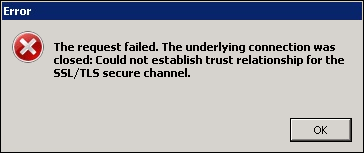
When restoring items with Veeam Explorer for Microsoft Exchange or sending them as attachments, the following error occurs:
The request failed. The underlying connection was closed: could not establish trust relationship for the SSL/TLS secure channel
Cause
There are two possible causes:
- The self-signed certificate the remote server uses has not been added to the local machine's Trusted Root Certification Authorities Store.
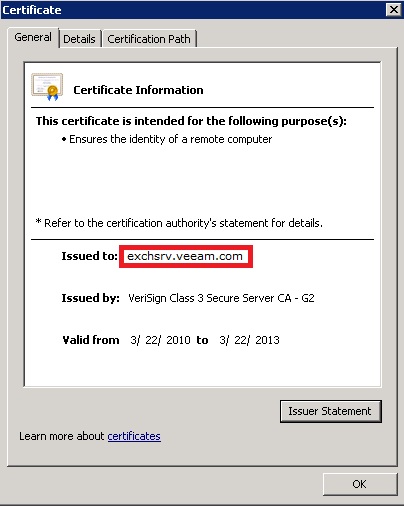
- The hostname or IP address used to initiate the connection to the Exchange server is not specified in the certificate.
Solution
The solution varies based on the cause:
- Ensure that the remote server's self-signed certificate is installed into the Trusted Root Certification Authorities Store.
- Ensure that the server name or IP address being used to connect to the mailbox server (CAS) is specified within the certificate.
If this KB article did not resolve your issue or you need further assistance with Veeam software, please create a Veeam Support Case.
To submit feedback regarding this article, please click this link: Send Article Feedback
To report a typo on this page, highlight the typo with your mouse and press CTRL + Enter.
