- Veeam Support Knowledge Base
- WinRM Service cannot process the Request
WinRM Service cannot process the Request
| KB ID: | 2707 |
| Product: | Veeam Backup for Microsoft 365 |
| Version: | Any |
| Published: | 2018-08-20 |
| Last Modified: | 2026-06-23 |

Get weekly article updates
Cheers for trusting us with the spot in your mailbox!
Now you’re less likely to miss what’s been brewing in our knowledge base with this weekly digest

Oops! Something went wrong.
Please, try again later.
Challenge
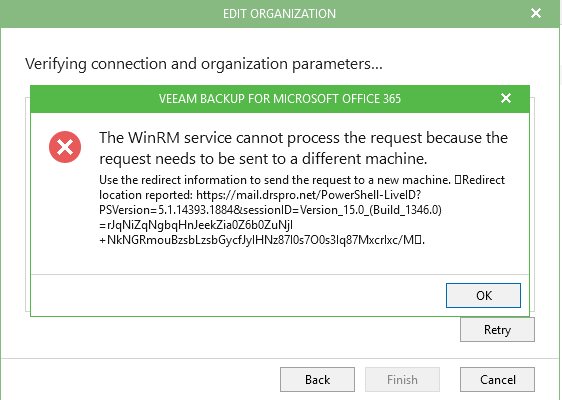
When attempting to add an On-Prem or Hybrid organization to Veeam Backup for Office 365 the following error occurs:
The WinRM service cannot process the request because the request needs to be sent to a different machine.
Use the redirect information to send the request to a new machine.
Cause
The On-Premises Exchange server does not have PowerShell authentication enabled.
Solution
The On-Premises Exchange server PowerShell must have Basic Authentication enabled.
- Open the Exchange Admin Center.
- Click on servers.
- Select the virtual directories tab.
- From the list, select PowerShell (Default Web Site) or PowerShell (Exchange Web Services website).
- In the pop-up window, switch to the authentication tab.
- Enable the Basic authentication option.

If this KB article did not resolve your issue or you need further assistance with Veeam software, please create a Veeam Support Case.
To submit feedback regarding this article, please click this link: Send Article Feedback
To report a typo on this page, highlight the typo with your mouse and press CTRL + Enter.
