- Veeam Support Knowledge Base
- SharePoint Online and OneDrive for Business Backup Jobs Fail with (403) Forbidden Warning Message
SharePoint Online and OneDrive for Business Backup Jobs Fail with (403) Forbidden Warning Message
| KB ID: | 3104 |
| Product: |
Veeam Backup for Microsoft 365 | 6.0 | 7.0 | 7a | 8 | 8.1 | 8.2 | 8.3 | 8.4 | 8.5 | 8.6 Veeam Backup for Microsoft Office 365 | 3.0 | 4.0 | 5.0 |
| Published: | 2020-02-13 |
| Last Modified: | 2025-10-20 |

Get weekly article updates
Cheers for trusting us with the spot in your mailbox!
Now you’re less likely to miss what’s been brewing in our knowledge base with this weekly digest

Oops! Something went wrong.
Please, try again later.
Challenge
SharePoint Online or OneDrive for Business backup jobs fail with the following message:
Processing site https://site.sharepoint.com/sites/111/subsite finished with warning:
Failed to backup item version: //1024/Shared Documents/, version: 1.0,
The remote server returned an error: (403) Forbidden. :: 0:00:21
Cause
This occurs due to limitations in the file version history, which prevents the file from being downloaded.
Solution
To investigate the limitations of file version history, do the following:
- Open the affected OneDrive or SharePoint Site in a web browser.
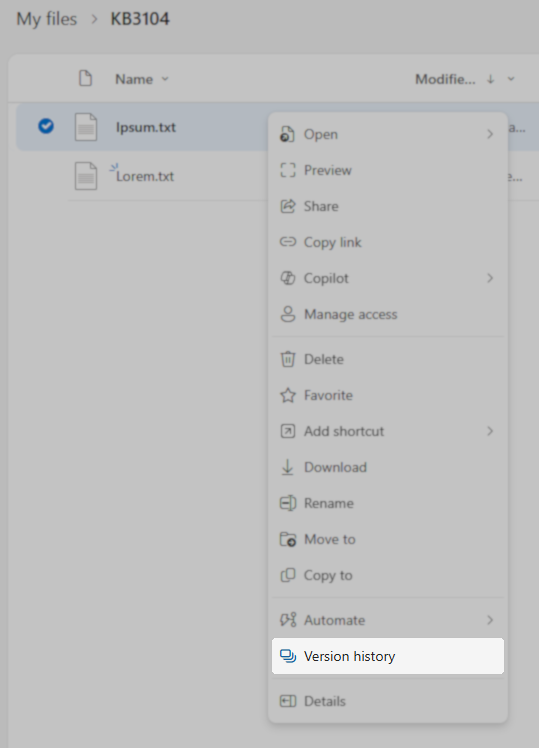
- Locate the file that cannot be downloaded and open its Version History.
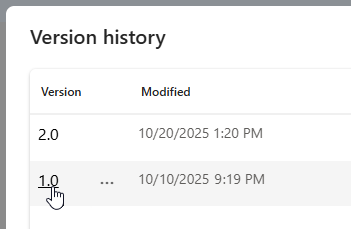
- In the Version History window that pops up, left-click the version specified in the warning.
- If a 403 error occurs, that means that the file is inaccessible in Office 365. Contact Microsoft Technical Support for futher assistance.
- If the file opens without issue, or if an error other than 403 occurs, contact Veeam Technical Support.
If this KB article did not resolve your issue or you need further assistance with Veeam software, please create a Veeam Support Case.
To submit feedback regarding this article, please click this link: Send Article Feedback
To report a typo on this page, highlight the typo with your mouse and press CTRL + Enter.
