- Veeam Support Knowledge Base
- Features of Veeam Backup & Replication may not function when the Veeam Backup Service is run as a user that is not assigned the "Veeam Backup Administrator" role
Features of Veeam Backup & Replication may not function when the Veeam Backup Service is run as a user that is not assigned the "Veeam Backup Administrator" role
| KB ID: | 4252 |
| Product: | Veeam Backup & Replication | 11 |
| Published: | 2021-12-10 |
| Last Modified: | 2021-12-14 |

Get weekly article updates
Cheers for trusting us with the spot in your mailbox!
Now you’re less likely to miss what’s been brewing in our knowledge base with this weekly digest

Oops! Something went wrong.
Please, try again later.
Article Applicability
This article is specific to a situation in which the Veeam Backup Service is set with a "Log On As" other than Local System.
Challenge
When the Veeam Backup Service is set to use a specific user as the service's "Log On" account, some features may not function correctly if that account is not assigned the Veeam Backup Administrator role.
Examples of observed behavior
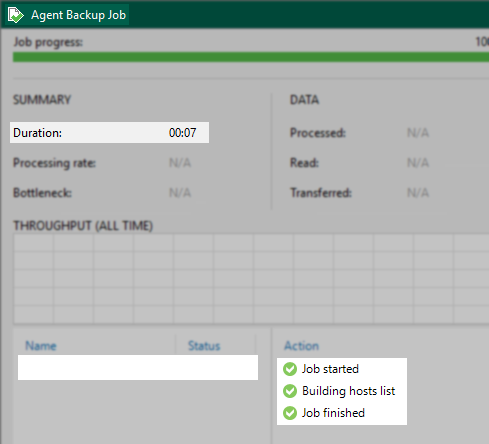
- Veeam Agent jobs running in Managed by backup server mode fail to run on schedule. Additionally, when that same job is manually run, the console shows a successful session result even though nothing was processed:
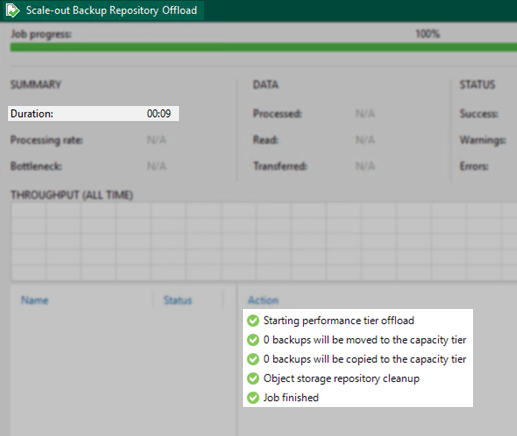
- SOBR offload sessions are not running automatically. Instead, it displays a successful session result even when nothing was processed for all automatic offloads:
Solution
Review the Users and Roles configuration and ensure that the account listed as "Log On As" for the Veeam Backup Service is also listed and assigned the Veeam Backup Administrator role.

More Information
Notes:
- Based on support cases, the most common cause of this issue relates to customers attempting to improve the security of Veeam Backup & Replication by removing the default "Administrators" group and neglecting to ensure that the account used by the Veeam Backup Service was added to the Users and Roles section. (This is only an issue when the Veeam Backup Service is not using the Local System as the log on.)
- This issue is uncommon because the Veeam Backup Service uses LocalSystem to Log On As in most environments. The most common reason to deviate from this is when the SQL Instance storing the Veeam Backup & Replication configuration database is on a different server than the Veeam Backup Server.
- This issue is made further rare because, by default, the "Administrators" local user group on the Veeam Backup Server is given the Veeam Backup Administrator role. Meaning that assuming the "Administrators" group was not removed, one would have to assign the Log On As to an account that is not a member of the Administrators group, which by default contains Domain Admins.
If this KB article did not resolve your issue or you need further assistance with Veeam software, please create a Veeam Support Case.
To submit feedback regarding this article, please click this link: Send Article Feedback
To report a typo on this page, highlight the typo with your mouse and press CTRL + Enter.
