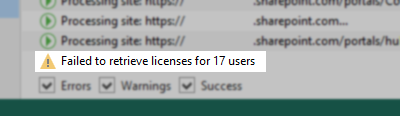
"Failed to retrieve licenses for # users" After Changing Hostname and/or Domain
| KB ID: | 4296 |
| Product: |
Veeam Backup for Microsoft 365 | 6.0 | 7.0 | 7a | 8 | 8.1 | 8.2 | 8.3 | 8.4 | 8.5 | 8.6 Veeam Backup for Microsoft Office 365 | 5.0 |
| Published: | 2022-03-25 |
| Last Modified: | 2023-03-16 |

Get weekly article updates

Challenge
After changing the hostname or domain, or both, of the server where Veeam Backup for Microsoft 365 is installed, the jobs display the following warning:
Cause
Reference: Considerations and Limitations
- You cannot change the name of the Veeam Backup for Microsoft 365 server or change domains of the server without resetting the configuration.
- If any of the machines with any of the Veeam Backup for Microsoft 365 components have been renamed (or its FQDN has been changed), or any machine has been added to a different domain, then all the components become unavailable to each other. If any of the listed has occurred on a server that acts as a backup proxy server, then such a server becomes Offline in the Veeam Backup for Microsoft 365 console. To make a server available, re-add it. For more information, see Adding Backup Proxy Servers.
Confirm Cause in Logs
C:\ProgramData\Veeam\Backup365\Logs\Veeam.Archiver.Service.<dateandtime>.log
Warning: Authorization denied. Identity: new_domain\new_hostname$ (expected: old_domain\old_hostname$)
Error: Access is denied.
Solution
There are two options to resolve this issue:
Option 1: Revert name/domain change
Change the hostname or domain, or both, back to what it was previously so that it aligns with what is expected by Veeam Backup for Microsoft 365.
Option 2: Reset Veeam Backup for Microsoft 365 Configuration
- Make sure no Backup jobs or Restore sessions are running.
- Stop the following services:
- Veeam Backup for Microsoft Office 365
- Veeam Backup Proxy for Microsoft Office 365
- Navigate to the C:\ProgramData\Veeam\ and rename the folder Backup365 to Backup365_old
- Start the services stopped in Step 2.
- Open the Veeam Backup for Microsoft 365 console and re-add the Organization(s), Repositories, and Backup Jobs.
Note: The duration of the first job run will be longer than usual, as the newly added job will be synchronizing the data in the repository to resume regular backup activity.
If this KB article did not resolve your issue or you need further assistance with Veeam software, please create a Veeam Support Case.
To submit feedback regarding this article, please click this link: Send Article Feedback
To report a typo on this page, highlight the typo with your mouse and press CTRL + Enter.
