Files with Microsoft Purview Sensitivity Labels Are Not Accessible After Being Restored
| KB ID: | 4754 |
| Product: | Veeam Backup for Microsoft 365 | 8 | 8.1 |
| Published: | 2025-10-23 |
| Last Modified: | 2026-02-26 |

Get weekly article updates

Challenge
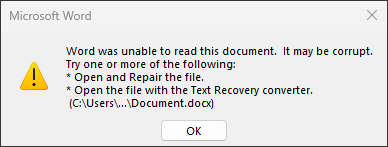
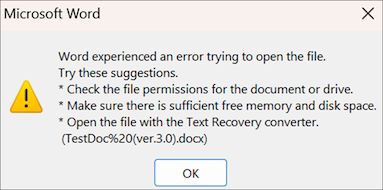
After restoring a file that was encrypted with a Microsoft Purview Sensitivity Label, attempting to open it results in an error similar to:
Word was unable to read this document. It may be corrupt.
Try one or more of the following:
* Open and Repair the file.
* Open the file with the Text Recovery converter.
Word experienced an error trying to open the file.
Try these suggestions.
* Check the file permissions for the document or drive.
* Make sure there is sufficient free memory and disk space.
* Open the file with the Text Recovery converter.
(TestDoc%20(ver.3.0).docx)
Word found unreadable content in "TestDoc (ver.3.0).docx". Do you want to recover the contents of this document? If you trust the source of this document,
click Yes.

Cause
When using Veeam Backup for Microsoft 365 builds 8.0.2.159 through 8.1.2.180, files with Microsoft Purview sensitivity labels are backed up and stored in the repository in a corrupted format.
Solution
To resolve this issue, upgrade to the latest version of Veeam Backup for Microsoft 365.
Starting in Veeam Backup for Microsoft 365 8.2, files with sensitive labels will be protected correctly.
- Ensure that the Veeam Backup for Microsoft 365 deployment has been upgraded to build 8.2.0.2008 or later.
- Run the backup jobs that protect files with sensitivity labels.
Notes:
- Veeam Backup for Microsoft 365 8.2 will not retroactively repair files stored in a corrupt format that were previously created in restore points.
- Veeam Backup for Microsoft 365 8.3 introduced a feature that detects and repairs items with Microsoft Purview Sensitivity Labels affected by this issue, but the repair function is currently limited to items stored in local repositories.
If this KB article did not resolve your issue or you need further assistance with Veeam software, please create a Veeam Support Case.
To submit feedback regarding this article, please click this link: Send Article Feedback
To report a typo on this page, highlight the typo with your mouse and press CTRL + Enter.
