

Key Takeaways
- Affordable backup is rarely about finding the lowest monthly price. It is about finding the most predictable total cost as your data, workloads, and recovery expectations grow.
- Cloud backup pricing usually comes down to four things: storage models, tool sprawl, restore and egress fees, and recovery efficiency.
- Cheap backup often leaves out the boring day 2 stuff that keeps costs under control later, like verification, immutability, portability, and low-friction recovery.
- The reality is that a low monthly bill does not mean a low total cost of ownership.
- For SMBs, the best-value backup is usually the option that balances predictable pricing, broad workload coverage, operational simplicity, and confidence during recovery.
If you have spent any time comparing cloud backup services, being skeptical makes sense. A lot of products look inexpensive upfront, especially compared to enterprise platforms. Then the environment grows, retention expands, more workloads get added, and someone eventually needs to restore data quickly. Suddenly the “cheap” option starts pulling more complexity, more manual work, and more surprise costs into the environment.
That is the tension SMBs are dealing with right now. Teams are under pressure to modernize infrastructure, protect more data, support cloud services, and recover faster during incidents, all while budgets stay flat. According to Global Technology Alliance research, 47% of SMBs kept their 2025 IT budgets roughly the same as 2024, while another 12% reduced spending altogether. That means almost 6 in 10 SMBs are being asked to do more without additional budget.
So, affordability matters. But the reality is affordability and “cheapest” are not always the same thing. The cheapest backup option on paper can become the most expensive one operationally if recovery takes too long, restores trigger massive cloud fees, or your team spends every week stitching together five different tools.
The goal is not to boil the ocean. It is to understand what you are actually paying for.
The Four Cost Drivers Behind Cloud Backup Pricing
If you want to compare cloud backup costs honestly, start with the areas that change your bill the most over time. These are also the areas vendors tend to oversimplify.
|
Cost driver |
What you’re really paying for |
What to ask the vendor |
|
1. Storage volume and pricing model |
Entry-level per-GB pricing often looks inexpensive early on, but predictability becomes harder as retention and data volumes grow. |
“What does my cost look like at 1 TB, 5 TB, and 10 TB? What changes besides storage?” |
|
2. Tool sprawl across workloads |
Multiple backup products create policy drift, overlapping costs, fragmented recovery workflows, and more operational overhead. |
“How can I maximize usage across disparate environments as my needs change? |
|
3. Restore and egress fees |
Some providers charge heavily during restores, retrievals, or outbound transfers, exactly when pressure is already highest. |
“What would a full restore of my environment cost, including retrieval and data transfer?” |
|
4. Backup tactics and recovery policies |
Poorly optimized retention, snapshots, and storage tiers quietly increase long-term cloud costs. |
“How can I configure my strategy to lower TCO while meeting my SLAs?” |
1. Storage volume and pricing model
This is usually where buyers start. It is also where many assumptions break down.
Per-GB pricing feels approachable because the entry point looks small. But the reality is backup environments rarely stay small. Retention increases, more users get added, SaaS applications expand, and cloud workloads multiply. Before long, the original estimate no longer reflects reality.
This is where binocular vision becomes important. One lens shows today’s footprint. The other shows where the environment will be 18 to 24 months from now. For SMBs especially, predictability matters almost as much as raw cost.
So, when you talk to vendors, do not stop at the starting price. Ask what changes as the environment grows: storage tiers, API requests, immutability costs, retrieval fees, support levels, and retention requirements.
The pricing model should survive growth without turning every expansion conversation into a budgeting exercise.
2. Tool sprawl
A lot of SMBs default to the native backup tool attached to each workload. One product for Microsoft 365. Another for endpoints. Another for virtual machines. Native snapshots for cloud services. A separate archive product somewhere else.
At first, that can feel economical. Kind of a “do you want fries with that?” approach to backup. But over time, those decisions create a fragmented recovery environment with multiple bills, multiple retention policies, multiple restore experiences, multiple consoles, multiple vendors, and multiple points of failure.
And this is where friction becomes a signal. If your team spends more time managing backup operations than validating recoverability, the environment is already telling you something.
Affordability is not just a storage conversation. It is an operational maturity conversation. The reason is simple: SMBs usually do not have the luxury of dedicated backup administrators managing five separate products. The operational burden lands on the same IT teams already handling endpoints, cloud infrastructure, SaaS administration, identity, and security.
When you evaluate pricing, inventory every workload first. Then evaluate how many separate tools it takes to protect them. Often, what looks efficient on a procurement spreadsheet can quietly create operational debt for already stretched teams.
3. Restore and egress fees
This is where a lot of SMBs get blindsided.
Many organizations move backup data into the cloud expecting predictable monthly costs. Then a recovery event happens. Large restores trigger egress charges. Archive retrieval fees appear. Failback operations introduce additional transfer costs. Suddenly, the cheapest backup solution in the evaluation process becomes the most expensive part of the incident.
And the reality is those costs tend to show up during the exact moment nobody wants to debate budget, whether that is ransomware recovery, a cloud outage, accidental deletion, or a migration.
Hope is not a strategy here.
SMBs should look for vendors that provide visibility into storage growth, API consumption, retrieval costs, egress exposure, and estimated restore pricing before a recovery event happens. This approach shifts backup conversations from reactive billing surprises into proactive planning.
Recovery planning works best when teams understand the financial impact before an incident forces the conversation.
4. Backup tactics and recovery policies
A lot of environments inherit backup configurations over time. More snapshots get added, retention expands, redundant copies pile up, and storage tiers stop matching business requirements. The result is the cloud equivalent of leaving the lights on in 10 rooms nobody is using.
This is where the boring day 2 stuff matters.
Features like deduplication, compression, automated tiering, policy optimization, and workload-aware retention are not flashy capabilities. But they are often the difference between sustainable cloud economics and runaway storage costs. The goal is not maximum retention at all costs. The goal is aligning RTO and RPO policies to actual business requirements. A backup strategy should reflect business priorities, not simply maximize retention for retention’s sake.
Bottom line
Most cloud backup pricing conversations are not really about storage. They are about how pricing behaves as your environment grows, how many tools your team has to manage, what recovery costs under pressure, and how efficiently you can return to operations. That is the reality SMBs need to evaluate.
What ‘Cheap’ Cloud Backup Usually Leaves Out
Backup can be a race to the bottom, often driving attractive prices by leaving out the things that reduce operational effort, improve recovery confidence, and keep costs predictable as the environment grows.
That is the tradeoff SMBs need to look at carefully: what looks inexpensive at purchase can become expensive in labor, downtime, or surprise charges later.
|
What gets left out |
Why it gets expensive later |
|
Consistent protection across workloads |
Low-cost tools often protect each system differently or rely on separate agents and manual setup. That creates inconsistent performance, policy drift, and more day-two admin work. |
|
Backup verification |
If the platform cannot verify recoverability automatically, you are left hoping restores will work when needed. That is a risky place to save money. |
|
A smarter alternative to snapshot sprawl |
Some cheaper approaches lean heavily on snapshots because they are easy to create. But snapshots still consume billable storage, and faster restore options can cost extra, which makes “cheap” protection more expensive over time. |
|
Low-friction recovery workflows |
A low sticker price may mean more manual recovery steps later: reinstalling agents, rebuilding systems, or stitching together restores by hand during an outage. |
|
Room to grow |
Some budget products work fine at a small scale but become awkward or expensive as data volume, retention, or workload count increases. |
|
Portability |
Cheap backup can come with a lock-in problem: the data is stored in a way that is hard to move, reuse, or recover flexibly if your environment changes, or you switch vendors. |
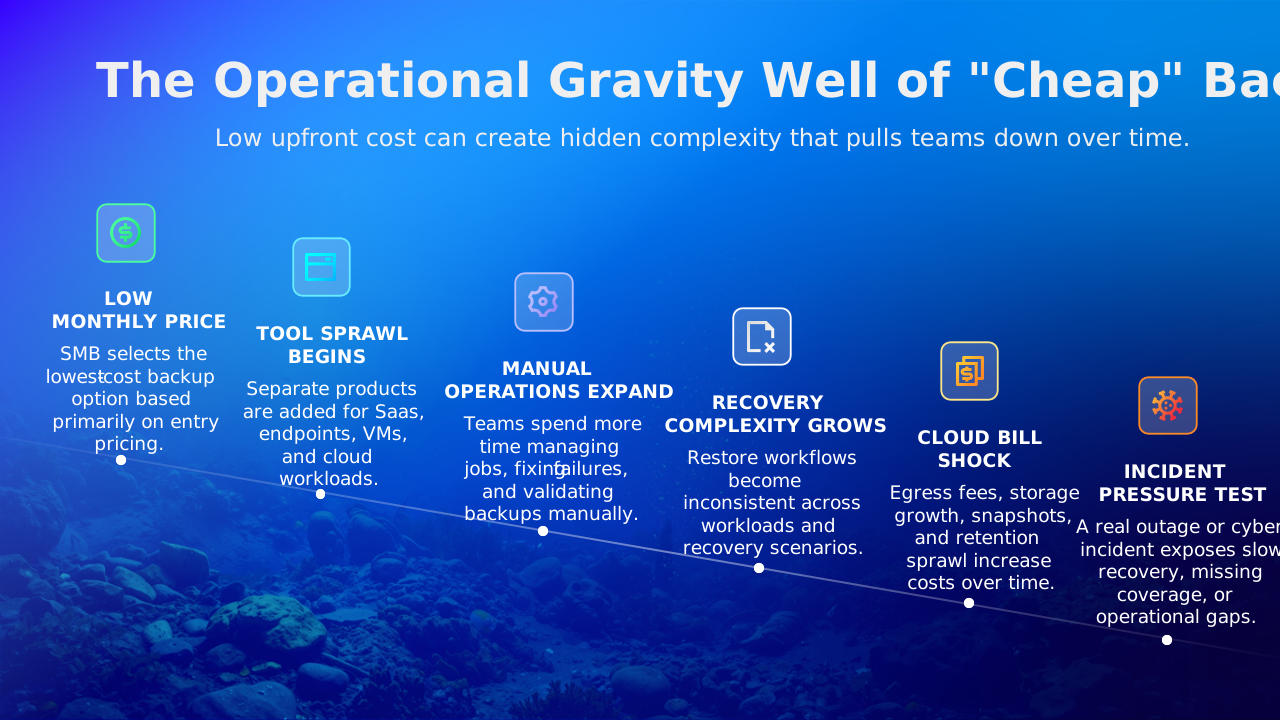
The practical takeaway
Affordable backup is not about storing data for the lowest possible price. It is about reducing manual work, avoiding surprise costs, recovering consistently under pressure, preventing operational drift, and giving lean IT teams room to breathe.
No smoke and mirrors. Just predictable resilience.
What small businesses should actually look for in an affordable cloud backup solution
Here are seven criteria worth prioritizing:
- Predictable pricing as data grows
Entry-level pricing is easy to compare.
What matters more is whether the economics still work when the environment doubles or triples in size. Look for pricing models that support forecasting instead of forcing constant recalculation. - Broad workload coverage under one platform
The more products you need to protect your environment, the harder backup becomes to manage operationally. Coverage matters because recovery happens in context, not isolation.
Your identities, SaaS applications, virtual machines, databases, and endpoints all interact with each other. The backup strategy should reflect that reality. - Immutability built into the design
Cyber resilience should not depend on expensive add-ons. Immutable or isolated recovery options should feel like table stakes for modern backup.
Modern ransomware campaigns increasingly go after the recovery layer itself, not just production systems. - Clear restore speed expectations
Recovery speed matters. And the reality is some lower-cost service tiers quietly throttle recovery performance.
Ask vendors what restore limits exist, which workloads are prioritized, and what changes across service tiers. A low monthly price loses its value quickly if recovery timelines stretch beyond what the business can tolerate. - Transparent restore and egress costs
Cloud bill shock is one of the fastest ways for “cheap” backup to become expensive.
Trust but verify. If a vendor cannot clearly explain recovery-related pricing, assume the math gets complicated later. - Simple deployment and manageable day 2 operations
SMBs should not have to trade budget savings for operational exhaustion.
Look for sensible defaults, automated policy management, streamlined onboarding, centralized visibility, and low-friction administration. No heroics needed.
The goal is to reduce operational drag, not add another system your team has to babysit.
What Veeam Offers SMBs
If you are evaluating affordable cloud backup options now, the reality is you probably need more than a cheap storage destination. You need predictable recovery, operational simplicity, and flexibility as the environment changes. That is where Veeam focuses can assist SMBs.
Veeam’s small business solutions are designed to help organizations reduce tool sprawl, improve recovery confidence, and maintain predictable operations across cloud, SaaS, virtual, and physical workloads.
And importantly, they are designed for the real world SMBs operate in today: lean teams, constrained budgets, growing data volumes, and rising recovery expectations. Recovery confidence is the thing most organizations are ultimately buying, whether they phrase it that way or not.
FAQs
1. What makes cloud backup affordable for a small business?
Affordable cloud backup is not just the lowest monthly price. It is the option with the most predictable total cost, including storage, workload coverage, restore costs, recovery speed, and the time your team spends managing it.
2. Is per-GB cloud backup always cheaper?
No. Per-GB pricing can look cheaper at small volumes, but it often becomes less predictable as data grows. SMBs should ask vendors what pricing looks like at 1 TB, 5 TB, and 10 TB to understand how costs change over time.
3. Do cloud backup services charge extra to restore data?
Some do. Depending on the provider and storage tier, restores can trigger retrieval fees, egress charges, or archive access costs. That is why SMBs should ask what a full restore would cost before they commit to a service.
4. Why can cheap cloud backup get expensive later?
Cheap cloud backup often leaves out things like verification, immutability, broad workload coverage, portability, or low-friction recovery. Those gaps can create hidden costs later in the form of manual work, downtime, tool sprawl, or surprise recovery charges.
5. What should SMBs look for in an affordable cloud backup solution?
SMBs should look for predictable pricing, full workload coverage, immutable storage, clear restore performance, no hidden restore fees, and simple day-two management. A solution is only affordable if it stays manageable and recoverable as the environment grows.
