

Key takeaways
- SMBs face enterprise-grade data risks with lean-team realities. The problem is not usually lack of backup. It is too much operational overhead, especially during Day 2 operations.
- “Effortless” protection does not mean fewer capabilities. It means the platform handles more of the heavy lifting through automation, policy-driven protection, verification, and built-in visibility.
- True simplicity is operational, not cosmetic. A product that looks easy to deploy but still requires constant monitoring, manual fixes, and restore guesswork is not reducing complexity.
- Automation matters most when it reduces ongoing work. Automated discovery, policy assignment, backup verification, and meaningful alerting help small teams stay protected without proving recoverability by hand.
- Recovery is the real test. SMBs need protection that supports fast, flexible, and clean recovery across file loss, infrastructure failure, and cyber incidents.
- The best protection models should practically run themselves. When workload tiers, resilience principles, identity controls, and verification are built into the operating model, backup becomes more dependable without becoming more demanding.
If you work in IT at an SMB, you probably do not need another article explaining why backup matters. You already know the stakes. What most teams need is fewer backup tasks dumped onto already stretched people.
That is the reality many SMBs are operating in right now. The threats look enterprise-scale. The staffing does not.
Lean IT teams are expected to manage endpoints, SaaS applications, cloud infrastructure, identity, security tooling, compliance requirements, and recovery readiness, often without dedicated backup specialists. In that environment, complexity becomes its own kind of operational risk.
And this is where a lot of backup conversations drift off course.
Too many platforms are marketed as “easy” because they are easy to deploy. But deployment is only the beginning. If a platform still requires constant monitoring, manual policy maintenance, restore guesswork, and multiple disconnected tools, it is not effortless. It is simply shifting the work into Day 2 operations.
For SMBs, that hidden operational burden is often what makes protection unsustainable over time.
Effortless data protection should mean something much more practical: less babysitting, less manual intervention, more policy-driven automation, and more confidence that recovery will work when it matters. The goal is not to lower the bar for backup. It is to make strong protection realistic for teams that do not have time to constantly manage it.
Why Data Protection Feels Harder Than It Should for SMBs
Most SMB backup challenges are not caused by lack of effort. They are caused by environments that were never designed for lean IT teams in the first place.
Small and midsize businesses face the same ransomware, outage, deletion, and recovery risks as larger organizations, but with far less time, staff, and margin for error. In that environment, friction becomes signal. Every extra console, manual check, or inconsistent restore workflow compounds operational pressure.
For most SMBs, that complexity usually comes from four places:
|
Complexity Driver |
Why It Creates Operational Drag |
|
Tool sprawl |
Different products for endpoints, Microsoft 365, servers, and cloud workloads create fragmented consoles, alerts, policies, and restore experiences. |
|
Manual processes |
Teams still have to monitor jobs, update policies, investigate failures, and verify recoverability by hand. |
|
Specialized expertise assumptions |
Some platforms quietly assume backup expertise most SMBs do not have available internally. |
|
Cost-driven compromises |
Lower upfront pricing often leads to weaker automation, fragmented tooling, and slower recovery later. |
The result is a pattern most IT teams recognize immediately: backups appear to be running, so everything feels fine until a restore is actually needed. Only then does the team discover a failed job, an unprotected workload, or a recovery process far more manual than expected.
That is the real cost of operational complexity; it erodes confidence. If teams cannot quickly answer what is protected, what is recoverable, and what is at risk, backup becomes something they hope is working instead of something they know is working.
That is exactly why effortless data protection matters. SMBs need strong protection that a lean team can operate confidently without turning backup into a second full-time job.
What “Effortless” Actually Means in Data Protection
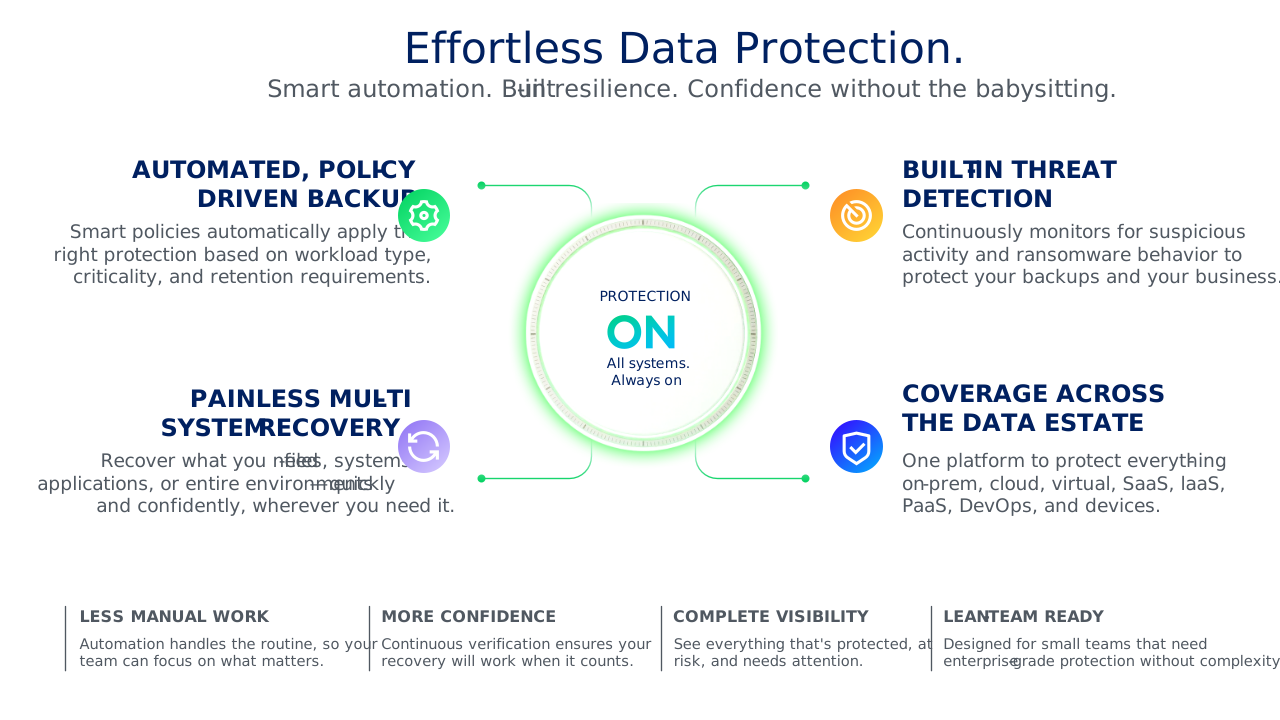
Effortless data protection does not mean invisible. It does not mean zero oversight. And it definitely does not mean sacrificing capability for simplicity.
The real benchmark is operational sustainability.
Can a small IT team confidently say:
- Our workloads are protected
- Our restore points are usable
- Our policies stay aligned as the environment changes
- We do not have to constantly babysit the system to know that
That distinction matters because some backup products only optimize for Day 0. They make deployment look clean and straightforward, but quietly shift complexity into Day 1 and Day 2 Operations.
That is where many SMBs get stuck. In practice, effortless protection usually comes down to four things:
- Setup stays manageable after deployment
- Operations run mostly in the background
- Recovery stays fast and low-friction
- Visibility makes recovery readiness easy to prove
The goal is not fewer controls. The goal is fewer manual dependencies.
1. Setup should stay simple after deployment
For SMBs, simplicity has to last beyond initial setup. A platform should reduce effort across:
- Day 0: deployment and configuration
- Day 1: policy rollout, initial testing
- Day 2: ongoing management as the environment changes
Because the reality is most backup environments do not stay static for very long. New users appear. SaaS applications expand. Cloud workloads shift. Retention requirements change. If every operational change requires manual reconfiguration, the setup was only superficially simple.
This is where policy-driven design matters. Strong automation should scale protection alongside the environment instead of forcing teams into constant manual maintenance.
2. Operations should run mostly in the background
This is where effortless protection becomes real. Lean IT teams do not need more dashboards to stare at. They need fewer repetitive tasks consuming operational time every week.
That is why meaningful automation matters more than simple scheduling. A scheduled job only runs at a set time. Policy-driven automation continuously applies protection rules as the environment changes. That distinction becomes incredibly important for SMBs that do not have dedicated backup administrators tuning the environment every day.
The operational sweet spot usually includes:
- automated discovery of new workloads
- policy-driven protection instead of one-off jobs
- alerting when action is actually needed
- automated backup verification
- centralized visibility across workloads
That is the key difference between scheduling and policy-driven automation. Scheduling runs a job at a set time. Policy-driven protection applies rules continuously, which is far more useful for lean teams.
A simple gut check works well here: if the automation still requires constant manual correction, the environment is not actually operating effortlessly.
3. Recovery should be fast and low-friction across systems
Backup only feels effortless if recovery does too. SMBs need to be prepared for three common scenarios:
- Granular recovery, such as a deleted file or email
- System recovery, such as hardware failure, outage, or corruption
- Cyberattack recovery, where the team must restore from a known-clean point
The backups may exist. But the restore workflows can still be slow, inconsistent, overly manual, or difficult to validate under pressure. Recovery works differently across workloads. Restore points may not be verified. Teams end up stitching together processes in the middle of an outage.
That operational friction matters far more than most feature comparisons acknowledge. Effortless protection reduces that pressure by making it easier to:
- Identify clean restore points
- Recover to alternate locations
- Restore workloads consistently
- Move recovery operations into the cloud when needed
Because at the end of the day, successful backup jobs are not the outcome the business cares about. Recoverability is.
4. Visibility should make protection status easy to prove
Effortless does not mean invisible. It means the right information is easy to access.
A small IT team should be able to quickly answer basic questions:
- What is protected?
- What failed?
- What is at risk?
- Which restore points are verified?
- What needs attention now?
That is a very different standard from simply checking whether a backup job completed successfully.
The reason is backup health and recovery readiness are not always the same thing. Meaningful visibility helps teams understand operational posture, not just job status. And for SMBs especially, that clarity reduces one of the biggest operational burdens in backup environments: uncertainty.
The Core Components of a Simplified Data Protection Stack
Every SMB environment is different, but the foundations of effortless data protection are consistent. The goal is to put the right capabilities in place, so protection stays reliable, recovery stays practical, and the environment does not require constant attention.
|
Component |
What it does |
Why it matters for SMBs |
|
Automated, policy-driven backup |
Applies backup rules automatically based on workload type, protection needs, and retention requirements. |
Reduces manual setup and ongoing maintenance, helping lean teams keep pace as the environment changes. |
|
Built-in threat detection |
Helps identify suspicious activity and risky restore points as part of the backup process. |
Makes it easier to recover from a clean copy without relying on separate security tools or extra expertise.
|
|
Painless multi-system recovery |
Supports fast, flexible recovery across files, systems, and cloud environments. |
Reduces downtime and avoids slow, manual restores when something goes wrong.
|
|
Coverage across the data estate |
Protects data center workloads, cloud infrastructure, and SaaS applications within a broader strategy. |
Helps reduce tool sprawl and closes protection gaps that often appear in fragmented environments.
|
If one of these elements is missing, the burden usually shifts back to the IT team, which is exactly what effortless data protection is supposed to prevent.
A simple way to assess your stack
If you want to pressure-test whether your current approach is actually simplified, ask four questions:
- Can new workloads be protected without manual intervention?
- Can we identify risky or suspicious restore points before an incident forces a decision?
- Can we recover quickly across file loss, system failure, and cyber disruption?
- Can we do all of that without juggling too many disconnected tools?
If the answer to any of those is no, the problem may not be effort but architecture.
How to Build a Data Protection Strategy That Practically Runs Itself
No backup environment literally runs itself. But for SMBs, it should come close.
The goal is to create a protection model that is policy-led, verification-based, and managed by exception, so IT teams spend less time babysitting backup operations and more time addressing meaningful issues.
A practical SMB strategy usually comes down to five steps:
|
Step |
What to do |
Why it matters |
|
1. Classify workloads by criticality |
Group workloads by recovery importance, for example, critical, important, and standard, and account for dependencies between systems. |
Not every workload needs the same protection. Tiering helps SMBs align backup frequency, retention, and recovery expectations to business impact. |
|
2. Build resilience and access control into the design |
Apply the 3-2-1-1-0 rule, use immutable or air-gapped copies where possible, and tighten identity and admin access to backup systems. |
Modern resilience depends on both protected data and protected backup administration, especially as ransomware increasingly targets backup infrastructure. |
|
3. Verify recoverability, not just backup completion |
Use automated recovery verification so restore points are tested regularly without requiring manual restore exercises. |
A successful backup job does not guarantee a successful recovery. Verification closes that gap. |
|
4. Stabilize Day 1 operations |
Tune alerts, fix early misconfigurations, confirm workload coverage, and address anything that could create friction during recovery. |
Many long-term backup problems start as small rollout issues that never get corrected. |
|
5. Optimize Day 2 operations |
Use reporting, automation, and AI-assisted insights to reduce manual oversight and help the team focus on exceptions. |
The best SMB backup strategy gets easier to operate over time, not harder. |
A simple operating model to remember
If you want one framework to carry forward, use this:
Classify → Harden → Verify → Stabilize → Optimize
- Classify workloads by business value and dependency
- Harden backup architecture with resilient copies and controlled access
- Verify recoverability automatically
- Stabilize issues before they become chronic
- Optimize operations with reporting, automation, and AI-assisted insight
That is what “practically runs itself” should mean for an SMB: not zero oversight, but far less manual effort to stay protected and recovery-ready.
What to Look For When Evaluating SMB Data Protection Platforms
When SMBs evaluate backup platforms, the biggest mistake is assuming the decision comes down to features or price. A better question is:
Will this platform help a lean team stay protected and recover quickly without creating more operational work than it removes?
For most SMBs, the evaluation should focus on three things:
- Coverage
- Recoverability
- Complexity reduction
1. Coverage: Can it protect your full data estate?
Even small IT environments often span a mix of on-premises infrastructure, virtual machines, cloud workloads, SaaS applications, and endpoints. If protecting all of that requires multiple disconnected tools, complexity tends to grow faster than confidence.
That is why workload coverage should be one of the first filters in any evaluation. The platform should support the systems you rely on today and reduce the need to patch together separate products as the environment evolves. For SMBs, broad coverage is one of the simplest ways to reduce tool sprawl and ongoing administrative effort.
Veeam’s SMB positioning reflects this broader coverage model across virtual, physical, cloud, and SaaS environments.
2. Recoverability: Can it restore what matters, the way you need to restore it?
The real test is whether the platform can restore data quickly, flexibly, and safely when something actually goes wrong.
For SMBs, that means looking beyond successful job completion and asking whether the platform can support granular restores, broader system recovery, and cyber-related recovery from a known-good point. It should also be practical under pressure: if restore workflows are slow, overly manual, or inconsistent by workload, the product may look stronger on paper than it does in a real incident.
3. Complexity reduction: will it make life easier after deployment?
This is the criterion many SMBs underestimate. Plenty of products look simple during setup. Far fewer stay simple once the environment changes, alerts start firing, and the team has to manage the platform every day.
That is why SMBs should evaluate shortcuts with monitoring, automation, and AI-enabled insights . The right platform should reduce manual oversight through policy-driven protection, automated discovery, built-in visibility, and predictable operations that a lean team can realistically maintain. If it still requires constant monitoring, manual correction, or too much specialized knowledge, it is not truly effortless, even if the demo felt easy.
A simple SMB buyer checklist
If you want a fast way to pressure-test a platform, start here:
- Coverage: Can it protect on-prem, cloud, and SaaS workloads without adding tool sprawl?
- Recoverability: Can it support granular, system-level, and cyber recovery and verify restore readiness?
- Complexity reduction: Can a lean team manage it confidently after deployment, without constant babysitting?
If those answers are unclear, the platform is probably not as simple as it appears.
One critical evaluation step most SMBs skip
Before committing to a backup platform, run a test restore.
That step is often skipped, but it tells you more than a feature list ever will. Dashboards and policy screens can look reassuring, but if the restore process is slow, incomplete, or too manual, the platform may not match the real recovery needs of the business.
If you only validate backup creation, you are evaluating half the product.
Effortless Data Protection Is Really About Confidence
At the SMB level, “effortless” is not about doing less. It is about needing to do less manually to stay protected.
When backup is policy-driven, verification is automated, recovery is flexible, and coverage extends across the environment, lean IT teams can stop treating data protection like a constant maintenance task. They can focus on running the business with more confidence that recovery will work when it matters.
That is the real value of effortless data protection: not simplicity for its own sake, but resilience that does not demand constant attention.
Explore Veeam’s small business data protection solutions:
https://www.veeam.com/solutions/small-business.html
FAQs
1. What does “effortless” data protection mean for small businesses?
Effortless data protection means backup and recovery require less manual work while still delivering strong coverage and reliable restores. For SMBs, that usually means automated protection, verified backups, clear visibility, and recovery workflows a small IT team can manage confidently.
2. Why does data protection feel so hard for SMBs?
Data protection often feels hard for SMBs because many backup environments were not designed for lean IT teams. Tool sprawl, manual checks, inconsistent policies, and products that assume specialized staff can turn basic backup operations into a day-to-day management burden.
3. What are the core parts of a simplified data protection stack?
A simplified data protection stack usually includes policy-driven backup, recovery verification, ransomware resilience, and broad workload coverage. The goal is to reduce operational complexity while making recovery faster and easier to prove.
4. How can a small IT team reduce backup complexity?
A small IT team can reduce backup complexity by standardizing on fewer tools, using policy-based automation, verifying recoverability automatically, and choosing a platform that covers on-prem, cloud, and SaaS workloads without separate point products.
5. What backup options does Veeam offer small businesses?
Veeam offers SMBs a few paths depending on how much they want to manage themselves. Veeam Data Platform Essentials is the self-managed option for hybrid and on-prem environments, while Veeam Data Cloud is the managed SaaS option for cloud workloads like Microsoft 365, Azure, Entra ID, and Salesforce. Veeam Software Appliance is designed to simplify deployment and reduce operational overhead.
