

Key Takeaways
- A completed backup job isn’t the same as a verified recovery point. One confirms data was copied, while the other confirms it’ll actually restore.
- Immutability only holds if the storage layer enforces it outside the backup console an attacker would log into.
- AI-assisted detection and automated fix suggestions can stand in for the IT staff you don’t have, but only if they’re switched on.
- Portable backup data means changing vendors or storage later won’t cost you weeks of rebuilt coverage.
Every backup vendor’s feature list looks roughly the same. Immutable storage. Ransomware detection. Automated recovery. The phrases are nearly identical from one product page to the next, and none of them tell you which one would actually get your business running again after a bad week.
That’s a harder problem when you’re the one signing the contract and there’s no IT specialist down the hall to check the answers. You already back up your data. What you can’t easily confirm is whether those backups would survive an attacker who has your admin password or hold up when a customer sends over a security questionnaire.
You don’t need to run a technical audit to find out. You need seven specific capabilities, and the right question to ask about each one, in a single vendor call. If you’d like a structured way to score what you hear, our small business backup evaluation guide pairs with this list.
Small Business Backup Features Comparison Table
Here’s the full list in one place. The third column is the part to bring with you, because those questions are what separate a working capability from a line on a data sheet. Next, we’ll explore each of these seven capabilities in depth.
| Feature | What It Means | What to Ask the Vendor |
| Immutability that survives compromised credentials | Backup copies that can’t be changed or deleted for a set period, enforced by the storage itself rather than by a setting in the software | What happens if someone with valid admin credentials tries to shorten or disable the retention lock before it expires? |
| Entropy-based ransomware detection | Scanning for the statistical signature of encryption while the backup runs, so an infected recovery point gets flagged instead of quietly stored | What specifically triggers a detection event, and how do you handle a false positive? |
| AI-assisted malware variant detection | A second detection layer using machine learning and behavior analysis to catch malware that doesn’t match a known signature yet | How recently were your detection models updated, and does that happen automatically? |
| Automated backup verification | Booting a real copy of a backup in an isolated environment on a schedule and confirming it works | Can you show me a live verification report during this demo? |
| Backup format portability | Backup data that can move to new storage or a new vendor with your existing history intact | What happens to my backup history if I switch vendors or storage next year? |
| Cost-per-workload transparency | Pricing that doesn’t jump tiers or add charges when you cross a threshold nobody mentioned | Can you show me current pricing next to projected pricing if I add 10 employees and 2 TB this year? |
| Automated fix suggestions | Software that tells you what to do about a failed backup job, not just that one failed | Can you show me a suggested fix during a simulated failure? |
Immutability That Survives Compromised Credentials
Immutability means a backup copy can’t be changed or deleted for a fixed period of time. The distinction that matters is where that rule is enforced.
Some products enforce it at the storage layer, using object lock on cloud object storage or a hardened Linux repository where the operating system itself refuses deletion requests. Others treat it as a retention setting inside the backup console. Both get described as immutable on a data sheet.
Only one of them holds when an attacker is already logged in with valid admin credentials, which is how backup deletion usually happens. A console setting can be switched off by anyone who can reach the console. Our guide to immutable backups covers the storage options in more detail.
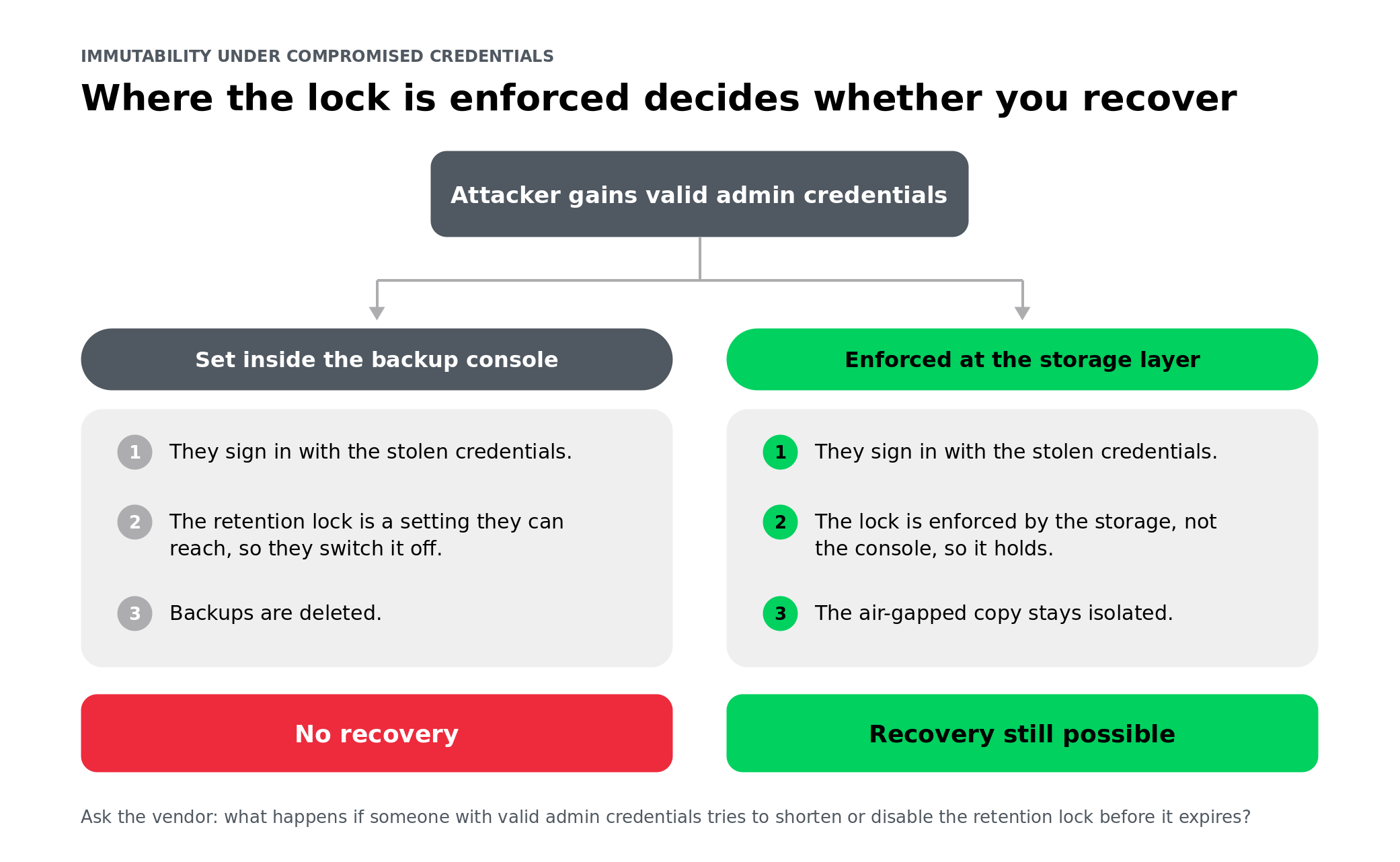
Ask about object lock modes, too. The two words to know are compliance and governance. Compliance mode blocks changes from every account, including root and administrator accounts. Governance mode lets a sufficiently privileged user override the lock, which can be useful for administrative cleanup but is not enough protection against a stolen privileged password. A vendor who can explain that difference is describing something real.
One more layer is worth having: A copy that’s air-gapped or logically isolated from your production environment, so one compromised network doesn’t reach every copy you own. Keeping backup software and backup storage in separate security zones is the core idea behind Zero Trust Data Resilience, and it’s the reason storage-layer enforcement works at all.
Without a security team reviewing who holds admin rights, the storage layer is doing that job on your behalf. Make the vendor prove it does.
Ask the vendor: What happens if someone with valid admin credentials tries to shorten or disable the retention lock before it expires?
Entropy-Based Ransomware Detection During Backup
A backup job that finishes successfully has told you one thing: The data was copied. It hasn’t told you the data was clean.
That gap matters because ransomware usually sits quietly in an environment before it triggers. During that window, your backups run normally and capture encrypted or partially encrypted files without complaint. When you go to restore, the recovery points contain the same problem you’re trying to recover from.
Entropy-based detection helps close that gap by looking for the statistical fingerprint of encryption. Because encrypted data is more random than ordinary business files, the software measures the entropy of data blocks as they stream through the backup job and flags patterns consistent with mass encryption. It does not need a known malware signature, which makes it useful against new or previously unseen ransomware.
Two limits are worth raising on the call. Entropy analysis won’t spot dormant malware that hasn’t encrypted anything yet, and it can misread legitimately compressed or encrypted files as suspicious. Neither is a dealbreaker. What matters is whether the vendor is straightforward about both, and whether there’s a sensible process when a false positive fires, because you’re the person who’ll be deciding what to do about that alert.
Ask the vendor: What specifically triggers a detection event, and how is a false positive handled?
AI-Assisted Detection of New Malware Variants
Entropy analysis and AI-assisted detection get bundled together in marketing copy, but they work differently, and you want both.
Entropy analysis is statistical. It measures randomness and flags the pattern encryption leaves behind. AI-assisted detection is behavioral. It uses machine learning models and heuristics to recognize how malware acts, which catches variants no signature database has seen yet, along with threats that don’t involve mass encryption at all. Here’s a closer look at how machine learning spots ransomware behavior.
The reason this matters for a small business is simple. Nobody on your staff is tracking emerging threats and updating rules, so the software must stay current on its own.
Which means the question isn’t whether there’s AI in the product. It’s how fresh the models are and who keeps them that way. If the answer involves you downloading something, that’s your answer.
Ask the vendor: How recently were the detection models or signatures last updated, and is that cadence automatic?
Automated Backup Verification
Automated verification means the software boots a real copy of a backup in an isolated environment, runs tests against it, and confirms it works. Not just that the backup job completed, but that the data can actually be restored.
This is the widest gap between what most businesses think they have and what they actually have. A green checkmark in a backup console reports on a copy operation. It says nothing about whether the recovery point will mount, whether the application inside it will start, or whether the file system is intact. Here’s what automated recovery verification looks like in practice.
Real verification runs on a schedule without anyone asking it to, in a sandboxed environment that can’t touch production, and produces a report you can read yourself. That last part matters more than it sounds. A verification feature that only writes logs for an administrator isn’t verification you can use.
This is also the zero in the 3-2-1-1-0 rule: Zero errors, confirmed by testing rather than assumed. The 3-2-1 rule and how it evolved covers where that came from.
Don’t accept a description of this one. It’s the easiest capability on this list to demonstrate live, so a vendor who can’t show you a report probably isn’t producing one.
Ask the vendor: Can you show me a live verification report during this demo?
Backup Format Portability
Portability means your backup data can move to different storage, or a different vendor, without you starting over from scratch.
This sounds like a problem for later, and it is, right up until it isn’t. Businesses outgrow a storage provider, get repriced at renewal, or decide a product isn’t working out. When backup data is locked to the vendor that wrote it, or depends on a central catalog server to be readable, changing your mind means seeding a fresh set of full backups from zero.
That’s not just a slow weekend. During a re-seed, you’re running thin coverage, because the new copies aren’t complete yet, and the old ones may no longer be usable. For a business without redundant systems, that’s a real window of exposure, and it’s the reason switching costs keep people on products they’ve already stopped trusting.
A good backup format is self-describing. Each file carries the metadata needed to read it, so any installation of the software can restore from it without the original server. Ask whether your existing backup chain continues after a move or if it restarts from scratch. Those are very different answers. The difference between vendor lock-in and lock-out is worth reading before you sign anything multi-year.
Ask the vendor: What happens to my existing backup history if I switch vendors or storage next year?
Cost-Per-Workload Transparency at Scale
Transparent pricing means you can calculate next year’s bill yourself, using numbers the vendor gave you this year.
Backup gets priced a few different ways: Per workload (per server, virtual machine, or endpoint), per terabyte stored, or in capacity tiers covering a range. Any of them can work fine. The problem is what sits underneath the headline number. Cloud egress fees charged when you restore. Per-seat charges for SaaS application backup that scale with hiring. Tier boundaries that trigger a jump nobody mentioned during the demo.
A fixed annual budget has no room for a surprise in month seven. And, unlike a larger business, you probably can’t absorb it by shifting money between departments.
So the most useful thing you can do on a pricing call is refuse to discuss the current number in isolation. Give the vendor a realistic growth scenario, a few more employees, more data, maybe another SaaS application, and ask them to price that alongside today. If producing the second number requires a follow-up call, you’ve learned something about how predictable this is going to be.
Ask the vendor: Can you show me current pricing next to projected pricing if I add 10 employees and 2 TB over the next year?
Automated Fix Suggestions for Backup Issues
When something breaks, the software should tell you what to do about it, not just that something broke.
Every backup product raises alerts. The gap is what the alert contains. A failure code is technically a notification and practically useless to someone who isn’t going to go digging through documentation to decode it. What closes the gap is software that recognizes the condition, explains it in plain language, and proposes a specific fix: This repository is out of space, this credential expired, or this host stopped responding at this time.
For a business with an IT team, that’s a convenience. For you, it’s the difference between a problem that gets resolved and one that sits in an inbox until it matters.
Look for two things beyond the alert itself. First, whether the platform watches the health of the backup infrastructure and not only individual job outcomes, since most failures start upstream of the job that reports them. Second, whether the recommendation comes from the product or from you filing a support ticket and waiting. Guidance built into AI-assisted operations is becoming standard rather than premium, so it’s fair to expect it at your price point.
Ask the vendor: Can you show me a suggested fix during a simulated failure, not just a description of the capability?
How Veeam Approaches Small Business Backup
Those seven capabilities describe what to look for in any backup product. Here’s how Veeam handles them, and the two ways you can buy it.
Veeam Data Platform Essentials is the self-managed option, built for businesses with fewer than 250 employees and 50 workloads. It bundles Veeam Data Platform Foundation Edition with Veeam ONE. And Veeam ONE is where the automated fix suggestions live. It includes Veeam Intelligent Diagnostics, which reads your backup logs, matches them against known issue signatures, and raises alarms that arrive with recommendations instead of error codes. That’s part of the bundle rather than a separate purchase, which answers the seventh question on the list.
Veeam Data Cloud is the fully managed option, for owners who’d rather not operate any of this. Backups in Veeam Data Cloud Vault are immutable by default and immutability can’t be turned off. Vault uses compliance mode object lock, which prevents even root-level and admin-level users from modifying data, and the copies are logically air-gapped from production. That’s a direct answer to the first question on the list, and it’s the strongest version of that answer. You can compare both paths on the Veeam small business solutions page.
Both use a self-describing, portable backup format, so your data isn’t tied to specific hardware or to a licensing arrangement you’d have to unwind later.
Frequently Asked Questions
Ask for recovery time and recovery point objectives written per workload, not a single “fast recovery” claim covering everything. Your email system and your file server probably don’t need the same target, and a blanket number usually means the vendor hasn’t committed to either. Also ask for a documented restore-testing cadence, so the commitment is backed by something that actually gets checked.
Weigh the cost against one day of downtime rather than against the cheapest per-seat option. Most owners can estimate that number quickly. Tiering protection by workload, with critical systems on the strongest coverage and everything else on something lighter, controls spend without leaving gaps where they’d hurt most.
A completed backup job confirms data was copied. A verified recovery point has also been tested and confirmed clean and restorable before it becomes eligible for recovery. The first is a status message about a copy operation. The second is evidence you can recover.
No. Cyber insurance claims and customer security questionnaires routinely request backup and retention records from businesses with no formal compliance program at all. If you can’t produce them, a claim can be delayed and a contract can stall. SMB data protection is increasingly reviewed by someone outside your business, not just inside it.
It depends on the format. With portable, self-describing backup files, your history moves with you, and the existing chain continues. With data tied to one vendor’s infrastructure or catalog, switching usually means starting coverage from scratch, which opens a gap in protection during the transition.