

Key Takeaways:
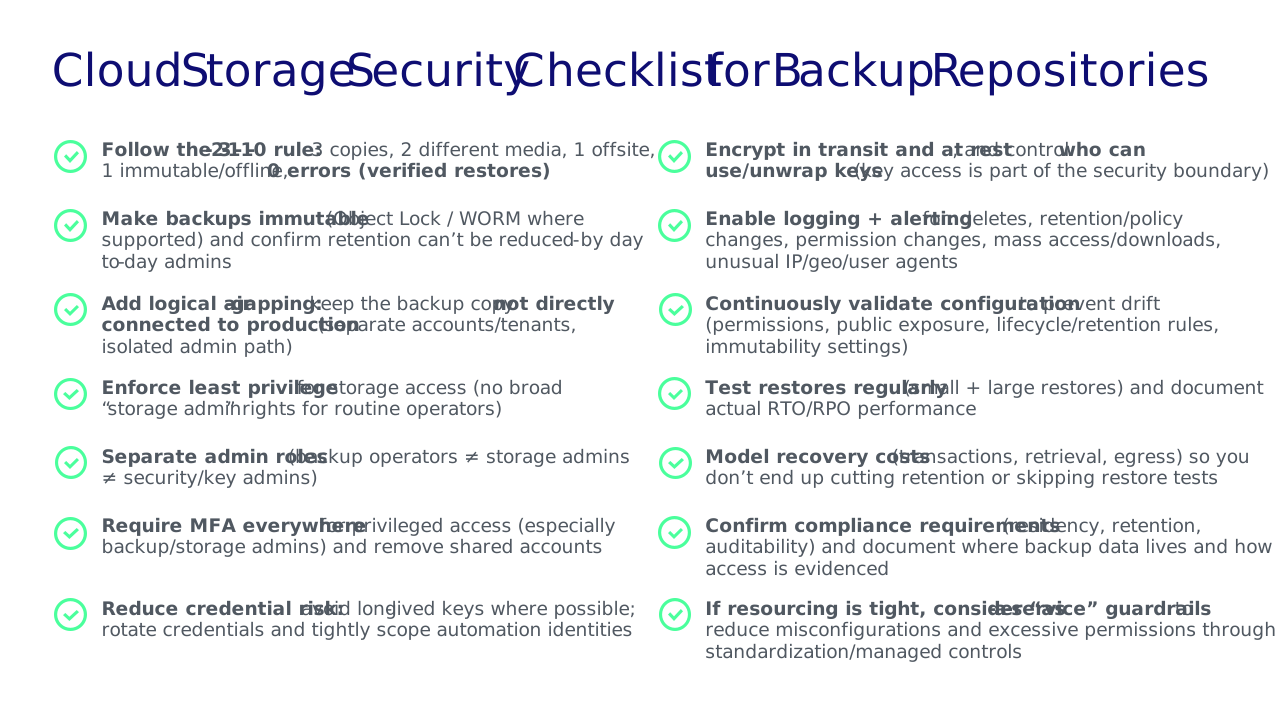
- Make backups immutable (Object Lock/WORM where supported) and add logical air-gapping to reduce the chance of deletion or tampering.
- Encrypt data in transit and at rest and treat key management as part of your security boundary.
- Implement zero trust for backup storage: Least privilege, MFA everywhere, separate admin roles, and assume credentials will be exposed.
- Turn on logging and alerting for risky events (mass deletes/reads, policy changes, unusual access patterns).
- Test restores regularly and plan for throughput/egress so recovery isn’t slow or unaffordable during an incident.
- Forecast hidden cloud fees (API calls, retrieval, egress,and immutability operations) so security controls remain sustainable.
What are cloud storage security issues?
Cloud storage security issues are risks that can compromise the confidentiality, integrity, or availability of data stored in cloud services, especially when that data is your last line of defense: Backups.
In cloud environments, security is also shaped by the shared responsibility model: The provider secures the underlying infrastructure, while you are responsible for securing your data, identities, configurations, access policies, and governance. Many “cloud storage incidents” happen in that customer-controlled layer.
What are the biggest cloud storage security issues when storing backups?
When you store backups in cloud storage, most risks don’t come from “the cloud” itself. They come from how storage is configured, who can access it, and how easy it is for an attacker to interfere with recovery. These are the biggest issues we see in real-world environments.
Ransomware targeting backup repositories
Modern ransomware attackers don’t stop at encrypting production. They try to break your ability to recover by going after backup data and backup infrastructure.
What “repository targeting” often looks like:
- Compromising credentials used by backup admins or automation
- Deleting backups (or shortening retention) to remove clean restore points
- Disabling backup jobs, corrupting backup chains, or tampering with configuration
- Exfiltrating backup data because it often contains “everything”
Mitigation focus: Treat backup storage like a tier-0 asset. You need to isolate it from production access paths, limit admin rights, and alert on unusual delete/policy-change behavior.
Lack of immutability and logical air-gapping
A common failure mode is having backups in cloud storage that are still fully mutable. That means anyone with sufficient permissions can delete or alter them. In an incident, that’s exactly what attackers (or malicious insiders) will try to do.
Two controls work especially well together:
- Immutability (Object Lock/Write Once, Ready Many (WORM where supported): Prevents deletion/changes during a defined retention period.
- Logical air-gapping: Ensuring your backup copy is not directly reachable from your production environment (separate accounts/credentials, segmented access, and tightly controlled admin paths).
You want an immutable, air-gapped solution that isn’t connected to your production environment.
Weak access controls (identity sprawl, over-permissioning, and misconfiguration)
Cloud storage platforms follow a shared responsibility model: The provider secures the underlying infrastructure, but customers control access, including:
- IAM roles and policies
- ACLs/bucket permissions
- Encryption settings
- Lifecycle and retention controls
That’s why misconfigurations and excessive permissions are consistently among the top cloud security risks. In backup scenarios, weak access control can quickly become a full recovery failure.
Mitigation focus:
- Enforce least privilege and separate admin roles (backup admin vs. storage/security admin)
- Require MFA for privileged users and avoid shared accounts
- Reduce or eliminate long-lived credentials where possible
- Continuously check for risky settings (e.g., overly broad policies, accidental exposure, or drift)
Also worth noting: If you use a solution delivered “as a service,” you can offload portions of configuration and permissions management. This can help reduce misconfiguration risk, especially for lean teams.
Encryption gaps and key management blind spots
Encryption is often “enabled,” but the details matter. For backups in cloud storage, problems typically show up as:
- Inconsistent encryption across datasets or accounts
- Unclear ownership of key access (who can decrypt, who can rotate, and who can audit?)
- Weak separation between storage admins and key admins
Mitigation focus: Enforce encryption in transit and at rest, use strong key management practices (rotation, auditing, and least privilege), and treat key access as part of your security boundary.
Operational overhead (complexity becomes risk)
Cloud storage for backups comes with lots of knobs: Retention settings, lifecycle rules, immutability modes, access policies, replication, and more. Over time, environments drift and that operational overhead can create security issues like inconsistent controls, blind spots, and “temporary exceptions” that never get removed.
Mitigation focus: Standardize designs, automate guardrails, and simplify operations wherever possible (including considering managed/“as-a-service” approaches when the team can’t sustainably manage the complexity).
Regulatory complexity (where data resides and what rules apply)
Backups often include regulated data (PII/PHI/financial records). A major security issue here is not knowing exactly where backup data lives, how long it’s retained, and whether you can produce the right audit evidence.
When you’re using multiple regions (or multiple providers), compliance can get complicated fast and mistakes can lead to business impact (including penalties).
Mitigation focus: Explicitly document data residency and retention requirements, control storage location by design, and ensure access/configuration changes are logged in a way you can use for audits.
Cloud storage pricing is usage-based, which is great for flexibility. but can also create surprise costs that quietly undermine your security posture. When budgets get tight, teams often (unintentionally) make riskier choices: Shortening retention, skipping restore tests, delaying monitoring, or relaxing controls that add overhead.
Here are the cost drivers that most directly impact backup storage security and recoverability:
- Data egress (often the biggest hidden cost): Cloud providers typically meter outbound traffic and charge per GB. For data-heavy workloads (or during large restores) transfer fees can exceed storage fees, and they’re often under-scoped during procurement until real-world restores and workload growth happen.
- Cross-region and replication costs: High-availability designs frequently replicate data across regions, which can trigger continuous transfer charges. Cross-region synchronization, database replication, and multi-region deployments can create ongoing egress costs that many teams underestimate. It’s one of the biggest gaps between architecture intent and budget reality.
- Vendor lock-in (cost becomes a resilience constraint): If moving data out is expensive or slow, you may be less able to switch providers, diversify recovery targets, or restore where you need to. Lock-in can turn “we have backups” into “we can’t afford to recover at scale,” which is a security and business continuity problem.
- Capacity growth over time: Backups accumulate quickly, especially with longer retention requirements and large volumes of unstructured data.
- Transactions and operations: Cloud storage isn’t just “$/TB.” API operations (writes, reads, listings, lifecycle operations) can add up depending on backup design and restore behavior.
- Data retrieval and restore testing: The cost of getting data back (including regular restore tests) can be material and often isn’t fully understood until an incident forces a large recovery.
Practical guidance: Don’t wait until a ransomware event to discover your “restore bill.” Model costs using real assumptions (change rate, retention, restore-test frequency, and a worst-case full recovery), including egress and cross-region replication. Then set guardrails (budgets/alerts, tagging, and regular cost reviews) so security-critical practices, like immutability and restore testing, stay funded and consistent.
Why skills and resourcing gaps lead to cloud storage security issues
Cloud storage security issues often show up less as “a cloud problem” and more as an operations problem: Teams don’t have the time, tooling, or specialized cloud expertise to keep backup storage consistently locked down. And because cloud environments change constantly, even a well-designed setup can degrade over time through misconfiguration and operational drift.
When you don’t have the right people or resources in place, controls break and there’s no one there to get alerted and fix them fast enough. That’s how small gaps (like an overly-permissive role or a missed policy change) become big incidents.
Common ways resourcing gaps turn into security risk:
- Inconsistent access policies across accounts/projects (permissions sprawl over time)
- Misconfigurations (public exposure, broad Identity Access Manament (IAM) roles, unsafe exceptions that never get removed)
- Weak monitoring and response (no alerting on deletes/policy changes; slow triage)
- Unverified recoverability (backups exist, but restores aren’t tested regularly)
Mitigation focus: Reduce the “human overhead” required to stay secure. Standardize designs, automate guardrails (policy checks, drift detection, and alerting), and, if your team is lean, consider a managed service approach that bakes in security controls (like immutability and isolation) so you’re not relying on constant manual upkeep.
Compliance and Data Sovereignty Issues
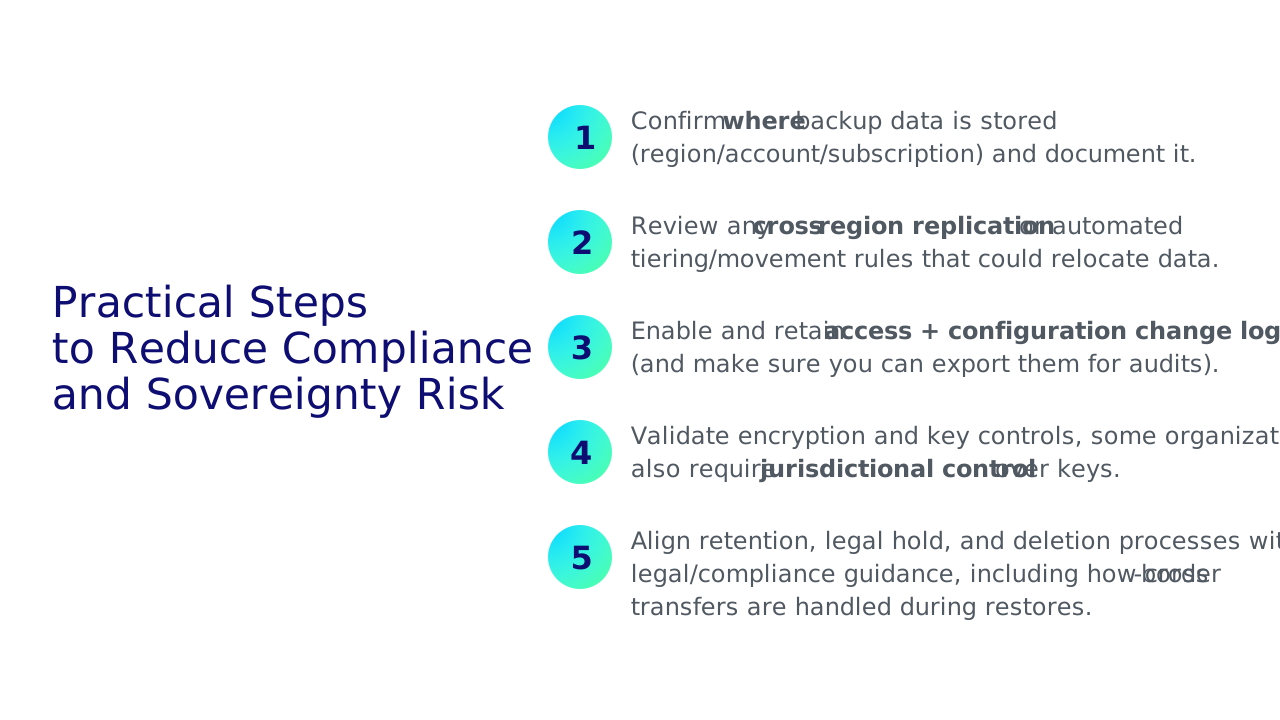
Cloud providers make it easy to select a region for storage, but compliance doesn’t happen automatically, especially when backup data can include personal, financial, or health information (and backups often contain all of it).
A major (and often underestimated) driver of cloud storage security issues is cross-border data transfer restrictions. Cloud storage architectures frequently replicate data across regions for durability, disaster recovery, or performance. If that replication or a recovery workflow moves backup data outside an approved jurisdiction, it can create unintentional compliance exposure, even when your “primary region” is set correctly.
This gets more complex as requirements evolve, particularly around cross-border transfers and data residency. European regulators have repeatedly emphasized the need for appropriate safeguards when transferring personal data outside approved jurisdictions, often requiring measures such as Standard Contractual Clauses (SCCs) plus additional technical and organizational controls (for example, strong encryption and appropriate access restrictions). Add an expanding patchwork of U.S. privacy laws, and it becomes harder to “set a region once” and assume you’re done. This is especially true in multi-region and multi-cloud environments, where data can be replicated, moved, or accessed across boundaries more easily than teams realize.
What this means for backup repositories in cloud storage:
- Data residency must be enforced, not assumed. Ensure backup data stays where it’s supposed to and that replication, lifecycle policies, support tooling, and recovery workflows don’t move copies outside approved regions.
- Cross-border transfer controls must match your architecture. If data can cross jurisdictions, confirm the required safeguards are in place (contractual, technical, and operational) and that you can evidence them.
- Auditability is part of security. If you can’t prove who accessed backup data, when, and what changed, you’ll struggle in audits and incident investigations.
- Retention rules can conflict with privacy requests. Many privacy laws focus on data minimization and deletion rights, while backup policies focus on retention for resilience. You need governance that meets both requirements without weakening recoverability.
Next steps
If you want to reduce cloud storage security issues quickly, without getting stuck in a months-long redesign, here are the most practical actions to take this week:
- Identify your “backup repository blast radius.”
List where backup data lives (accounts/subscriptions/regions), who can administer it, and which credentials could delete or alter it. - Turn on immutability and isolate admin paths.
Enable Object Lock/WORM where possible and ensure the people/systems that run day-to-day production don’t have an easy path to modify or delete backups. - Harden identity for backup storage.
Enforce least privilege, require MFA for privileged roles, remove shared accounts, and separate backup operator permissions from storage and security admin permissions. - Enable logging and alerting for high-signal events.
At minimum: policy/permission changes, retention/immutability changes, mass deletes, and abnormal access patterns. - Run a real restore test and capture time and cost.
Validate you can restore within your RTO/RPO, and document what the restore actually costs (throughput, retrieval, egress). If the test is painful, it’s a warning sign.
If you want a simpler path to an immutable off-site copy
If your priority is to keep ransomware and human error from touching your last line of defense, aim for an immutable, logically air-gapped backup copy that isn’t directly connected to production and doesn’t depend on perfect day-to-day configuration to stay that way.
Veeam Data Cloud Vault gives you a managed, secure off-site backup repository built for immutability and resilience, so you can reduce operational overhead while strengthening recoverability when it matters most.
Related resources:
– 9 Must-Haves for Offsite Cloud Storage
– ASSESSMENT: How Resilient is Your Offsite Storage?
– Product demo: Secure Off-Site Backup in Seconds
FAQs
What is the biggest cloud storage security issue?
Misconfigured identity and access is the biggest cloud storage security issue, especially when broad IAM roles, shared admin accounts, or exposed keys allow someone to delete or change backup data. Attackers who steal credentials often target retention and delete APIs first, turning a manageable incident into a recovery failure.
Key safeguards: Least privilege, MFA, separate admin roles, immutable retention, and alerts on delete/policy changes.
How do I protect cloud backups from ransomware?
Protect cloud backups from ransomware by combining immutability, isolation, and strict access controls. Enable Object Lock/WORM for an immutable retention window, keep the backup copy in a separate account/tenant (logical air gap), enforce least privilege and MFA, alert on deletes and retention/policy changes, and run regular restore tests.
Minimum controls: Immutable backups + isolated admin path + verified restores.
Is cloud storage secure enough for backups?
Yes, cloud storage can be secure for backups if it’s configured for ransomware and recovery. The provider secures the infrastructure, but you must secure identities, permissions, and retention (immutability), and continuously monitor changes. If backups remain fully mutable with broad delete rights, cloud storage won’t be secure enough for reliable recovery.
Rule of thumb: “Secure” means recoverable under attack, not just encrypted.
Why is immutability important for cloud backup storage?
Immutability stops backup data from being modified or deleted until a defined retention period ends. It protects restore points from ransomware, malicious insiders, and accidental admin actions. Without immutability, anyone with sufficient permissions can wipe or overwrite backups, which is often the first step attackers take to prevent recovery.
Look for: True WORM behavior and protected retention settings.
What should I log and monitor to detect cloud storage attacks?
Log and alert on events that change access, retention, or data integrity. Key signals include IAM/policy/access control list (ACL) changes; Object Lock/retention changes; lifecycle/replication rule edits; delete and purge operations; key management system (KMS)/key policy and key-usage events; unusual list/read/download spikes; access from new IPs/regions; and repeated failed authentications.
Priority alerts: Deletes + retention/policy changes + permission changes.
How do cloud storage costs impact security?
Costs can weaken security when hidden fees pressure teams to cut retention, monitoring, or restore testing. The biggest surprises are often data egress (per‑GB outbound charges) and cross-region replication traffic, which can exceed storage costs during large restores. Model worst-case recovery spend, set budgets/alerts, and account for vendor lock-in early.
Best practice: Estimate the “ransomware restore bill” before you need it.