

Imagine you’ve bought the best home security system money can buy. Cameras on every entrance. Motion sensors in every room. Alarms on every door and window. You open the app and everything is green.
Then a structural engineer knocks on your door and tells you the foundation may be cracked. Your security system didn’t fail, since it was never built to look at the foundation. All those green lights tell you what the sensors can see, but they say nothing about what they can’t.
You wouldn’t fix a foundation issue by buying another camera. You’d get the foundation inspected and you’d make sure that if the house turned out to be unsafe, everything that matters inside could still get out and land somewhere solid.
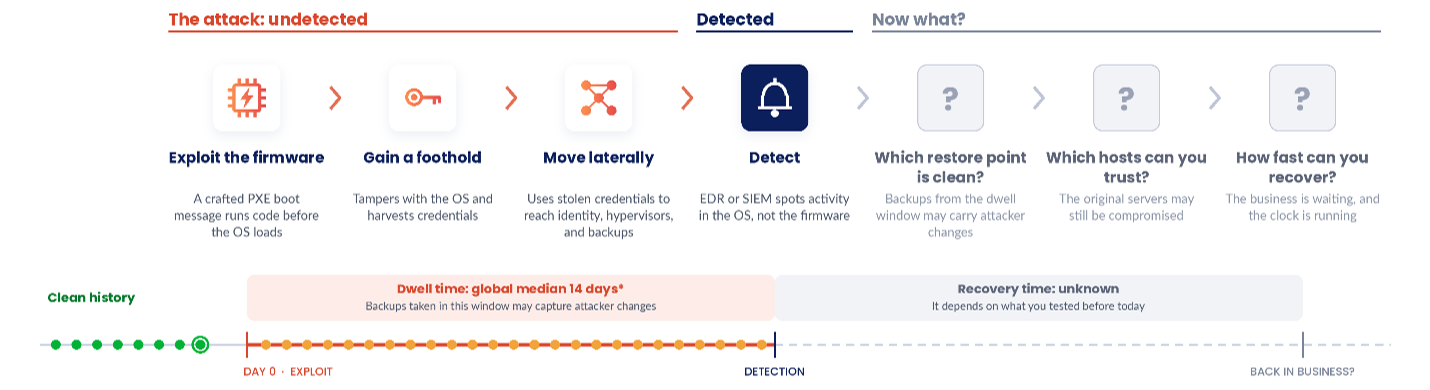
That foundation problem isn’t hypothetical in cybersecurity. CVE-2026-97631 is a critical buffer overflow in TianoCore EDK II that lives below the operating system. If you’ve never heard of EDK II, you’ve almost certainly run it. It’s the open-source code that firmware makers use to build UEFI, the firmware that wakes up your hardware and starts the boot process. It runs before the operating system, which means it runs before almost every security tool you own.
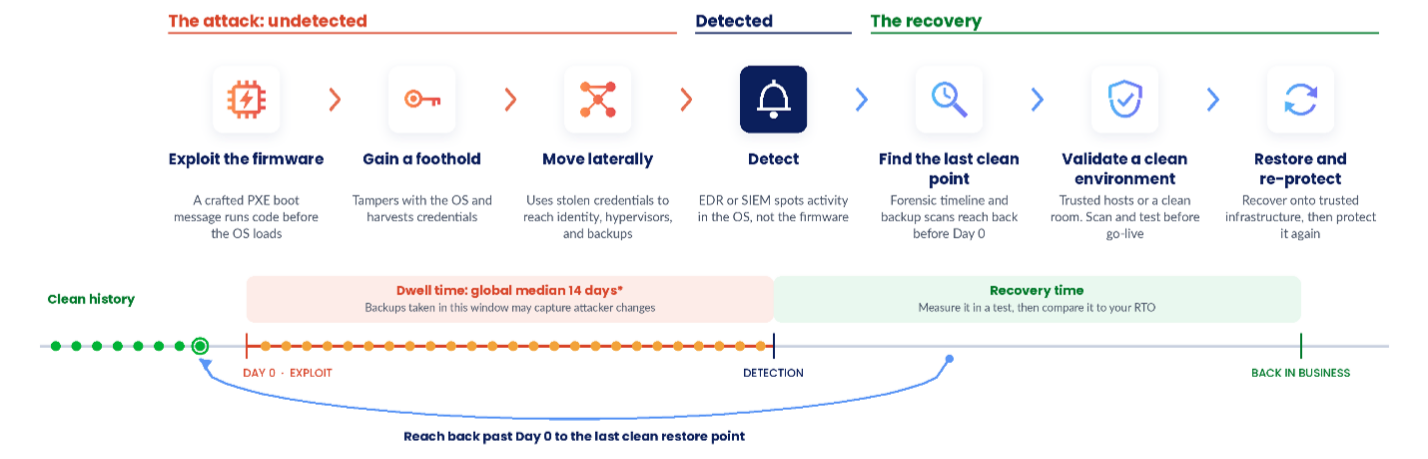
The flaw lives in the PXE network boot, which is how a server pulls its startup image over the network instead of from a local disk. Send a crafted network message at the right moment during that boot, and you can corrupt memory. Under the right conditions, an attacker can get code running before the OS ever loads.
The good news is not every server is exposed. An attacker needs affected firmware, a machine that’s actually booting over the network, and a way to reach it during that short window. As of Oct. 28, 2026, I haven’t found any confirmed exploitation in the wild.
So, this isn’t a reason to panic, but it’s a fire drill you should take seriously. The question changes in this fire drill from “Can we detect it?” to “Do we trust this box enough to run the business and can we recover if not?”
A completed backup is not a recovery strategy
If your team suspects they’ve been exploited by this vulnerability or in general that a physical host running a critical application can’t be trusted, what is your plan to recover? Just a backup isn’t enough if you restore that application onto the same hardware.
What’s in our favor is that a backup generally doesn’t include the server’s UEFI firmware. You can move the OS, applications, and data to a different host and leave the suspect hardware behind. You still must check what’s in the backup and where it’s going, but you’re not stuck with the box.
You need three things: A protected immutable copy, a recovery point you can trust, and somewhere trustworthy to run it.
Veeam won’t patch UEFI or certify that a physical server is clean. Where Veeam belongs is in the recovery plan, and that’s the part most organizations haven’t tested.
Keep an immutable copy outside the blast radius
If attackers own your production systems, that shouldn’t automatically give them the power to destroy what you need to rebuild.
That’s what immutable backups are for. Once they’re written, they can’t be changed or deleted until their retention period ends. Veeam supports immutable repositories on-premises, plus offsite options like Veeam Data Cloud Vault, which is a fully managed, immutable cloud storage service that lives outside your environment.
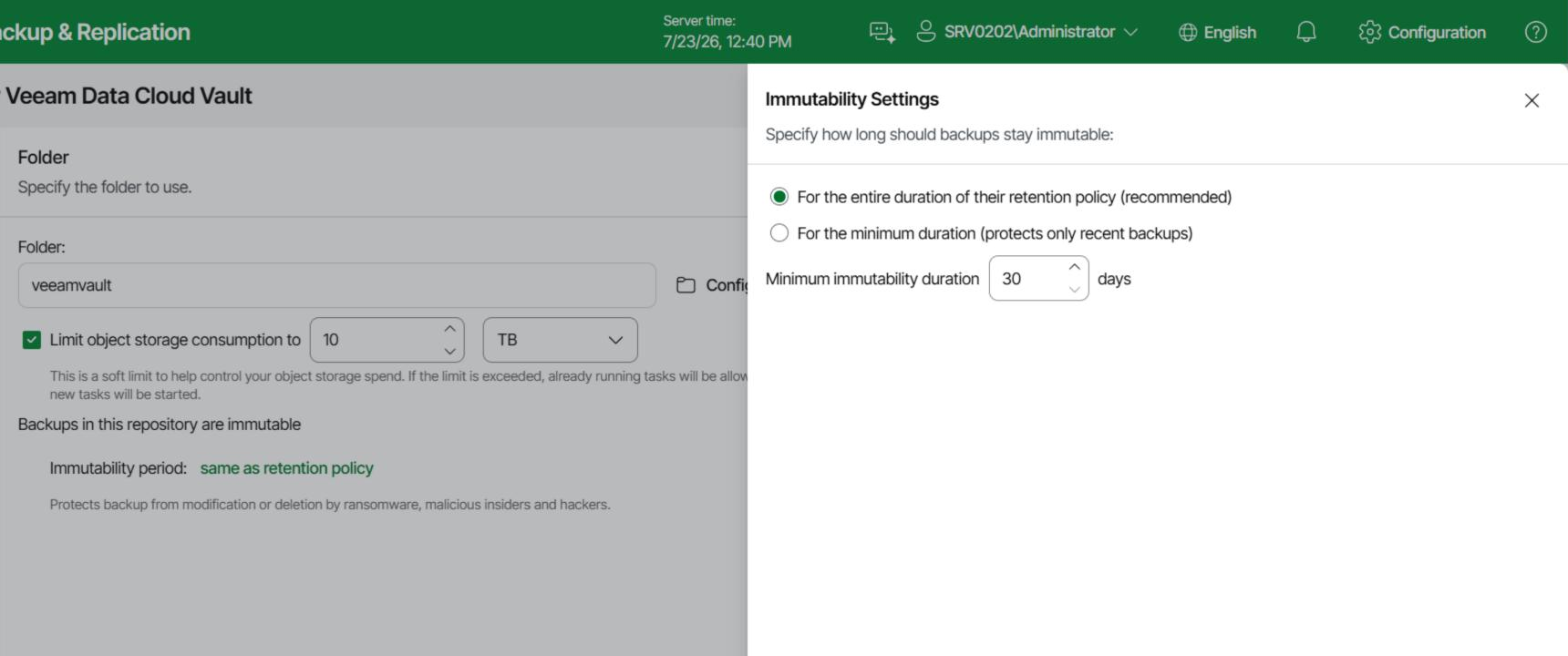
That said, immutability isn’t a magic word. It doesn’t prove the data was clean when you backed it up and you still need the credentials, encryption keys, retention, and admin separation to actually use it.
So, skip the easy question (“Are our backups immutable?”) and ask the hard one: If production and our backup server were both gone, could we still get to a usable copy?
Know what you’re restoring
If an attacker used pre-boot access to tamper with an OS or application, your more recent backups may have captured those changes.
Veeam’s malware scanning and Secure Restore let you inspect restore points before they go back into production. SureBackup goes a step further. It runs virtual workloads straight from backup in an isolated environment to confirm they boot and that the application actually works.
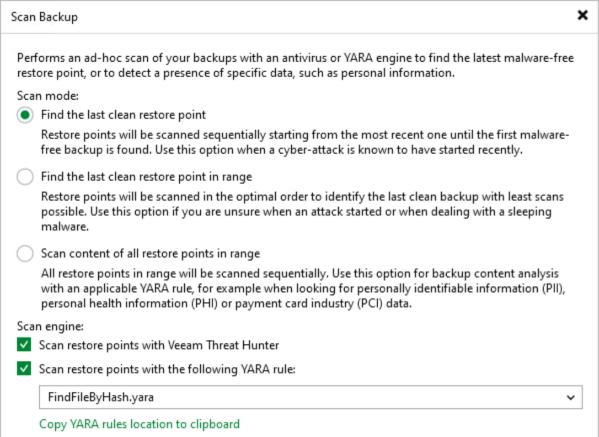
A completed backup job tells you a copy exists, and a recovery test tells you it works.
Recover somewhere you trust
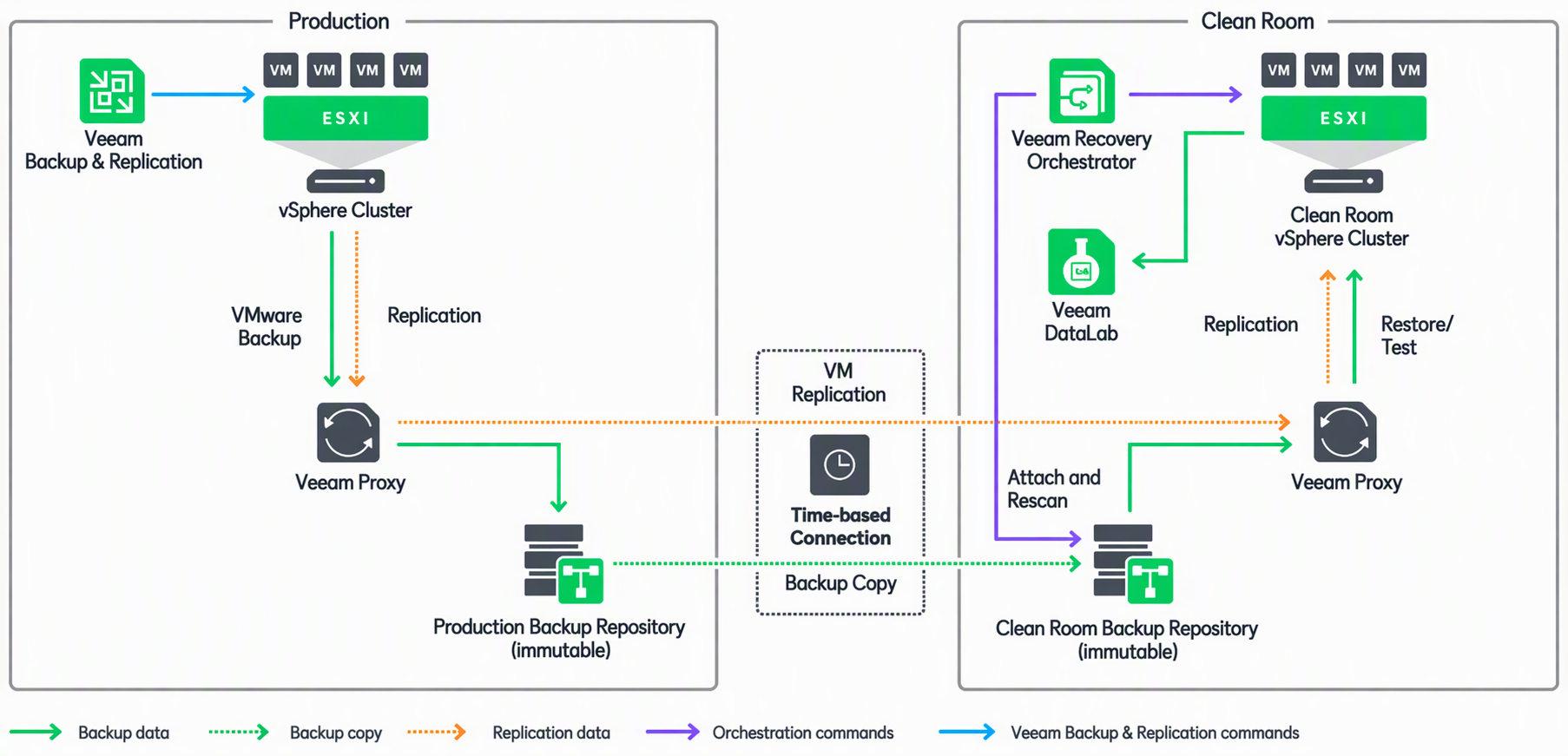
If the original hosts are suspect, where does the application run?
Maybe it’s replacement hardware you’ve already remediated. Maybe it’s a separate virtualization cluster. Maybe it’s the cloud. Veeam can restore workloads to all of those. Instant Recovery accelerates recovery to an alternative location, while Veeam Orchestrator automates and tests defined recovery plans. Moving a workload doesn’t magically make it safe, however, since cloud providers run firmware too. Your security and infrastructure teams still have to validate the destination’s platform assurance, configuration, network, access, and dependencies.
The goal isn’t just to restart a server; it’s to bring the business back without leaning on infrastructure you no longer trust.
Five recommendations today:
- Map the exposure. Find every system that network boots or runs potentially affected firmware. Turn off PXE where you don’t need it, lock down provisioning networks, and track OEM updates.
- Protect the recovery path. Confirm your tier-one workloads have immutable copies outside the primary blast radius. Then make sure the backups, credentials, and encryption keys are still reachable if your normal management infrastructure is down.
- Decide how you’ll pick a restore point. Agree now on how your team will investigate a suspected compromise window, choose a restore point, scan it, and verify the recovered application.
- Choose an alternate destination. Know where critical workloads would run if the original hosts are off the table. Check capacity, identity, connectivity, licensing, and application dependencies, not just whether the hypervisor matches.
- Run the test your dashboard can’t. Pick one business-critical application. Assume its hosts are gone and can’t be trusted. Recover it somewhere else, then measure how long until a real business user can actually use it. Compare that number to your recovery time objective.
A runbook is just a hypothesis until you’ve tested it.
The question I’d ask the team
Our job is to make sure a failure to detect doesn’t become a failure to recover.
Here’s the question I’d ask every CISO to take to their next leadership meeting:
If tomorrow we discovered that the servers running our five most critical applications could no longer be trusted, could we recover those applications somewhere else? Could we prove we’d meet our recovery objectives?
Not because our backup dashboard says green, not because our recovery plan looks good on paper, but because we’ve actually tested it.
A vulnerability like CVE-2026-97631 may never be exploited in your environment. But, the day you need to recover from infrastructure you can no longer trust is the wrong day to discover whether your recovery strategy works.
You can’t guarantee you’ll detect every attack. But you can prepare to make sure your data and your business survive one.