- Veeam Support Knowledge Base
- Using the vSphere MOB (Managed Object Browser) to Troubleshoot Snapshot Creation
Using the vSphere MOB (Managed Object Browser) to Troubleshoot Snapshot Creation

Purpose
Solution
Start by identifying the Managed Object Reference-ID (MORef-ID) of the VM for which the snapshot will be created.
If the VM is being protected by Veeam Backup & Replication, navigate to the log directory on the Veeam Server (%programdata%\Veeam\Backup). Within that directory, find the folder that is named after the job that the VM is protected by. Within the job folder will be a log named Task.<vmname>.<Ref-ID>.log
If the Ref-ID starts with “vm-“ the job is connecting to the vCenter server.
If the Ref-ID is just a number, the job is connecting to a standalone host.
- Using an web browser navigate to: https://<vc/host ip>/mob/?moid=<Ref-ID>
Example for VC: https://abp-vc.abp.lab/mob/?moid=vm-688
Example for host: https://esxi1.abp.lab/mob/?moid=26 - Confirm that the name matches what is expected:

- Click on “CreateSnapshot_Task”

- In the window that pops up, fill in the form as shown in the example below.
Note: If you are troubleshooting an issue where VMware Tools Quiescence was enabled at the job level, enter a “yes” for the “quiesce” field. Otherwise, leave both Boolean values set to false.
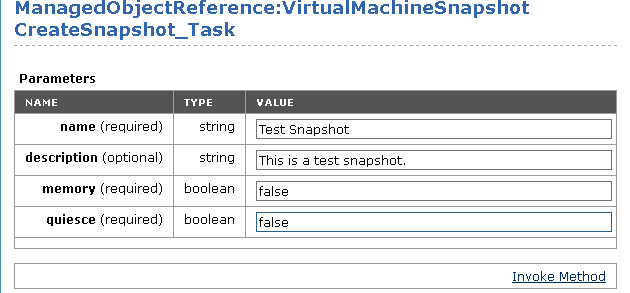
- Click “Invoke Method” to send the create snapshot task.
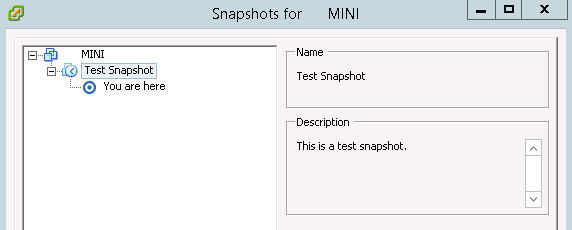
The snapshot creation task will then be processed. If the snapshot fails to create, it is advised to contact VMware Support to investigate further.
If this KB article did not resolve your issue or you need further assistance with Veeam software, please create a Veeam Support Case.
To submit feedback regarding this article, please click this link: Send Article Feedback
To report a typo on this page, highlight the typo with your mouse and press CTRL + Enter.
Spelling error in text

Thank you!
Your feedback has been received and will be reviewed.
Oops! Something went wrong.
Please, try again later.
You have selected too large block!
Please try select less.
KB Feedback/Suggestion
This form is only for KB Feedback/Suggestions, if you need help with the software open a support case
Thank you!
Your feedback has been received and will be reviewed.

Oops! Something went wrong.
Please, try again later.