- Veeam Support Knowledge Base
- How to Force Enterprise Manager Login to Use Form-Based Authentication
How to Force Enterprise Manager Login to Use Form-Based Authentication
| KB ID: | 2089 |
| Product: | Veeam Backup & Replication | 12 | 12.1 | 12.2 | 12.3 | 12.3.1 | 12.3.2 |
| Published: | 2016-01-15 |
| Last Modified: | 2026-04-17 |

Cheers for trusting us with the spot in your mailbox!
Now you’re less likely to miss what’s been brewing in our knowledge base with this weekly digest

Oops! Something went wrong.
Please, try again later.
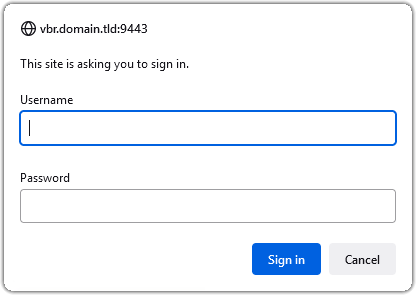
This article applies to Veeam Backup & Replication 12.x and older, as in those versions, the default was for Veeam Backup Enterprise Manager to utilize a Windows Authentication pop-up (key="useWindowsAuth" value="true").
Starting in Veeam Backup Enterprise Manager v13, the setting discussed in this article had its default value flipped to false, disabling the Windows Authentication pop-up. The settings location was also changed to:
C:\Program Files\Veeam\Backup and Replication\Enterprise Manager\WebApp\appsettings.json
Purpose
Solution
Disable Windows Authentication
- Open the web.config file.
Default Path: C:\Program Files\Veeam\Backup and Replication\Enterprise Manager\WebApp\web.config - Locate the useWindowsAuth key and set the value to false.
No reboot is required. Simply relaunch the Enterprise Manager webpage.
<add key="useWindowsAuth" value="true" />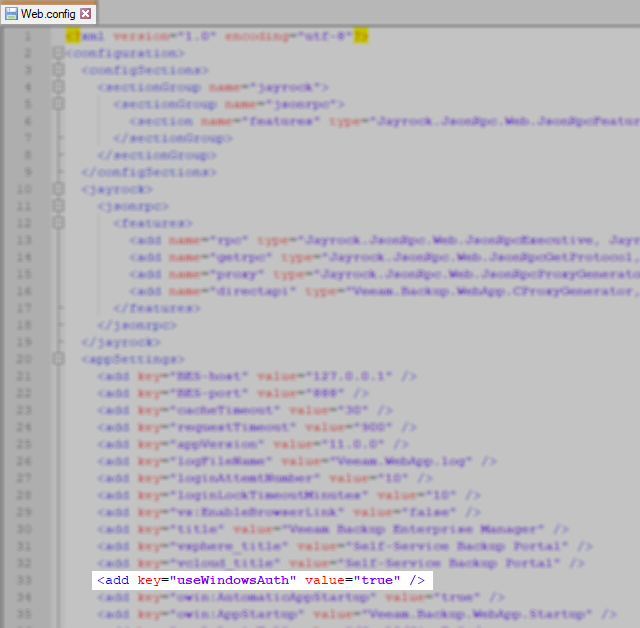
More Information
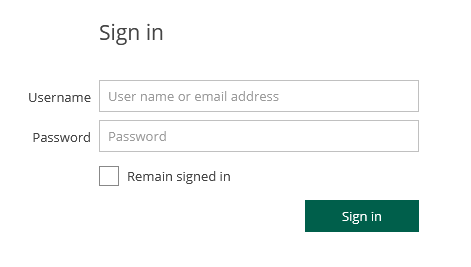
- Alternatively, use the following page to go directly to the HTML Form-based Enterprise Manager login page:
https://EnterpriseManagerServerDNSorFQDNhere:9443/login.aspx - Veeam Backup Enterprise Manager supports single sign-on authentication based on the SAML 2.0 protocol. For more information reference: About Veeam Backup Enterprise Manager > SAML Authentication Support
If this KB article did not resolve your issue or you need further assistance with Veeam software, please create a Veeam Support Case.
To submit feedback regarding this article, please click this link: Send Article Feedback
To report a typo on this page, highlight the typo with your mouse and press CTRL + Enter.
Spelling error in text

Thank you!
Your feedback has been received and will be reviewed.
Oops! Something went wrong.
Please, try again later.
You have selected too large block!
Please try select less.
KB Feedback/Suggestion
This form is only for KB Feedback/Suggestions, if you need help with the software open a support case
Thank you!
Your feedback has been received and will be reviewed.
Oops! Something went wrong.
Please, try again later.