- Veeam Support Knowledge Base
- How to Collect SQL Logs for Deadlock
How to Collect SQL Logs for Deadlock
| KB ID: | 2111 |
| Product: | Veeam Backup & Replication |
| Published: | 2016-03-15 |
| Last Modified: | 2024-04-04 |

Get weekly article updates
Cheers for trusting us with the spot in your mailbox!
Now you’re less likely to miss what’s been brewing in our knowledge base with this weekly digest

Oops! Something went wrong.
Please, try again later.
Challenge
To gather logs for SQL Deadlock troubleshooting.
Cause
Database actions can, in certain circumstances, cause deadlock issues.
Solution
Using SQL Server Management Studio Tools (SSMS) perform the following:
- Connect to the Veeam Backup & Replication configuration database.
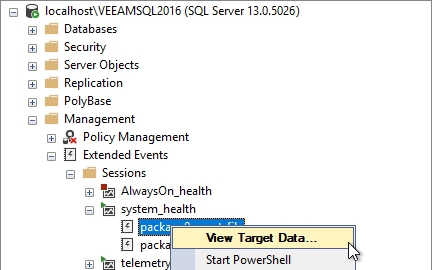
- Expand Management > Extended Events > Sessions > System health
- Right click package0.event_file and select "View Target Data"
- Open "Filters..." panel (Ctrl+R)
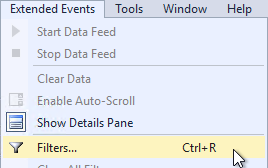
- Click on "click here to add a clause" then enter the values as listed below:
Field = name, Operator = Contains, Value = deadlock
- Click "Apply", then click "OK"
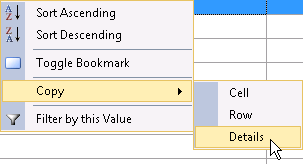
- Right-click the most recent deadlock and select "Copy > Details"
- Send a copy of the resulting data Veeam support
If this KB article did not resolve your issue or you need further assistance with Veeam software, please create a Veeam Support Case.
To submit feedback regarding this article, please click this link: Send Article Feedback
To report a typo on this page, highlight the typo with your mouse and press CTRL + Enter.
