- Veeam Support Knowledge Base
- How to split entire organization backup job on per-service basis
How to split entire organization backup job on per-service basis
| KB ID: | 4172 |
| Product: | Veeam Backup for Microsoft 365 |
| Published: | 2021-05-25 |
| Last Modified: | 2022-04-22 |

Get weekly article updates
Cheers for trusting us with the spot in your mailbox!
Now you’re less likely to miss what’s been brewing in our knowledge base with this weekly digest

Oops! Something went wrong.
Please, try again later.
Challenge
It might be required to create a backup job that would only process a particular Microsoft Office 365 service. This might help to improve backup performance of each service as well as to isolate performance issue to a particular service.
Solution
This example demonstrates creating a backup job that would process an entire organization but only include its Exchange data.
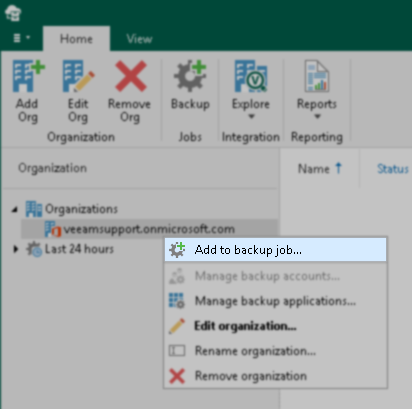
- Right-click an organization and select Add to backup job.
- Specify the job name and click Next.
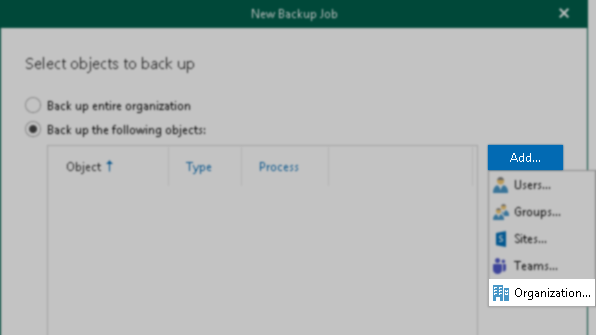
- To add an organization to the job, click Add > Organization and select the organization.
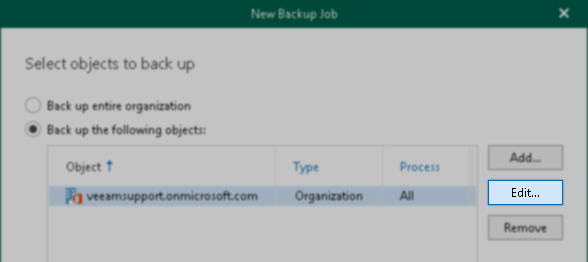
- Select the added organization and click Edit.
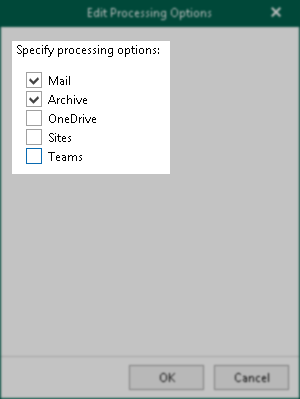
- Clear every check box except the Mail and Archive checkboxes and click OK.
- Proceed with other job settings.
If this KB article did not resolve your issue or you need further assistance with Veeam software, please create a Veeam Support Case.
To submit feedback regarding this article, please click this link: Send Article Feedback
To report a typo on this page, highlight the typo with your mouse and press CTRL + Enter.
