- Veeam Support Knowledge Base
- REST API Error: S3 Error: The difference between the request time and the current time is too large / Invalid Credentials for Amazon S3
REST API Error: S3 Error: The difference between the request time and the current time is too large / Invalid Credentials for Amazon S3
| KB ID: | 4248 |
| Product: | Veeam Backup & Replication | 9.5 | 10 | 11 | 12 | 12.1 | 12.2 | 12.3 | 12.3.1 | 12.3.2 | 13 | 13.1 |
| Published: | 2021-12-09 |
| Last Modified: | 2025-02-21 |

Get weekly article updates
Cheers for trusting us with the spot in your mailbox!
Now you’re less likely to miss what’s been brewing in our knowledge base with this weekly digest

Oops! Something went wrong.
Please, try again later.
Challenge
This article covers two different errors that occur when performing different tasks, but have the same root cause:
- When adding S3 Object Storage to Veeam Console, Veeam displays the follow error:
Failed to list S3 buckets: check if the specified account has required permissions
REST API Error: 'S3 Error: The difference between the request time and the current time is too large.
Code: RequestTimeTooSkewed'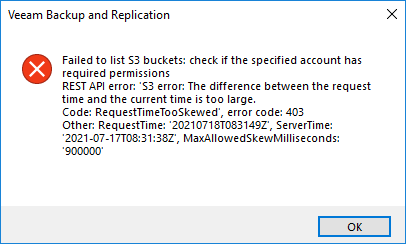
- Job fails during Offload after the backup job runs, with error:
Invalid credentials for Amazon S3 endpoint. See logs for details.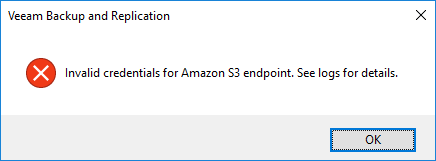
Click to Expand and view log file examples
In the Task Logs, it will be as below:
Error    Amazon REST error: 'S3 error: The difference between the request time and the current time is too large.. Code: RequestTimeTooSkewed', error code: 403.
Other: RequestTime: '20210721T040936Z', ServerTime: '2021-07-17T10:12:34Z', MaxAllowedSkewMilliseconds: '900000'
If the error occurs during SOBR Offload, it will be visible in ArchiveCleanup.Gate Log as below:
aws      | WARN|HTTP request failed, retry in [120] seconds, attempt number [20], total retry timeout left: [223] seconds
aws      | >>  |REST API error: 'S3 error: The difference between the request time and the current time is too large.
aws      | >>  |Code: RequestTimeTooSkewed', error code: 403
aws      | >>  |tr:Request ID:
aws | >> |Other: RequestTime: '20210720T101336Z', ServerTime: '2021-07-17T10:13:41Z', MaxAllowedSkewMilliseconds: '900000'Cause
The failure occurs because AWS allows for a maximum of 15 minutes of time stamp variation between the server and Gateway Server (Client).
Solution
Review system time synchronization on Gateway Server specified when configuring the Object Storage Repository. If the gateway server is not explicitly specified, review system time synchronization on the Veeam Backup Server and Scale-Out Backup Repository - Performance Tier Extents.
If this KB article did not resolve your issue or you need further assistance with Veeam software, please create a Veeam Support Case.
To submit feedback regarding this article, please click this link: Send Article Feedback
To report a typo on this page, highlight the typo with your mouse and press CTRL + Enter.
