

Key Takeaways
- Small businesses get attacked because their defenses are thinner, not because their data is worth more.
- The highest return precautions are staff training, multi-factor authentication (MFA), prompt patching, and the backups you’ve actually tested.
- An incident response plan written before an attack determines how fast you can recover from one.
- The same controls get asked about twice: Once by your insurer, and once by any larger customer that vets its suppliers.
- Security is a review cycle, not a one-time setup. Revisit it annually and after anything changes.
Most small businesses think cybersecurity means doing a smaller version of what big companies do, but it doesn’t. It means having a short list of protections that are applied in the right order, plus a plan for the day something gets through — because something eventually will.
Owners often come to this realization after a prompting event: A peer got hit, an insurance renewal asked questions nobody could answer, or a larger customer sent a security questionnaire. The problem is rarely a shortage of advice. Rather, it’s the advice that arrives as 40 undifferentiated items with no sense of what matters most.
This blog post fixes that ordering problem.
Why is Cybersecurity Important for Small Businesses?
Small businesses matter to attackers because they’re easier to reach, not because their data is worth more. Targets are chosen by opportunity, and a business without dedicated IT staff presents more opportunity.
Verizon’s 2026 Data Breach Investigations Report found that 31% of breaches now start with an unpatched software vulnerability, overtaking stolen passwords as the most common way in. Ransomware features in 48% of all breaches, but neither route requires knowing anything about your business first.
Three things can make a small businesses more attractive to attackers:
- Credentials get reused across personal and business accounts, and nobody is watching.
- Patching slips because it isn’t anyone’s specific job, and then exploit code now follows disclosure within hours.
- Access is worth stealing even when your data isn’t. Third-party breaches rose 60% in the past year and are now featured in 48% of the total, so a vendor login or a large quantity of client records makes you worth reaching regardless of your size.
Common Cyberthreats Facing Small Businesses
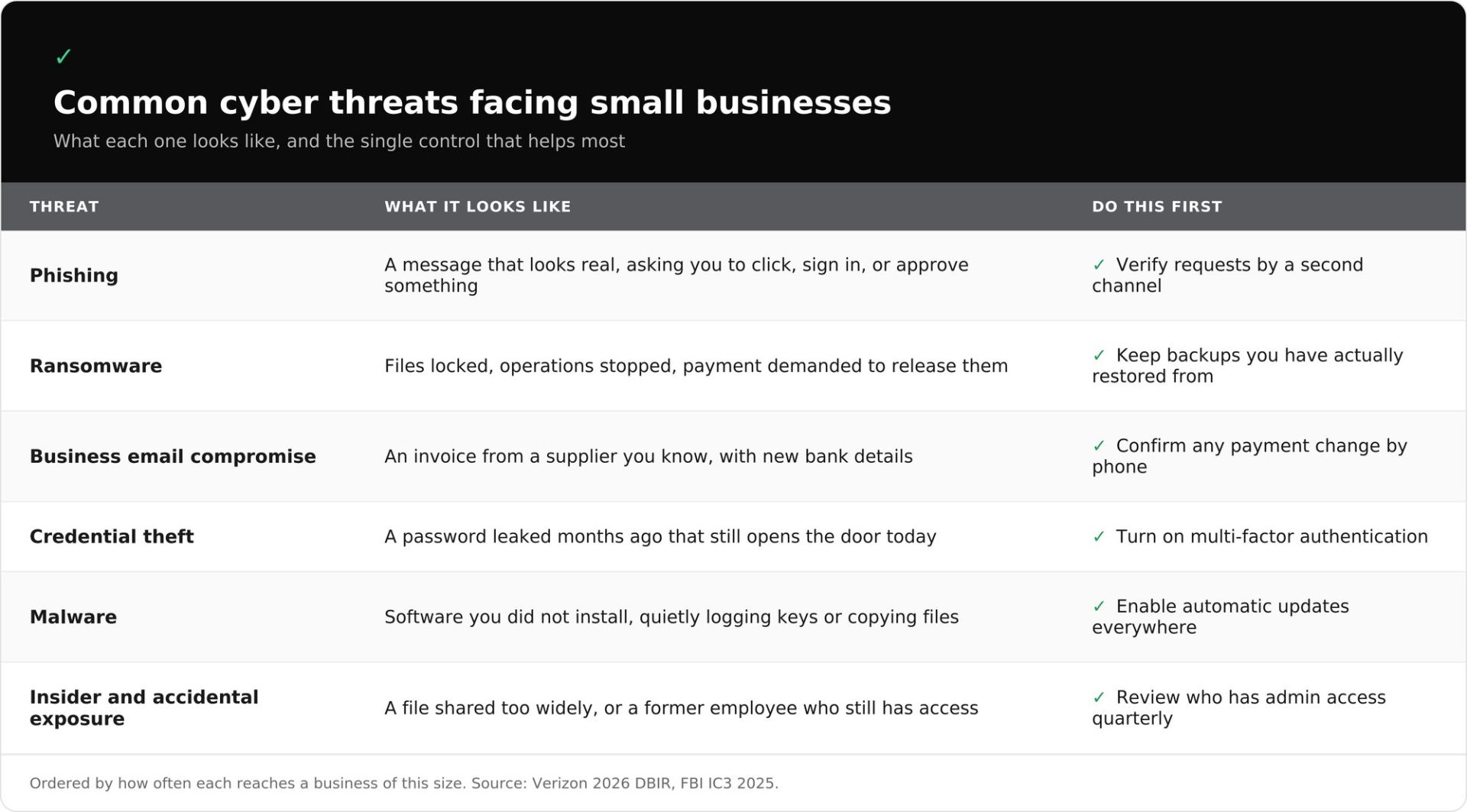
Most attacks on small businesses use a short list of techniques, and they arrive by email far more often than anything exotic will. In rough order, here’s how they often reach a business this size:
- Phishing and social engineering. This is a message that looks legitimate gets someone to click, sign in, or approve something. That’s how 62% of breaches begin, and text and phone attempts now draw click rates that are 40% higher than email.
- Files are encrypted and payment is demanded, often with a threat to publish what was copied. Most ransomware attacks on small businesses start with a leaked password or an unpatched remote access tool, not something dramatic.
- Business email compromise. An attacker will use or imitate a real account to redirect money, usually a known supplier’s invoice, that now points to a new bank account. No malware, and no file for a filter to catch. The FBI logged just over $3 billion in reported BEC losses in 2025.
- Credential theft. This includes passwords that were stolen by phishing, by reuse on a breached consumer site, or by malware on a personal laptop. The credential theft and the attack are often months apart.
- This is software that’s installed to do something you didn’t authorize. It usually arrives through a phishing attachment or link, a fake software download, or an unpatched remote access tool rather than appearing on its own.
- Insider and accidental exposure. Usually, this is a mistake rather than a betrayal: A file shared too widely, a spreadsheet sent to the wrong person, or a former employee who still has access.
Assessing Your Small Business Cybersecurity Needs
Before you buy anything, find out what you already have. This can be done with these three steps, each producing something that you can refer back to.
- List every device and account that touches your business data. Include laptops, phones, the front-desk machine, personal devices used for work, and then every account like email, banking, payroll, website host, point of sale, and every SaaS tool anyone signed up for.
- Map where your customer and financial data actually lives. Follow one real customer record and note every place it lands: Your inbox, a shared drive, the CRM, a spreadsheet on someone’s desktop, or your accountant’s portal.
- Write down who has administrator access to each system, then check that list against who currently works for you.
In the NIST Cybersecurity Framework, this is the Identify function, and it comes first because you can’t protect a system you forgot or don’t know you had. What it reliably turns up is access nobody remembered granting, like a former employee still on the shared drive, a contractor’s login from a finished project, or a vendor with standing access to your files.
Your Prioritized Small Business Cybersecurity Checklist
Work through this in order. The first tier only takes an afternoon to complete and closes gaps attackers actually use.
This Week:
- Turn on MFA for email, banking, and payroll. If you do one thing here, do this.
- Confirm a backup exists, then restore a single file from it. An untested backup is just a guess.
- Enable automatic updates on every computer, phone, and router.
This Month:
- Set up a password manager and get everyone to use it.
- Remove access for anyone who no longer needs it.
- Print a one-page incident contact list that includes your IT support, bank, insurer, and lawyer.
- Separate guest Wi-Fi from the network your business systems use.
- Nominate someone to receive security alerts and confirm that that email address is a monitored inbox.
This Quarter:
- Put staff training on a schedule.
- Review vendor and SaaS access and cancel what’s unused.
- Write a basic incident response plan.
- Collect the documentation that insurers and enterprise customers ask for.
This checklist gives partial credit. A business that finishes the first tier and nothing else is still meaningfully harder to attack than it was last week.
Developing a Cybersecurity Strategy
A real cybersecurity strategy consists of seven practices that cover the foundation and a record of what you’ve done.
These practices map onto the NIST Cybersecurity Framework. It’ll tell you whether you’ve left a category unaddressed, and it gives you shared vocabulary to communicate to customers when needed.
|
NIST Function |
What It Means in Practice |
Covered On This Page |
|
Govern |
Someone owns security decisions |
Name who receives alerts, keep the plan current |
|
Identify |
Know what you have |
The assessment section listed above |
|
Protect |
Make it harder to get in |
Training, access controls, network security, patching |
|
Detect |
Notice when something is wrong |
Monitoring and detection |
|
Respond |
Act when it happens |
Incident response |
|
Recover |
Get the business running again |
Backup and recovery |
Most advice concentrates on Protect. Detect, Respond, and Recover are what determine how bad a bad day gets, and they’re the three most often missing.
Employee Training
Training works when it’s specific, repeated, and fails as an annual slideshow. A workable cadence could be a short session during onboarding, a refresher twice a year, and sending simulated phishing messages in between.
Treat a failed simulation as a signal about your training, not a performance problem. Punishment teaches people to hide mistakes, and what you want from someone who clicked a phishing link is an immediate report.
The most valuable habit is verifying requests through a second channel. Any message asking to change bank details, reset a password, or send a wire gets confirmed by phone on a number you already had. Say out loud that staff have permission to slow down and check.
Authentication and Access Controls
MFA is the highest return control available for small businesses, and it’s usually free. Logging in takes your password plus a code from an app, so a stolen password stops working on its own. Start with email, banking, and payroll.
Passwords still need to be long and unique per account, which a password manager makes achievable.
Then limit what each account can reach. Give people only what their job needs, keep daily work on a standard rather than administrator account, and split sensitive tasks so no single account can both create and approve a payment. That principle is separation of duties, the small business version of zero trust: Verify every request rather than trusting anything by default.
Data Protection and Backup Strategy
Backup is where a security failure becomes a bad week instead of a catastrophe. Three principles are important to know:
- Follow the 3-2-1-1-0 rule. Three copies, two types of storage, one off-site, one immutable, and zero errors. The 3-2-1-1-0 rule survives hardware failure, theft, fire, and an attacker inside your network, and it’s the baseline for most small business backup strategies.
- Make one copy immutable. An immutable backup can’t be altered or deleted for a set period, even by someone using your own administrator credentials. Ransomware looks for backups first, because encryption is only leverage if you can’t restore.
- Test a restore and record how long it took. Restore one important file quarterly and confirm it opens. That number is what your downtime will actually cost.
One assumption worth checking: On Microsoft 365, Google Workspace, or any SaaS platform, the provider keeps the service running but the data in it is your responsibility. Deleted-item retention is measured in weeks and won’t help after a compromised account or a mistaken bulk deletion.
Network Security
Two changes cover most of the ground, and neither needs new hardware.
Separate guest Wi-Fi from the network your business systems use, so a visitor’s infected laptop isn’t sitting alongside your point-of-sale system. Use a VPN when staff work from home, hotels, or coffee shops.
Your router already includes a firewall. The problem is usually keeping factory settings and a default administrator password. Change it, turn off remote administration unless you need it, and add the router to your inventory so it gets patched like anything else.
Patch and Software Update Management
Updating software is the most neglected high-impact control for small businesses. Unpatched vulnerabilities are now the most common way in, at 31% of breaches, and exploit code often appears within hours of disclosure.
- Turn on automatic updates for operating systems, browsers, and applications. Where that isn’t possible, assign it to a named person on a recurring reminder.
- Patch the things that aren’t computers, including routers, firewalls, network storage, cameras, and point-of-sale terminals. Work from your device inventory.
- Give end-of-life software a replacement date. Once a vendor stops issuing security updates, no amount of care makes that system safe.
Vendor and Third-Party/SaaS Risk
Your data sits in your accounting platform, your CRM, your email provider, your payroll service, and whatever tools your employees signed up for. Each is somewhere you can be breached without anyone touching your network, and third-party incidents rose 60% in the past year.
Ask three questions before committing to a vendor. One unwilling to answer them plainly has told you something useful:
- Do you offer MFA, and is it included at my plan level?
- What happens to my data if I cancel, and how do I get it out?
- Have you had a security incident in the past two years, and where do you publish that?
Review vendor access quarterly and cancel what’s unused. Treat integrations as access: Connecting two tools grants standing permission that usually outlives whoever set it up. If a vendor outage would stop you trading, that belongs in your IT continuity planning.
Monitoring and Detection
Detection is noticing something is wrong before someone else tells you. Small businesses rarely find out late because no alert was fired and nobody owned the alerts. Email platforms, banks, and most SaaS tools will notify you about unusual sign-ins, new devices, forwarding rules, and permission changes. Turn those on, route them to a monitored inbox, and name who reads them.
Four things always warrant investigation: A sign-in from a country where you don’t operate, an email forwarding rule nobody created, a new administrator account, and a backup job that started failing quietly.
If nobody can own this, a managed security provider is a reasonable trade.
Incident Response: What to Do When an Attack Happens
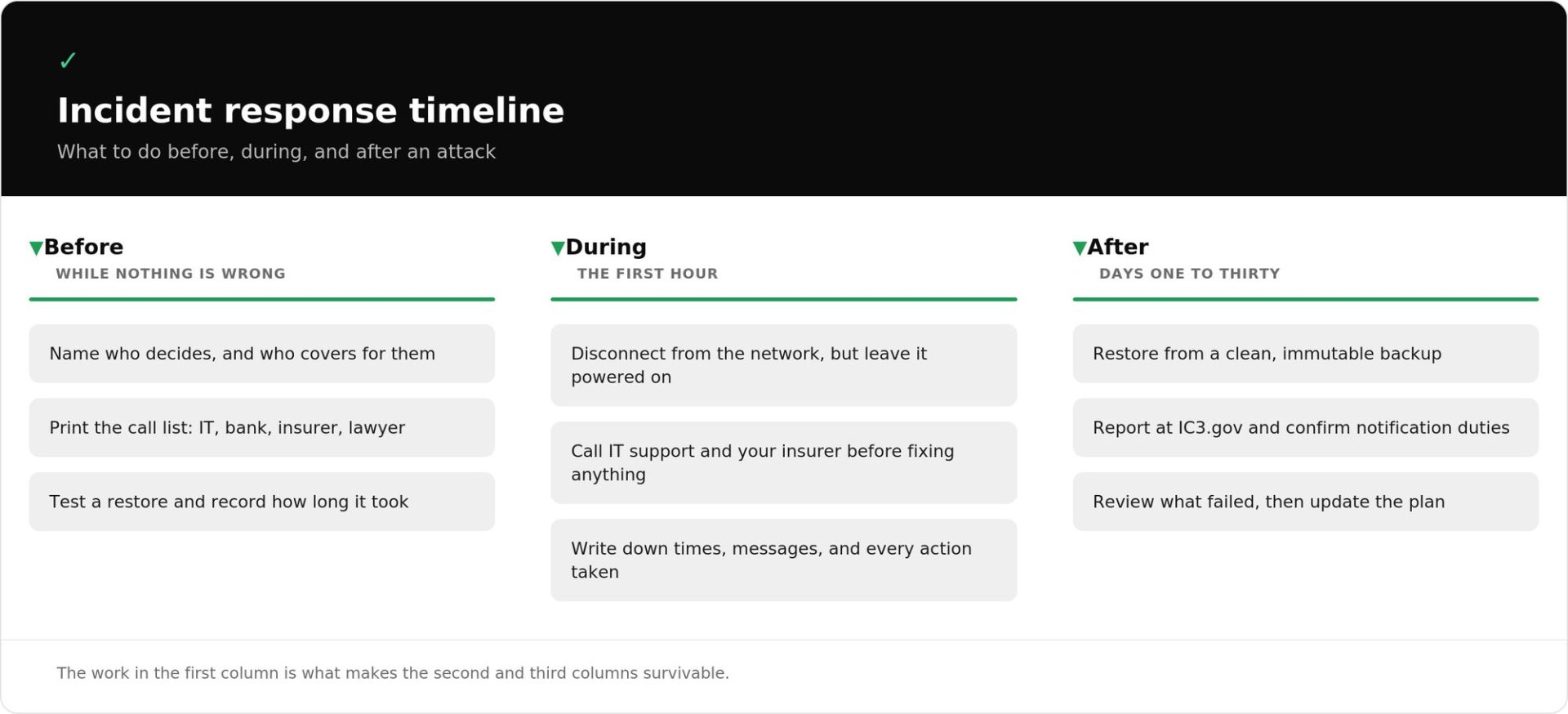
An incident response plan records who does what when something goes wrong, written before it does. Without one, you’ll improvise under pressure, possibly with your email unavailable, and that’s where recoverable incidents turn into breaches.
A minimum viable plan for a small business fits on one page:
- Who decides? One named person who can authorize taking systems offline, plus a backup for when they’re unreachable.
- Who to call: Include IT support, bank, insurer, lawyer, and backup provider, with phone numbers rather than email addresses.
- What gets shut off first? Decide in advance rather than argue about it live.
- Establish how you communicate when company email may be compromised, and who speaks to customers and staff.
- What “recovered” means: Which systems must be running for the business to operate, and in what order should they come back.
The First Hour
- Disconnect the device from the network, but don’t power it off. Shutting down can destroy evidence about what happened.
- Call for help before you start fixing things. Your insurer often requires notification first and may have a panel of responders you’re expected to use.
- Write down what you saw and when. This includes times, error messages, affected accounts, and every action taken.
On Paying a Ransom
Law enforcement discourages it, and payment doesn’t guarantee recovery. Beyond that, it’s a decision for your insurer and your lawyer. What matters now is that the decision only exists if you can’t restore, so a tested, immutable backup takes the question off the table.
Notification
Report to the FBI’s Internet Crime Complaint Center at IC3.gov and involve local law enforcement. Notify your insurer promptly, since policies commonly set short reporting windows. Customer notification requirements vary by state and by data type, so confirm yours with a lawyer rather than assuming one national rule.
Cyber Insurance and Customer Security Requirements
Most small businesses formalize their security because someone outside the company asked them to. An insurance application arrives with a control questionnaire, or an enterprise customer might send a vendor security review. Both of these are answered from the same documentation.
Insurers now ask which specific controls are in place, including MFA, backup and recovery, patching, training, and a written incident response plan. Answering yes isn’t the whole job, since applications signed and a control you claimed but don’t operate can become a problem at claim time.
Good news is, you’ve already done most of the work. Your inventory answers the asset questions, your access review answers the permissions questions, and your restore test answers the recovery questions.
Coverage terms vary. The Federal Trade Commission publishes plain-language guidance on cyber insurance for small businesses at ftc.gov, and your broker can confirm what your policy requires.
Keeping Your Plan Current
Security drifts because the business changes and the plan doesn’t. Review everything once a year, and additionally whenever any of these change:
- People: Someone joins, leaves, or changes role.
- Systems: You adopt a tool, retire one, or replace hardware.
- Vendors: You add a provider, drop one, or connect two tools together.
- Premises: You move, add a location, or change how people work remotely.
The annual review is short if you’ve kept up. Re-run the access review, confirm backups still restore, check that automatic updates are applying rather than silently failing, and reread the plan to see whether the names and phone numbers are still correct.
What changes fastest isn’t the technology; it’s who can reach your systems.
How Can Veeam Help?
Veeam’s role here is narrow: Making sure that when something does get through, you can get your data back. It isn’t your firewall, your email filtering, or your training program.
For businesses running their own servers and workstations, Veeam Data Platform covers backup and recovery across VMware vSphere, Microsoft Hyper-V, Proxmox, Nutanix AHV, physical servers, workstations, and cloud workloads from a single console. It comes in three editions that build on each other: Foundation for backup and recovery, Advanced adding observability and AI-powered threat detection, and Premium adding recovery orchestration and compliance reporting. Essentials packaging covers environments up to 50 workloads. You can compare editions and start a free trial from the pricing page.
The off-site immutable copy described earlier is where Veeam Data Cloud Vault fits. It’s fully managed cloud storage purpose-built to receive Veeam backups, immutable and logically air-gapped from production by default with no locking step to configure. Pricing is flat per terabyte with API calls, restores, and egress included, so a recovery doesn’t arrive with a surprise cloud bill.
For the SaaS gap above, Veeam Data Cloud for Microsoft 365 covers Exchange, SharePoint, OneDrive, Teams, and Entra ID as a Veeam-hosted service, with backups held separately from your tenant and service-level immutability on the primary backup included at no additional cost.
Which combination fits depends on where your data lives, which you worked out during the assessment. To go further on prevention, see our guide to proactive cybersecurity and the small business solutions page.
FAQs
Because small businesses are easier to reach, not because their data is worth more. Attacks are largely automated and opportunistic, and a small business can also be a route into a larger partner or customer network.
Customer payment and personal information, employee and payroll records, and login credentials. Credentials are the most consequential, because they give an attacker access to everything else rather than just one dataset.
Operational downtime, direct financial loss, regulatory exposure depending on the data involved and your state’s rules, and lasting damage to customer trust. The missing plan mostly drives downtime, since recovery time is set by decisions made beforehand.
There’s no reliable single average, and Verizon’s 2026 Breach Impact Study declines to publish one on purpose. Working from roughly 70,000 US cyber insurance claims, it puts the median impact on a small or midsize business at about $38,000, with losses reaching as much as 7% of annual revenue in the most extreme cases.
Cybersecurity is the work of preventing attacks from succeeding. Cyber resilience is the ability to keep operating and recover quickly when one does, which rests almost entirely on whether your backups are immutable, current, and tested.