- Veeam Support Knowledge Base
- Job fails with error "The operation is not allowed in the current state."
Job fails with error "The operation is not allowed in the current state."
| KB ID: | 1296 |
| Product: | Veeam Backup & Replication |
| Published: | 2011-10-13 |
| Last Modified: | 2025-01-31 |

Cheers for trusting us with the spot in your mailbox!
Now you’re less likely to miss what’s been brewing in our knowledge base with this weekly digest

Oops! Something went wrong.
Please, try again later.
Challenge
A task fails for a vSphere Virtual Machine that is being processed by Veeam Backup & Replication with the error:
Error: The operation is not allowed in the current state.


Cause
"The operation is not allowed in the current state." is being reported to Veeam Backup & Replication by the vSphere Environment when Veeam Backup & Replication sends the request that a snapshot be created.
Solution
As this issue has to do with the inability to create a snapshot on the virtual machine within the vSphere Environment, the resolution will be to determine what is preventing a snapshot from being created. Once a snapshot can be manually created on the VM (remember to remove it). The Veeam Backup & Replication job will work without issue.
Observed possible causes:
- VM is stuck in shutting down state.
- VM is in the middle of being Storage vMotioned
- VM has a A PCI device is attached.
Related VMware KB article: https://knowledge.broadcom.com/external/article?legacyId=1027707
More Information
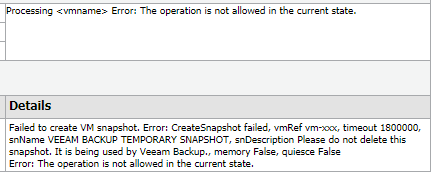
This error can be found in the log file: %programdata%\Veeam\Backup\<jobname>\Task.<vmname>.<moref>.log
Error    Failed to create VM snapshot (Veeam.Backup.Common.CRegeneratedTraceException)
Error    CreateSnapshot failed, vmRef vm-xxx, timeout 1800000, snName VEEAM BACKUP TEMPORARY SNAPSHOT, snDescription Please do not delete this snapshot. It is being used by Veeam Backup., memory False, quiesce False (System.Exception)
Error    The operation is not allowed in the current state. (Veeam.Backup.ViSoap.ViServiceFaultException)
Error    VimApi.InvalidState
If this KB article did not resolve your issue or you need further assistance with Veeam software, please create a Veeam Support Case.
To submit feedback regarding this article, please click this link: Send Article Feedback
To report a typo on this page, highlight the typo with your mouse and press CTRL + Enter.
