

Key takeaways
- A DRP is a documented, tested recovery procedure, not a backup policy.
- It is narrower than a business continuity plan and different from an incident response plan.
- Every plan contains the same core elements regardless of size.
- Organizations keep a library of plans, since one plan cannot be tested or kept current.
- Ransomware changes what recovery means, because the backup itself may be compromised.
Your backups are running. That isn’t the same as being able to recover.
A disaster recovery plan (DRP) is a formal document that specifies the sequence of actions required to restore a defined IT system to a defined working state within a defined time. It names the system, the owner, the recovery targets, the components, the steps, and the checks that confirm the service works.
For most IT teams, the gap isn’t backup coverage. It’s that nothing documents who does what, in what order, and how to confirm the recovery worked. Veeam’s Data Trust and Resilience Report 2026 found that 90% of organizations are confident they can recover within their recovery time objectives, yet among those hit by ransomware, only 28% fully recovered all affected data. Confidence and proof are different capabilities.
This guide covers what a DRP contains, how it differs from adjacent plan types, what happens when one is executed, and how to test it.
What is a disaster recovery plan?
A disaster recovery plan is scoped to IT systems and data, and it’s operational rather than strategic: it tells someone what to do, in what order, and how to know when they’re finished.
This is where the difference between backup and recovery becomes concrete. A backup is a copy of data. A DRP is the instruction set that turns that copy into a working service, covering the order components come up in, the dependencies that must exist first, and the checks proving the application works rather than merely powers on. Broader disaster recovery strategy sets direction. The plan is what gets executed.
One constraint shapes almost every decision in a plan: a DRP is written to be executed by someone who didn’t write it and may not know the application. That’s why plans name owners explicitly, write steps as scripts, and spell out validation. If a plan only works when its author runs it, it’s a note to self.
DRP vs. business continuity plan vs. incident response plan
Readers use these terms interchangeably, and the confusion has consequences: teams write one document, assume it covers all three jobs, then discover mid-incident that nobody defined who declares a disaster.
|
|
Disaster recovery plan |
Business continuity plan |
Incident response plan |
|
Scope |
IT systems and data restoration |
Whole-organization operations and facilities |
Containment and investigation of a security incident |
|
Trigger |
A critical system, application, or site goes down |
A disruption threatens product or service delivery |
Detection of a compromise or malicious activity |
|
Owner |
IT, with the system owner setting acceptable loss |
Business leadership, often with risk |
Security, with legal and executive escalation |
|
Success |
Restored, validated, and in service within its RTO |
Critical functions keep running or resume on schedule |
Threat contained, scoped, and evidence preserved |
The relationship is nested. The business continuity plan covers the organization, the disaster recovery plan sits inside it and covers IT restoration, and the incident response plan runs alongside both. One ransomware event can activate all three.
At smaller organizations all three often live in one document. That’s fine, as long as the IT restoration steps stay separable and testable on their own.
The core elements of a disaster recovery plan
Every plan contains the same core elements, whether it covers a file server or a multi-tier ERP system. Size changes the document’s length, not its structure.
|
Element |
Why a recovery fails without it |
|
Plan name |
Teams reference plans by memory and the wrong one gets executed |
|
System or application covered |
Ambiguous scope is how components fall between plans and get recovered by nobody |
|
System owner and contact |
Decisions needing the owner’s judgment stall when the plan lists someone who left, or nobody at all |
|
Declaration criteria |
Without a documented threshold and named authority, teams spend the first hour debating whether this counts |
|
RTO and RPO |
Whoever executes needs to know the clock they’re working against |
|
Component inventory |
Recoveries fail on the component nobody documented, rarely the application server |
|
Dependency mapping |
Skip it and you restore an application into an environment where nothing can authenticate |
|
Recovery steps per component |
“Restore the database” is a summary. A step is something a stranger can perform |
|
Validation and verification steps |
Without them, teams declare success on a component that merely powered on |
|
Escalation and notification list |
Undocumented notification leaves stakeholders in the dark, or stops recovery for updates |
|
Revision history |
How you tell whether the plan still describes your environment, and the fastest audit evidence |
Name an owner per plan and a backup for every role, since a plan depending on one person is a single point of failure with a pulse. Roles and team structure are covered in our disaster recovery plan guide for small businesses. Then have it reviewed by someone unfamiliar with the system.
Types of disaster recovery plans
One plan for the whole business would be too large to test, execute, or keep current. Organizations keep a set instead, along two axes that are easy to confuse.
Plans organized by what failed
The first axis is failure scope.
- Component-level plans cover one piece of infrastructure, such as a storage array. Narrow, technical, and mainly there to document the order of operations.
- Application-level plans cover one application and are the workhorse of most DR programs, since owners know their startup order and audit needs.
- Site-level plans cover the loss of a location, and are mostly an index: which applications recover, in what priority.
Plans organized by what is being recovered
The second axis is asset class. Each type carries a distinct constraint, which is why one generic plan doesn’t work.
|
Plan type |
The distinctive recovery constraint |
|
IT disaster recovery plan (also called an information technology disaster recovery plan) |
Broad by definition, so it needs subordinate plans with real scope to be testable |
|
Data center disaster recovery plan |
Depends on physical capacity existing elsewhere before the event, not on procedure |
|
Network disaster recovery plan |
Everything else depends on it, so it recovers first or nothing validates |
|
Virtualized disaster recovery plan |
Recovery is fast and automated, which makes untested plans easy to trust |
|
Cloud disaster recovery plan |
Hinges on account and identity access, not hardware. If you can’t authenticate, the data doesn’t help |
|
SaaS or application data plan |
Depends on data the provider does not retain for you, the shared responsibility gap |
Cloud and hybrid mechanics differ from on-premises assumptions, covered in our guides to cloud disaster recovery and hybrid cloud disaster recovery. Most organizations keep a small library across both axes.
Disaster recovery procedures: what happens when a plan is executed
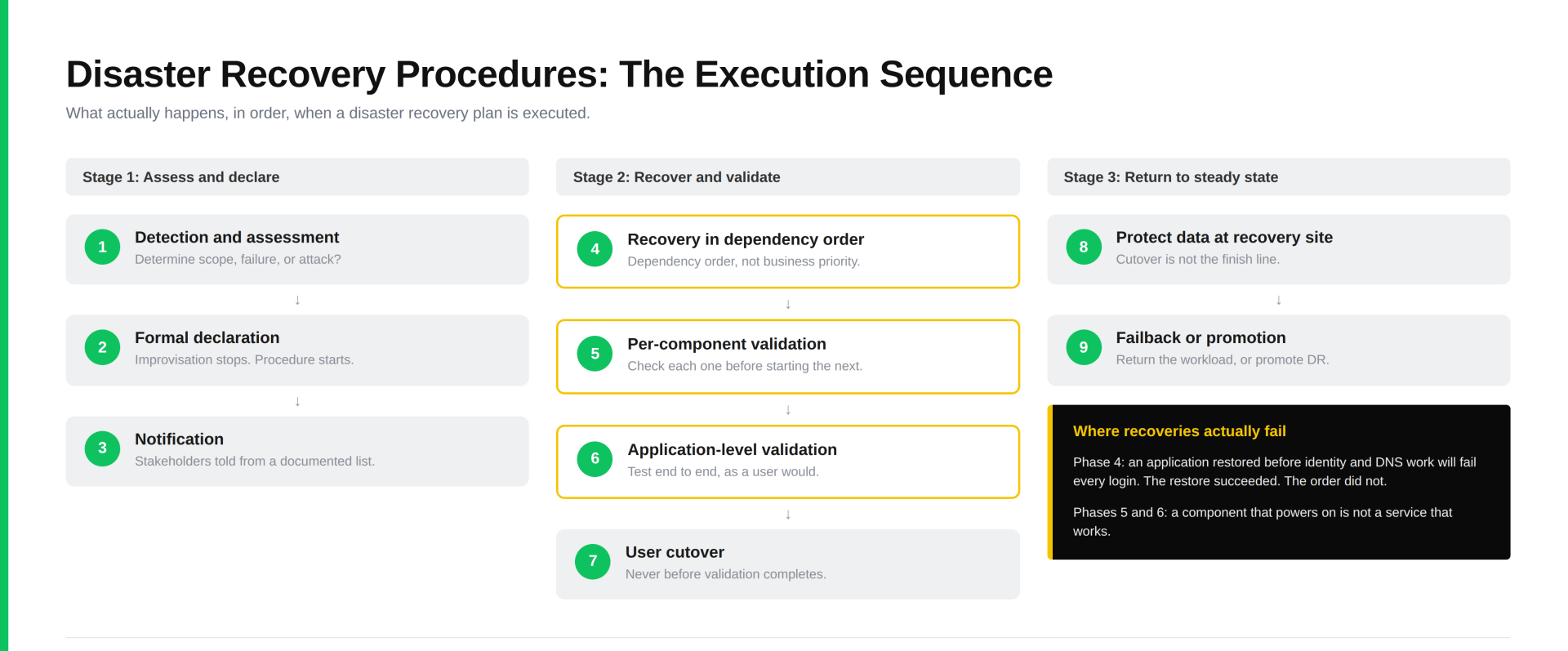
Most guides tell you what a plan should contain. Few tell you what happens when someone runs one, which is where recoveries succeed or fail. Disaster recovery procedures are the ordered phases from detection to restoration.
- Detection and assessment. Determine what’s affected and whether the cause is failure or attack. That distinction changes everything downstream.
- Formal declaration. An authorized person invokes the plan against the documented threshold. Improvisation stops and procedure starts.
- Stakeholders and application owners are told at the specified milestones, from a documented list.
- Recovery in dependency order. Components come back in the order the dependency map requires, not by business importance.
- Per-component validation. Each component is checked before the next starts. A bad restore caught early is cheap.
- Application-level validation. The service is tested end to end: a transaction, a login, a queue that drains.
- User cutover. Access is redirected and users are told they can work again, never before validation completes.
- Protecting data at the recovery site. Backups resume. DR sites often run unprotected for weeks because cutover felt like the finish line.
- Failback or permanent promotion. The workload returns home, or the recovery site becomes production. Both belong in the plan.
Why dependency order is where recoveries fail
Identity and DNS are the clearest example. Restore a business-critical application before Active Directory, Entra ID, or DNS resolution works, and it will come up and fail every login. To everyone watching, that reads as a failed recovery. The restore worked. The order didn’t.
The pattern repeats with certificate authorities, license servers, and message queues: each unremarkable alone, each blocking something more visible. Under pressure teams reach for the most important application first, which is why the dependency map belongs in the document.
Why validation is a distinct phase, not a final check
A component that powers on is not a service that works, and declaring success on the former is the most common recovery error. The VM is green, the console responds, the dashboard looks healthy. None of that confirms the application functions. Treating validation as its own phase surfaces problems early and forces criteria to be written while people are calm rather than improvised at 3 a.m.
Procedures are written as scripts for the same reason: the person executing may not have written the plan or know the application, so consistent structure keeps the recovery from depending on a specific expert.
DRP in cybersecurity: why ransomware changes the plan
Traditional disaster recovery rests on one assumption: the data is intact and the infrastructure failed. Ransomware inverts it. The infrastructure may be healthy while the data is deliberately corrupted, and the recovery target may itself be compromised.
The mechanism is dwell time. Attackers operate inside an environment before triggering encryption, and your backups run faithfully through that window, capturing the compromised state. A backup predating detection is not automatically clean, and the restore point that looks safe may sit inside the intrusion.
Three controls matter here, and they are not the same thing. Immutability means backup data can’t be altered or deleted during its retention period, even by an administrator with valid credentials, which defends against tampering. An air gap removes network reachability between production and at least one backup copy, which defends against lateral movement. Encryption makes the data unreadable without the key, which defends against exfiltration.
None of the three substitutes for the others. An immutable copy on a reachable network can’t be altered, but it can still be found and copied, and stolen data stays leaked whether or not you recover cleanly. An air-gapped copy without immutability can be corrupted by anyone with legitimate access. An encrypted copy that can still be deleted protects confidentiality but not availability. All three sit inside a broader 3-2-1 backup strategy.
A cyber-aware plan also adds four things: a defined last known good point, malware scanning of backups before restore, restoring into an isolated environment rather than a live one, and a security hold clearing the restore before user cutover.
That creates a sequencing conflict worth naming in advance. Incident response wants to preserve evidence and contain the threat, while disaster recovery wants to restore service. The plan should state which takes precedence and who decides. Our guide to ransomware recovery covers how they coordinate.
Setting RTO and RPO for each system
The recovery time objective (RTO) is how long a system can be unavailable before the impact becomes unacceptable. The recovery point objective (RPO) is how much data loss is acceptable. Both are defined in depth in our guide to recovery time and recovery point objectives, so here’s the decision most teams get wrong.
These are per-system values, not one organizational number. A blanket target either overspends on systems that don’t need it or under-protects the ones that do. Order processing might carry an RTO of one hour and an RPO of 15 minutes, demanding replication and automated failover. An internal knowledge base might sit at 48 and 24 hours, where a nightly backup is adequate. Same company, different impact.
Here’s the connection readers miss. RPO determines backup frequency. RTO determines recovery method. A nightly backup can’t meet a 15-minute RPO no matter how fast the restore, because the data doesn’t exist. These values dictate architecture rather than describe it.
Set them with the system owner, who defines acceptable loss, while IT defines the method that delivers it. Then put both numbers at the top of the plan.
How to test a disaster recovery plan
An untested disaster recovery plan is a hypothesis. Most organizations manage a real test once or twice a year at best, and restoring a single server is the most common version. That proves your backup software works, not your plan.
|
Test type |
What it validates |
Cost to run |
|
Tabletop walkthrough |
Whether documentation is complete, understandable, and correctly sequenced |
Low |
|
Component restore |
Whether an individual system can be recovered, and how long it takes |
Low to moderate |
|
Isolated full failover |
Whether the full stack comes up in order and passes validation |
Moderate to high |
|
Unannounced live failover |
Whether the plan works unprepared, with whoever is available |
High |
Run tabletops and component restores often, isolated failovers annually, and unannounced tests once the first three pass consistently.
Define pass and fail before you start. A test passes when the documented RTO and RPO are met, every validation step completes, and no undocumented improvisation was required. That last criterion is the one teams resist and the one that matters most.
Tie cadence to change rather than the calendar: an annual full test, plus a component test whenever the application changes materially. And the value of a test is the list of things that didn’t work. No findings usually means it was too narrow.
Keeping your disaster recovery plan current
Plan documentation is accurate the day it’s written and drifts from there. IP addresses change, dependencies get added, hostnames are reassigned, and staff leave while their names stay in the contact list.
This is the most common reason plans fail in a real event, and the failure mode is specific. The plan wasn’t wrong. It described an environment that no longer exists, so the team follows correct instructions into a configuration that changed months ago.
Four controls keep drift in check: a named owner per plan rather than a team, since shared ownership produces no ownership; a review trigger tied to change management, because change gates don’t get dismissed the way calendar reminders do; revision history; and testing, the only mechanism that surfaces drift you didn’t know about.
One structural option is worth knowing: plan documentation can be generated from the live environment rather than maintained by hand, which stops drift being a discipline problem.
How to start building your disaster recovery plan
Starting from nothing, the sequence matters more than the sophistication.
- Inventory your systems. Know what you have before deciding what to protect.
- Assess business impact. Determine what each system’s downtime actually costs.
- Set RTO and RPO per system, with the system owner.
- Document the plan, one per application or system.
- Test it, starting with a tabletop.
Our disaster recovery plan guide for small businesses walks the full build step by step and includes a template you can start from.
How Veeam helps
Two problems in this guide are documentation problems rather than technology problems: plans drift out of alignment with the environment and go untested because testing is expensive.
Inventory is where this starts, and it’s the step most teams do by hand. Veeam ONE, part of Veeam Data Platform, includes prebuilt inventory and infrastructure overview reports that document the current configuration of your virtual and backup infrastructure for audit purposes, along with topology views covering hosts, clusters, VMs, disks, and networks. That output maps directly to two of the plan elements above: component inventory and dependency mapping.
Veeam Recovery Orchestrator, part of Veeam Data Platform Premium Edition, generates recovery plan documentation from the live environment, including runbooks, test outputs, timing, and outcomes. The plan describes what’s deployed because it’s built from what’s deployed.
It also runs automated DR tests against live backup data in an isolated environment with no production impact, each producing a detailed recovery report. That changes the economics: testing after every material change becomes realistic, and those reports are the evidence auditors and cyber insurers ask for. Application verification confirms applications function correctly after recovery rather than merely powering on, and Veeam Recovery Orchestrator adds cleanroom recovery for validating readiness in isolation.
If ransomware is driving your planning, start with our SMB guide to ransomware recovery. To see recovery executed rather than described, watch the Veeam Data Platform demo.
Frequently asked questions
Usually, though rarely in a prescribed format. Most frameworks and cyber insurers require a documented and tested recovery capability rather than a specific structure. The hard part isn’t proving a test happened, it’s the testing itself: finding the time, running a true end-to-end exercise rather than a single restore, and documenting specific results. “This server was restored” is weak evidence. “Licensing validated, services confirmed running, test transaction completed within the documented RTO” is what demonstrates a tested capability.
Length is the wrong measure and testability is the right one. A 200-page plan covering the whole environment can’t be executed under pressure or kept current. Several short per-application plans, each testable alone, beat one long one.
The system owner defines acceptable loss, meaning RTO and RPO, since that’s a business judgment about impact. The IT owner defines the recovery method that delivers those targets. Confusion between the two is why some plans have targets nobody can meet.
Yes, and it looks different. Provider uptime is not your data recovery. Under the shared responsibility model, providers guarantee infrastructure availability while your data, configuration, and identity stay yours. A deleted record or compromised admin account isn’t an infrastructure failure, so cloud plans shift to account, identity, and configuration recovery.
The DRP is the scoped plan and the runbook is the executable step sequence inside it. The plan carries the objectives, ownership, declaration criteria, dependency map, and validation requirements. The runbook performs the recovery, but won’t say when to run it or who authorizes it.
