

Key Takeaways
- It’s important to name what can realistically go wrong, putting hardware failure and accidental deletion ahead of natural disasters in your plans.
- Run a scaled-down business impact analysis where you uncover three to five functions that stop revenue or block customer service.
- Assign ownership to two or three named people. Documented responsibility matters more than headcount.
- Set a recovery time objective and recovery point objective (RTO and RPO) per system, not one target for the whole business, then sort those systems into tiers.
- Fill in the template below, then test it yearly by restoring one critical file and timing it.
Most small businesses don’t lose their data to a hurricane or other natural disaster. They lose it to a failed drive, a deleted folder, or a ransomware attack on an ordinary Tuesday.
A disaster recovery (DR) plan is a formal process that documents the steps your IT department needs to take to mitigate the effects of a disaster and resume normal business operations in the shortest amount of time that’s practical.
You don’t need a dedicated DR team or a big budget to do this. This guide covers the nine steps a small business can realistically apply, the tools and strategies that keep IT running during and after a disaster, and a fillable template you can copy into your own plan.
Why Small Businesses Need a DR Plan
Small businesses run on the same critical systems as large enterprises do but carry far less financial cushion when systems go down. Sales, procurement, finance, and HR all depend on IT. The same outage that a large company can shrug off can shut down a nine-person business for a week.
These threats split into two categories: Physical and cyber threats. Physical ones are pretty familiar, like storms, flooding, fire, and the far more common failed drive. Cyberthreats, however, are growing the fastest, and at a small scale, they usually arrive in three forms: Ransomware that encrypts your files and demands payment, phishing that tricks someone into handing over their credentials, and unpatched software that an attacker exploits from outside. All three of these cyberthreats end the same way, with your data out of reach.
Verizon’s 2026 Data Breach Investigations Report analyzed more than 22,000 confirmed breaches across 145 countries. Ransomware appeared in 48% of them, which is up from 44% previously. Exploitation of software vulnerabilities also overtook stolen credentials as the most common way in, reaching 31%. That shift lands hard at a small scale, because patching is the first task to slip when nobody owns it full time.
There’s better news underneath, though. 69% of ransomware victims didn’t pay, and the median ransom fell to $139,875 from $150,000. More organizations refuse to pay because more can recover without paying. That ability to say no is what a DR plan buys you, and it’s why small business ransomware is now survivable rather than fatal.
Creating a Small Business DR Plan: Key Components and Steps
A small business DR plan comes together in nine steps, and you can work through them in order. Each step produces something the next step uses, so by the time you reach the template in step 7, most fields are already filled in.
1. Identify Potential Disasters
Start by listing what can actually go wrong, from natural disasters such as earthquakes, floods, and storms through supply chain disruptions, cyberattacks, and technological failures.
Put hardware failure and accidental deletion at the top of your list. They’re the least dramatic entries, but are by far the most likely reason you’ll ever open this plan: A drive dies, someone empties a shared folder, a laptop with the only local copy goes missing. Ranking these items by likelihood rather than severity keeps your planning proportionate to the risks you’ll actually face.
2. Conduct a Business Impact Analysis
A business impact analysis tells you which parts of the business will hurt most when they stop. It focuses on critical functions such as operations, product delivery, service delivery, and financial management, thus turning a vague sense that everything matters into an actionable and ranked list.
A full business impact analysis has ten phases:
- Identify critical business functions, the ones revenue or customers depend on.
- Identify potential disruptions and map them onto those functions.
- Assess impact severity in lost revenue, missed obligations, and reputation.
- Set RTOs for each function.
- Prioritize functions so you know the restore order in advance.
- Identify dependencies like systems, vendors, data sources, and people.
- Gather input from the people who actually run each function.
- Document results in a form the rest of the plan can reference.
- Develop a business continuity plan covering staffing, facilities, and operations.
- Review and update regularly, because a stale business impact analysis will produce a stale recovery order.
On a small scale, a much shorter exercise gets you most of the value. Name the three to five functions that stop revenue or block customer service, then score each on one question: How long can this be down before it genuinely hurts? Taking payments, delivering the product, and answering customers usually make the list. Internal reporting doesn’t. That short version is enough at this size, and treating the full ten-phase process as the standard is the most common reason small businesses end up starting but never finish a business impact analysis.
3. Create a DR Team
At this scale the DRteam is usually two or three people, sometimes the owner plus whoever knows the server best. That’s fine. The goal is documenting ownership, not headcount, as long as every recovery responsibility has a name attached before an incident starts, so nobody spends the first hour working out who does what.
Keep that ownership real with training:
- Familiarization with the plan
- Role-specific training
- Scenario training
- Cross-training so people can cover each other
- Disaster planning documentation
- Simulation drills
Roles and Responsibilities
The table below is the full reference model. Larger organizations staff these as ten distinct roles, and it’s a useful checklist for the work a recovery requires even if you’ll never fill them all.
|
Role |
Responsibility |
Role |
Responsibility |
|
Disaster Recovery Leader |
Oversees and manages the overall DR effort. |
HR and Employee Support |
Coordinates employee well-being and support during a disaster. |
|
IT Specialist |
Handles IT systems, networks, and data recovery, and ensures critical systems are restored within defined RTOs and RPOs. |
Finance and Resource Manager |
Manages budget allocation and expense tracking during recovery. |
|
Data Backup and Recovery Specialist |
Maintains and restores data backups. |
Documentation and Records Manager |
Keeps records of all DRP activities, test results, and incident reports. |
|
Communication Coordinator |
Manages internal and external communications during and after a disaster. |
Vendor and Supplier Liaison |
Maintains vendor relationships and confirms vendors have their own DR plans. |
|
Facilities and Physical Asset Manager |
Oversees recovery of physical assets, facilities, and infrastructure. |
Logistics and Resource Coordinator |
Manages recovery logistics including transportation and supply chain. |
For a business with five to 30 employees, those ten roles collapse into three.
|
Consolidated Role |
Absorbs |
What This Person Owns |
|
Recovery Lead |
DR Leader, Finance and Resource Manager, Documentation and Records Manager |
Calls the incident, decides restore order, approves spending, and keeps the record of what happened and what was tested. |
|
Technical ead |
IT Specialist, Data Backup and Recovery Specialist, Facilities and Physical Asset Manager |
Runs the restores, verifies backups, and handles hardware and premises issues. |
|
Communications Lead |
Communication Coordinator, HR and Employee Support, Vendor and Supplier Liaison, Logistics and Resource Coordinator |
Talks to staff, customers, vendors, and insurers. |
Write down who holds each responsibility. Then add one line stating that any responsibility not explicitly assigned falls to the recovery lead. That sentence prevents a task sitting untouched because everyone assumes someone else did it.
4. Solidify Your Toolset
List the infrastructure your recovery depends on, component by component. Working through it in order also shows where to spend first when budget is tight. This may include:
- On-premises and cloud infrastructure. Know what runs where. Non-negotiable.
- Data backup and storage. This is the highest-value item here since everything below assumes a working backup. Non-negotiable.
- Software inventory. Versions, license keys, and vendor contacts, since a restore means reinstalling under pressure. Non-negotiable.
- Business continuity software. A written plan and a phone tree cover the same ground at a small scale. Optional to start.
- Security software. Endpoint protection and multi-factor authentication (MFA) reduces how often you need the plan at all. Non-negotiable.
- Customer communication tools. Decide now how you’ll reach customers if your usual channels are down. Non-negotiable.
- Backup power. A UPS on the equipment that matters buys a clean shutdown. Generators can wait. Partially optional.
- Physical security. Locks, access control, and knowing who can reach your hardware. Scale to your premises.
- Emergency response plan. People and safety first, systems second. Non-negotiable.
- Financial plan. Know what you can spend mid-incident and who authorizes it. Optional to formalize but be sure to decide.
For backup, the organizing principle is the 3-2-1 rule: Three copies of your data, on two media types, with one offsite. It’s the most actionable framework at this budget level, and the offsite copy is what survives a fire, a flood, and ransomware that reaches everything on your network.
5. Develop Communication Strategies
Plan communication before you need it. Document roles, maintain updated emergency contact lists, use multiple channels, prioritize which messages go first, designate a single external spokesperson, establish a chain of command, set remote work policies, and train your employees on all of it.
One instruction matters more than the rest: Keep a copy of your contact list outside the systems that might be down. A list that lives only in the email system you’re restoring is not a contact list. Print it or keep it on a phone and make sure at least two people have it.
6. Establish Recovery Objectives
RTOs and RPOs determine how quickly you need systems and data back after a disruption.
RTO: The maximum acceptable downtime for a critical function or system, a.k.a. the window within which it should be restored.
RPO: The maximum allowable data loss measured in time, or the point to which data must be recovered. Consider data value, storage capacity, and backup frequency.
Your RTO and RPO should align with your business’s needs, risks, and resources. Set them per system, not once for the whole business. A single company-wide target either sets an unaffordable standard for systems that don’t need it, or an unsafe one for the systems that do. Your payment processing and your internal wiki don’t deserve the same urgency.
Prioritizing Systems by Recovery Tier
Once every system has an RTO and RPO, group them into tiers. Tiering turns a list of objectives into a restore order.
- Tier 1: Mission critical. This is restored first. Systems that stop revenue or halt customer service the moment they’re unavailable.
- Tier 2: Important. Restored within 24 to 48 hours. The business functions without them, awkwardly, for a day or two.
- Tier 3: Everything else. Restored last, once the business is running again.
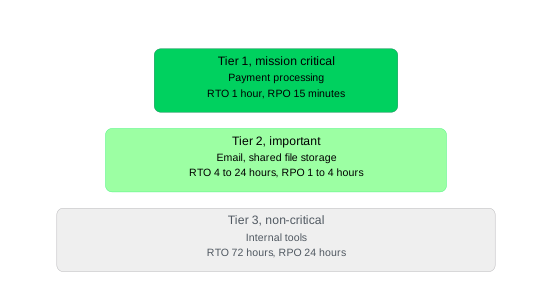
Here’s how that looks for four systems that a small business would actually run:
|
System |
Tier |
RTO |
RPO |
Why |
|
Payment processing |
1: Mission critical |
1 hour |
15 minutes |
Every minute down is revenue you don’t collect. |
|
|
2: Important |
4 hours |
1 hour |
Customers can’t reach you, but the business keeps operating. |
|
Shared file storage |
2: Important |
24 hours |
4 hours |
Work slows, though most teams have local copies of active files. |
|
Internal tools |
3: Non-critical |
72 hours |
24 hours |
Reporting and admin can wait until customer-facing systems are back. |
Your systems will differ but the pattern usually doesn’t. Anything that takes money or serves customers lands in tier 1, communications in tier 2, and internal tools in tier 3.
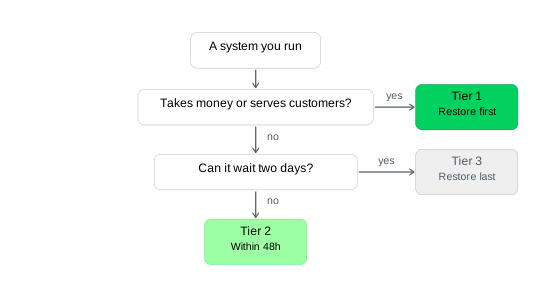
Tiering is what makes the plan executable under pressure. It moves the decision about what to restore first out of the incident response, when you’ll be tired and fielding calls, and fosters a calm moment in advance. During the outage, your team can read the order of operations off the page and start working.
7. Document the Plan: Small Business DR Plan Template
A written plan does one job: t lets someone who isn’t you start the recovery. It must name the systems, say who owns each, state how fast each needs to come back, and give the first concrete step. If your plan can’t survive its author being unreachable, it isn’t finished.
Documentation matters more at a small scale, not less. A large organization has redundancy in its people. A nine-person business often has exactly one person who knows how the backup job is configured, and the plan turns that knowledge into something the business owns.
Copy the table below into a spreadsheet or document and fill it in.
DR Plan Template
|
System or Function |
Owner |
Recovery Tier |
RTO |
RPO |
Restore Source |
First Recovery Step |
|
Payment processing |
Recovery lead |
1: Mission critical |
1 hour |
15 mins |
Provider status page, cloud backup |
Check provider status, then fail over to backup payment method |
|
|
Communications lead |
2: Important |
4 hours |
1 hour |
Microsoft 365 backup |
Verify tenant access, restore affected mailboxes |
|
Shared file storage |
Technical lead |
2: Important |
24 hours |
4 hours |
Offsite backup copy |
Mount most recent verified backup, restore active project folders first |
|
Internal tools |
Technical lead |
3: Non-critical |
72 hours |
24 hours |
Offsite backup copy |
Rebuild after tier 1 and tier 2 systems are confirmed stable |
The italicized entries are just examples. Replace them with your own systems, people, and the targets you set up in step 6. Around the table, a finished plan needs four supporting sections:
- Contact list. Staff, key customers, and anyone who needs to know you’re down. This list should be kept outside affected systems.
- Vendor and account details. Support numbers, account numbers, and who’s authorized to open a ticket.
- Escalation path. Who declares an incident, who authorizes emergency spending, and when you call outside help.
- Last-tested date. When you last confirmed you could restore each system and how long it took.
If you can only fill in part of the table, fill in the tier 1 row and stop. A plan covering the one system that takes your money beats a blank template. Keep the whole thing simple enough to reproduce in a spreadsheet and remember that a printed copy in a drawer beats a perfect plan you can’t reach.
8. Integrate Business Continuity Plans
A DR plan restores technology. It doesn’t tell staff where to work if the office is unusable, or how you serve customers while systems come back. That’s what business continuity planning covers, and for a small business the two documents work best built together.
Integration extends the plan beyond IT to the whole organization’s ability to keep operating. It minimizes downtime across both, directs limited resources to what matters most rather than spreading them evenly, and improves communication and adaptability during a crisis. Practically, it often means adding two or three pages to the document you just built rather than starting a separate project.
9. Test and Update the Plan
An untested plan is a hypothesis. Testing turns it into something you can rely on, and it surfaces gaps while they’re still cheap to fix.
Test at least once a year, and again after any material changes to your infrastructure, vendors, or staff. Those triggers matter as much as cadence. A plan written around a server you no longer run, or a technical lead who left in March, will fail at the worst moment.
If you have no dedicated IT staff, start with the smallest test that proves something. Restore one critical file from backup and time it against the RTOs you documented. That takes an afternoon and tells you whether your plan is real.
It also surfaces the most common failure in small business DR: A backup that nobody has verified is actually restorable. Corrupted files, incomplete jobs, missing application data, and expired credentials all hide behind a green status until someone tries to restore. Finding out during a test costs an afternoon. Finding out during an incident can cost the business.
Debrief after every test and every real incident, update the document while it’s fresh, and record the date in the last-tested column.
Budgeting for SMB DR
Set aside part of your annual budget for DR, covering the plan itself, training, and equipment, and focus that spending on the most crucial parts of the business. Insurance is worth investigating too: Business interruption, property, and cyber policies can offset costs when a disaster hits, though premiums are an added expense.
For businesses with limited budgets and resources, outsourcing disaster recovery to a managed service provider (MSP) is a strong alternative. MSPs bring specialized expertise, current technologies, and awareness of evolving threats, giving you a tailored strategy without extensive internal investment, along with quicker response times and less downtime.
How Can Veeam Help?
We encourage small businesses to prioritize DR planning. At Veeam, our mission is to help every company keep running no matter what, and we’ve built solutions for small business needs including Veeam-powered DRaaS and managed backup and DR services.
- Veeam-powered DRaaS: Work with trusted service providers to build a plan that fits your needs and budget. Built on Veeam Data Platform, our partners support small business DR from plan development through testing, documentation, and full management.
- SMB backup and recovery solutions: Manage and shift infrastructure, storage, and backup restores as needed, and recover any data instantly, even across cross-platform workloads.
- Managed backup and disaster recovery services: Delivered through Veeam Cloud & Service Provider (VCSP) partners, giving you experts who proactively manage data protection, accelerate time-to-value, and reduce daily IT complexity.
When the CrowdStrike update took systems down worldwide in July 2024, Signal Financial Federal Credit Union had all financial services restored for its 23,000 members within two hours, while many far larger banks took half a day. As their VP of IT Nico Stein put it, “Our entire business continuity and DR plan revolves around Veeam.” It’s also a reminder that the disaster which finally tests your plan is rarely the dramatic one you pictured.
Your plan is only as good as the backup underneath it. Veeam’s small business solutions are built for lean IT teams with no dedicated backup administrator: guided setup, immutable backups, and verified recovery that confirms your backups will actually restore before an outage puts them to the test. See what that looks like for a business your size.
Explore solutions for small business
FAQs
A DR plan is IT-focused, including restoring systems, data, and infrastructure after a disruption. A business continuity plan is broader, covering the whole organization including staffing, facilities, customer communication, and how essential operations keep running while systems are down. In most organizations, the DR plan sits inside the BC plan as its technology component. The DR plan tells you how to restore the file server; the BC plan tells you what the team does for the two days it’s unavailable.
Yes, and the gap is bigger than most small businesses expect. A DR plan restores your technology but says nothing about where people work if the building is unusable, who handles customer inquiries while systems are down, or how you meet client commitments during the outage. At nine or 20 employees, the business continuity plan might be three pages appended to the document you already built.
Cut it down to three roles. Consolidate the ten standard roles onto three — a recovery lead, a technical lead, and a communications lead — with anything unassigned defaulting to the recovery lead. Shorten the business impact analysis to the three to five functions that stop revenue or block customer service. Start with a one-page checklist listing your critical systems, owners, recovery targets, and backup locations, then expand it into the full template above.