

Key Takeaways
- Ransomware hits small businesses hardest. SMBs made up 96% of ransomware victims of known size in the 2026 Verizon Data Breach Investigations Report (DBIR).
- The minimum backup floor is the 3-2-1-1-0 Rule, an immutable or air-gapped copy, tested restores, and multi-factor authentication (MFA) on the backup console.
- Attackers routinely target backups, so a backup only counts if it can’t be changed and you’ve proven it can restore.
- Protection works in layers: Prevention, backup and recovery, and incident response working together.
- A tight budget still covers the minimum. Start with MFA and restore tests, then add one immutable copy.
It’s a common misconception that small businesses do not get attacked by cybercriminals as often, but unfortunately, bad actors do not discriminate. According to Veeam’s 2023 Data Protection Trends Report, 85% of organizations were hit by at least one cyberattack in the previous year, and small businesses carry more than their share of the damage. In Verizon’s 2026 Data Breach Investigations Report, 96% of ransomware victims (where organization size was known) were small and mid-size businesses (SMBs) with fewer than 1,000 employees.
The consequences of SMB ransomware attacks are severe, and most small businesses can’t operate during a ransomware attack. Many also did’t have an incident response plan, and of those that did, nearly a third hadn’t tested their plans in six months. A high percentage of small businesses also report having to pay the ransom to regain access to their data.
Paying doesn’t guarantee recovery, either. Veeam’s 2026 Data Trust and Resilience Report found that fewer than one in three ransomware victims fully recovered their data.
While these small business ransomware statistics are worrying, those who take cyber resilience seriously are better prepared to resist cyberattacks. In this article, we’ll provide practical tips on how to assess your vulnerabilities, what to do to protect yourself against ransomware, how to recover from an attack without paying a ransom, and the minimum backup requirements every small business needs to have in place.
Key steps include implementing a ransomware response plan and ensuring your company has an affordable backup plan. A further layer of protection is ensuring you have immutable (i.e., unchangeable) backups stored offline that you can use for self-recovery.
Understanding Ransomware for Small Businesses
Cybercriminals understand that small businesses have limited financial and IT resources. They rely on this knowledge to extort SMBs since they believe SMBs don’t have many options for recovering their data.
Ransomware for Small Businesses
Ransomware is malware that cybercriminals use to lock users’ computers so they can’t gain admission to files and company systems. Hackers often encrypt files so users can’t access them without a decryption key. They also frequently threaten to release private and sensitive company information to the public to pressure victims into paying a ransom.
Unfortunately, paying a ransom doesn’t necessarily mean the end of an attack. In fact, Veeam’s 2026 Data Trust and Resilience Report found that among organizations whose cyber budgets didn’t increase, 52% paid a ransom, yet only 16% recovered all of their data.
Common Tactics Used by Cybercriminals
Cybercriminals use a variety of tactics to infect victims’ computers with malware. The most common forms of ransomware attacks against small businesses are:
- Phishing: Scam emails and text messages that trick users into supplying passwords and login credentials.
- Malicious email attachments: Emails with attachments that contain malware.
- Drive-by attacks: Malware downloaded from an infected website.
- Software vulnerabilities: Using unpatched vulnerabilities on servers to gain access to computer systems.
How Do Ransomware Attacks Affect Small Businesses?
Successful ransomware attacks on small businesses have devastating consequences. Small businesses have limited resources in terms of people and money, so they often can’t afford to be out of business for any period of time. Other challenges include reputational damage and the possibility of legal and regulatory action.
Financial Implications
Aside from the direct cost that comes with paying a ransom, small businesses can also face substantial recovery costs. This might include loss of income, the cost of hiring cybersecurity specialists to identify and remove ransomware, and expenditure to strengthen security. Plus, at the end of the day, there’s still no guarantee the business will be able to recover the data encrypted by cybercriminals. Veeam’s 2026 Data Trust and Resilience Report shows how wide that recovery gap is. Among organizations hit by ransomware, 56% said attackers succeeded in encrypting or exfiltrating data. Of those affected, only 28% fully recovered their data, while 44% recovered less than 75% of it.
Reputational Damage
Customers and suppliers quickly lose confidence following a ransomware attack, especially if hackers leak confidential company data. After an attack, there’s always suspicion, often rightly so, that the company was somehow negligent because it didn’t have secure data protection systems in place. A direct consequence of this loss of confidence is that the SMB’s customers will start to feel vulnerable and take their business elsewhere.
Legal and Regulatory Consequences
Depending on the jurisdiction and the extent of the breach, companies may also face multiple penalties from regulatory authorities, including:
- Fines for non-compliance or for failing to adequately protect data.
- Legal action in the form of individual or class action lawsuits.
- Regulatory investigations into the cause and extent of a breach.
- Remediation costs as part of taking corrective action for data vulnerabilities.
Companies are also often required to report data breaches to regulatory authorities and notify potentially affected parties. This only serves to compound the negative impact to a brand’s reputation when a data breach occurs.
Small Business Vulnerabilities
Small businesses account for between 40% and 50% of the GDP. In the U.S., over 99.9% of companies are SMBs. Having an entrepreneurial approach, most SMBs are privately owned and funded and have small management teams. This makes them more vulnerable to cyberattacks for several reasons, including:
- Limited IT expertise: Many SMBs rely on vendors to develop their IT systems and relatively few have dedicated IT teams. Of those who do, they still often have limited cybersecurity knowledge.
- Budget constraints: Small companies have limited resources and don’t have the money to spend on complex cybersecurity measures.
- Security gaps: SMB IT management often doesn’t have the expertise to implement concepts such as zero trust, MFA, and disaster recovery (DR) planning.
- Backups: Many small businesses don’t adhere to or know about the 3-2-1 backup rule, especially the requirements to encrypt backups and keep some copies offline or on separate systems.
How to Protect Your Small Business From Ransomware
Ransomware protection for small businesses is a multi-faceted process with three distinct layers. The first layer is to prevent an attack by strengthening your network against intrusion, the second is to implement a backup and recovery process, and the third is implementing an incident response plan.
Key steps include:
- Employee awareness training: Train employees to recognize and defeat potential cyberthreats and explain that hackers use various techniques to trick employees into providing login and security credentials. The most common trick is phishing, but other techniques include tricking employees into clicking malicious pop-ups and downloading infected software.
- Cybersecurity measures: Develop a coherent cybersecurity strategy for your business. Cybersecurity best practices include strong authentication and access controls, network security, data encryption, and endpoint protection.
- Backup and recovery plan: Have an effective backup and recovery plan, back up regularly, and keep multiple backups. Scan backups for malware and verify them by simulating the backup recovery process with an offline or virtual machine (VM), and always encrypt your backups.
- Incident response plan: Prepare a comprehensive ransomware response plan that specifies the steps to take in the event of an incident. Test and review your plan by simulating cybersecurity incidents and make sure each team member knows their role in containing, eradicating, and restoring services.
These layers work together. For the backup layer specifically, the next section sets out the minimum requirements your setup needs to meet.
Minimum Backup Requirements for Ransomware Protection
The minimum backup requirements for ransomware protection in a small business come down to four main controls: Following the 3-2-1-1-0 Rule, keeping at least one immutable or air-gapped copy, testing restores on a set schedule, and enforcing MFA on the backup console. Treat these as a foundation, not a wish list. They’re the controls governmental ransomware guidance consistently points to, and they’llgive you a clear answer when an insurer or MSP asks whether your backups are ransomware ready.
Backups need their own requirements because attackers know a clean backup is your fastest way out of having to pay. CISA warns that many ransomware variants try to find and delete or encrypt any backups they can reach. If your backups can be changed, they can be destroyed.
- Follow the 3-2-1-1-0 Rule. Keep at least three copies of your data on two different media, with one copy off-site and one copy that’s air-gapped, immutable, or offline. Then confirm there’s zero errors through backup verification. The 3-2-1-1-0 Rule builds on the classic 3-2-1 rule by adding the two controls that matter most against ransomware.
- Keep an immutable or air-gapped copy. At least one copy must be impossible to alter or delete for a set retention period, even if an attacker gains admin access to your backup console. Immutable backup storage locks the data in place, and air-gapping separates it from your network entirely. Either one gives you a copy the attacker can’t touch.
- Set a restore test schedule. A backup you’ve never restored is just an assumption. Test a restore at least once a year, and again after any major change to your infrastructure or IT staffing, such as a new server, a new managed service provider (MSP), or a departing admin. Automated verification lets you check this far more often without adding manual work.
- Turn on MFA for the backup console. Enable MFA on the backup console and every backup admin account, separately from the MFA on your email or VPN. Stolen credentials are one of the most common ways attackers get in, and someone with backup admin rights can delete your restore points before launching encryption.
How the Minimum Controls Map to Security Guidance
You don’t need to read four government frameworks to know whether you’re covered. The table below translates each control into what the main regulatory bodies ask for. You can use it to show an insurer, auditor, or MSP where your setup stands.
| Minimum Control | NIST SP 1800-11 | CISA #StopRansomware Guide | NCSC Ransomware Resistant Backups | FTC Small Business Guidance |
| 3-2-1-1-0 Rule | Back up data so you can restore systems to their last known good state. | Keep offline and encrypted backups of critical data. | Keep backups long enough to restore earlier, uncorrupted versions. | Keep offline, off-site, and encrypted backups of essential business information. |
| Immutable or Air-Gapped Copy | Store backups securely and check their integrity so your recovered data can be trusted. | Keep backups offline, because ransomware seeks out reachable backups. | Make backups resistant to tampering, overwriting, and deletion. | Keep copies offline. |
| Tested estores | Test backups periodically. | Regularly test that your backups are available and intact in a DR scenario. | Test restores regularly. | Not specified. |
| MFA on the Backup Console | Not addressed directly. | Use phishing-resistant MFA, especially on accounts that access critical systems. | Don’t let a single compromised account control all backup access, and alert on privileged actions. | Consider MFA. |
This list is the minimum, not the ceiling. Larger or more regulated organizations, and any business that holds sensitive customer data, should go well beyond it with more frequent testing, longer retention, and a documented, orchestrated recovery plan.
How Small Businesses Can Protect Backups on a Limited Budget
You don’t have to fund all four controls at once. If budget is tight, start with the controls that cost little or nothing, like MFA on the backup console and scheduled restore tests. Then add one immutable or off-site copy before you build out a full multi-tier backup setup. Done in that order, you can close the biggest gaps first.
The table below puts the minimum requirements in order of cost and impact, so you can roll them out in phases instead of treating them as one big upfront expense.
| Priority | Control | Typical Cost | Why It Comes First |
| Start Now | MFA on the backup console and backup admin accounts. | Often no extra cost if your backup software supports it. | Closes the easiest path an attacker has to deleting your backups. |
| Start Now | Scheduled restore tests using your existing backup tools. | Staff time. | Proves your backups can restore before you need them to. |
| Next | One immutable or off-site copy, such as immutable cloud object storage. | Low, ongoing storage cost. | Gives you a copy an attacker can’t encrypt or delete. |
| Plan and Budget | Dedicated air-gapped infrastructure and automated backup verification tools. | Added hardware, licensing, or service costs. | Raises confidence and cuts manual testing once the basics are in place. |
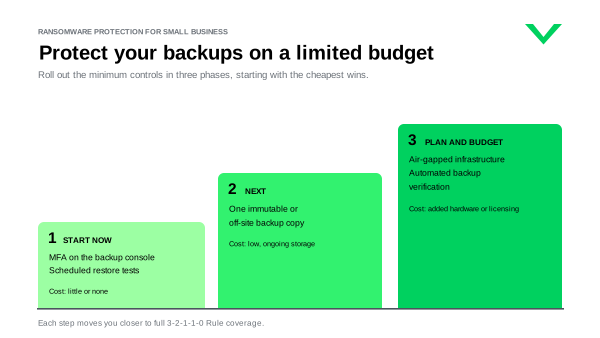
Each tier moves you closer to full 3-2-1-1-0 coverage. A business that’s done only the first two tiers is still far better protected than one with an untested backup sitting on the same network.
Free guidance helps, too. The CISA #StopRansomware Guide pairs prevention best practices with a step-by-step response checklist, and the NIST Small Business Cybersecurity Corner offers plain-language resources at no cost. Neither requires an enterprise tooling budget to put into practice.
Collaborative Ransomware Solutions
With the complexity of today’s modern infrastructure, it’s challenging for an SMB with a small IT department to keep track of all possible cybersecurity threats. However, you can largely overcome these limitations by networking with IT specialists and management from other companies, industry associations, and security providers.
Encourage your IT team to reach out to other IT managers at other companies in the area, including those you have a business relationship with. Set up task groups and meetings where you can discuss cybersecurity and share experiences and knowledge with one another.
Engage With Industry and Government Cyber Resources
Join industry associations to gain ongoing insights into cybersecurity issues. Examples include The Cyber Threat Alliance, the National Cybersecurity Alliance, and the Center for Internet Security. Federal resources include the FBI Internet Crime Complaint Center and the NIST Small Business Cybersecurity Corner.
Partner With Cybersecurity Providers
Consult with cybersecurity service providers and let them perform a cybersecurity analysis and identify the gaps in your environment. Contract with them to provide security and monitoring software, train employees on internet etiquette, and provide support services if you become a victim of a ransomware attack.
Ensuring Regulatory Compliance
Any small business domiciled in the EU or one that does business in those territories must comply with the EU General Data Protection Regulation (GDPR). These requirements strictly regulate data protection and data security and can impose huge penalties for data breaches, including data that’s made public due to cyber theft.
While there are no general or universal data protection laws in the U.S., numerous laws exist that can result in penalties for data breaches. Some of these laws include:
- The Health Information Technology for Economic and Clinical Health Act (HITECH)
- Health Insurance Portability and Accountability Act (HIPAA)
- Driver’s Privacy Protection Act
- Right to Financial Privacy Act
Many of these laws incorporate specific requirements to protect data and report data breaches and strict penalties may be imposed. Several states have strict data protection laws like the following:
- California Privacy Rights Act
- Virginia Consumer Data Protection Act
- Colorado Privacy Act
- New York’s Stop Hacks and Improve Electronic Data Security
- Illinois Biometric Information Privacy Act
The bottom line is, there’s an obligation for SMBs to take active steps to prevent the theft or loss of data in the U.S., and failure to do this may lead to fines from authorities and lawsuits from the aggrieved parties.
Small Business Ransomware Case Studies
Here are two case studies that show the impact ransomware can have on a business. One is a rural hospital and the other a large public library system, but their outcomes show what happens when any organization can’t recover quickly, whatever its size.
St. Margaret’s Health: Spring Valley, IL
In 2021, a ransomware attack on St. Margaret’s Health Hospital in Spring Valley was the tipping point that led to the hospital’s closure. The attack affected the hospital’s billing systems, which meant it couldn’t submit medical claims to health insurers, including Medicaid and Medicare. It took several months to restore systems, the hospital was already in a difficult situation following the COVID-19 pandemic, and the losses arising from the ransomware attack pushed it over the financial cliff.
Toronto Library System
In October 2023, the Toronto Public Library was hit by a ransomware attack that took down its entire service. The library refused to pay the ransom, but since it had no backups, it took weeks to restore limited in-library services. Its website didn’t partially return until Jan. 29, 2024, three months after the attack, with the remaining online services expected back by the end of February. For more than two months, patrons couldn’t access their library accounts online or use library computers.
Lessons Learned
These two examples illustrate the difference having a ransomware strategy in place can make for SMBs. In both incidents, neither organization could quickly restore from clean backups, and the time taken to rebuild systems severely affected operations, resulting in closures and suspended services. For a small business, the lesson is to detect the attack early, keep at least one immutable copy that ransomware can’t reach, and prove it can restore before you need it. That’s what the minimum backup requirements above are built to do.
Protect Your Small Business With Veeam
Statistics show that small businesses are a priority target for ransomware. This is partly because small businesses don’t have the same level of IT security as large organizations, and so SMBs would rather pay the ransom than risk going out of business.
Small businesses face the same ransomware gangs as enterprises, but with three disadvantages: Little or no dedicated IT or security staff, smaller budgets for specialized tools, and fewer ways to recover if they won’t pay. Backup vendors address these risks by building ransomware protection into the backup itself, so it works without a security team running it day to day. Here’s how Veeam maps to each one:
| SMB Risk | What It Looks Like | How Veeam Addresses It |
| Limited IT or Security Staff | No one has time to harden storage or watch for tampering. | Veeam Data Cloud Vault keeps every backup immutable by default, and immutability can’t be turned off. It’s a fully managed, logically air-gapped cloud copy, so there’s no storage to configure or patch. |
| No Time for Manual Testing | Restore tests slip because they depend on someone remembering to run them. | SureBackup automatically boots backups in an isolated environment, runs tests, and reports the results in place of a manual testing program. |
| Fewer Recovery Alternatives | Without a clean backup, paying the ransom can feel like the only option. | Secure Restore scans data for malware before it goes back into production. Veeam Threat Hunter helps find the most recent clean restore point. Instant Recovery runs workloads directly from backup to cut downtime. |
To protect the backup admin accounts attackers go after, Veeam Backup & Replication supports MFA on the console as well as four-eyes authorization, which requires a second administrator to approve sensitive actions like deleting backups.
For businesses with fewer than 250 employees, Veeam Data Platform Essentials brings Veeam Backup & Replication and Veeam ONE together for up to 50 workloads. If you’re just starting out, Veeam Backup & Replication Community Edition is free for up to 10 workloads. For a deeper feature checklist, see Backup Features Small Businesses Should Demand.
Besides the direct costs of a ransomware attack, SMBs face severe penalties if private or confidential data is stolen and shared. This is why companies should always encrypt their data. If a hacker or anyone else steals the data, it’s useless without the decryption key. To resist ransomware attacks, companies need strong cyber defenses and immutable backups. Being cyber resilient is no longer optional; it’s a necessity.
Don’t lose your business. Protect your data with Veeam Backup Solutions for Small Businesses. See how Veeam ransomware recovery helps you restore clean and fast, or explore Veeam Data Platform data protection if you’re still building your backup foundation.
FAQs
At minimum, a small business needs four controls: Follow the 3-2-1-1-0 Rule, keep at least one immutable or air-gapped backup copy, test restores at least once a year and after major changes, and enforce MFA on the backup console and admin accounts. Treat these as a floor backed by guidance from NIST, CISA, and the NCSC, not as optional best practices.
Start with the controls that cost little or nothing: Turn on MFA for the backup console, and schedule regular restore tests with the tools you already have. Next, add one immutable or off-site copy, such as immutable cloud object storage. Save dedicated air-gapped infrastructure and automated verification tools for a later phase.
SMBs typically have limited IT staff, smaller budgets, and fewer recovery options if they won’t pay a ransom. Backup vendors respond with immutable backups that don’t need a security expert to maintain, automated backup verification in place of manual testing, and built-in recovery workflows that scan for malware and restore from a clean point.
No law mandates either rule. The 3-2-1 rule is still a solid general baseline, but it wasn’t designed for attackers who hunt down backups. The 3-2-1-1-0 Rule adds one immutable, air-gapped, or offline copy that ransomware can’t alter, plus zero errors confirmed through verification. For ransomware protection, treat it as the standard.
Test a restore at least once a year, and again after any major change, such as new servers, a new MSP, or a change in IT staff. If your backup tool supports automated verification, run it on a regular schedule so problems surface long before you need to recover.
Related Content
- Small Business Data Protection Best Practices
- Ransomware Defense: Detect and Respond to Attacks
- Ransomware Recovery: A Comprehensive Guide to Save Your Data
- Data Trust and Resilience Report 2026
- Common Types of Ransomware
- Immutable Backup: What It Is and Why It Matters
- Backup Features Small Businesses Should Demand