- Veeam Support Knowledge Base
- Veeam vPower NFS Service fails to start
Veeam vPower NFS Service fails to start
| KB ID: | 1094 |
| Product: | Veeam Backup & Replication | 10 | 11 | 12 | 12.1 | 12.2 | 12.3 | 12.3.1 | 12.3.2 | 13 | 13.1 |
| Published: | 2011-07-20 |
| Last Modified: | 2025-12-09 |

Cheers for trusting us with the spot in your mailbox!
Now you’re less likely to miss what’s been brewing in our knowledge base with this weekly digest

Oops! Something went wrong.
Please, try again later.
Challenge
Solution
Check Port Usage
Check if another process is locking one of ports used by the Veeam vPower NFS Service:
- Open an Administrative PowerShell Prompt
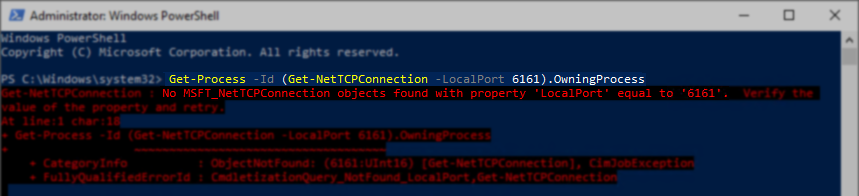
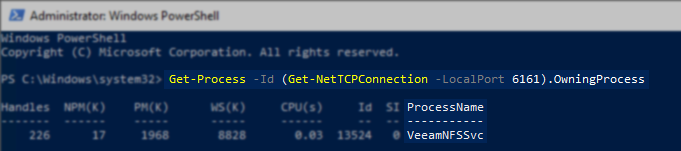
- Run the following command to check the ports used by Veeam vPower NFS Service.
Shown in this example command is port 6161, but starting in Veeam Backup & Replication 13, if port 111 is locked by another process the service will now fail to start.
Get-Process -Id (Get-NetTCPConnection -LocalPort 6161).OwningProcess- Review the output. If the port is in use by another process, stop that process and start the Veeam vPower NFS Service.
The results of the command will either list a process, or an error will be displayed stating that no objects were associated with the port. "Get-NetTCPConnection : No MSFT_NetTCPConnection objects found with property 'LocalPort' equal to '6161'. Verify the value of the property and retry."
More Information
Related Articles
- KB1055: Troubleshooting vPower NFS Datastore Mounting Issues
- KB1094: Veeam vPower NFS Service fails to start
- KB1110: Unable to access the virtual machine configuration: Invalid datastore path
- KB1284: How to Test Manually Mounting the Veeam vPower NFS Datastore
- KB1289: fault.RestrictedVersion.summary
- KB1478: SureBackup fails: Failed to call RPC function - Access is Denied
- KB1690: Unable to Mount VeeamBackup_ Datastore - Specified Key, Name, or Identifier Already Exists
- KB4166: Upgrading/Uninstalling Veeam Backup & Replication fails with "Error 1327. Invalid Drive: [a-z]:\" or "Warning 1327. Invalid Drive [a-z]:\"
- KB4167: Linux Guest File Restore Cannot Connect Backup Datastore to ESXi Host
- KB4363: Datastore Named 'VeeamBackup_' Listed as Inaccessible
- KB4504: SureBackup Job Failure: "The resource 'VeeamBackup_' is in use."
If this KB article did not resolve your issue or you need further assistance with Veeam software, please create a Veeam Support Case.
To submit feedback regarding this article, please click this link: Send Article Feedback
To report a typo on this page, highlight the typo with your mouse and press CTRL + Enter.
Spelling error in text

Thank you!
Your feedback has been received and will be reviewed.
Oops! Something went wrong.
Please, try again later.
You have selected too large block!
Please try select less.
KB Feedback/Suggestion
This form is only for KB Feedback/Suggestions, if you need help with the software open a support case
Thank you!
Your feedback has been received and will be reviewed.
Oops! Something went wrong.
Please, try again later.