Migrating Veeam Kasten for Kubernetes to the Red Hat Certified Operators Catalog
| KB ID: | 4774 |
| Product: | Veeam Kasten for Kubernetes |
| Published: | 2025-09-24 |
| Last Modified: | 2026-05-28 |


Challenge
One or more of the following symptoms may be observed in a Red Hat OpenShift environment running Veeam Kasten for Kubernetes:
- Upgrades are no longer available for the Veeam Kasten operator installed from the Red Hat Operator Marketplace catalog.
- Veeam Kasten (Enterprise - Term) or Veeam Kasten (Enterprise - PAYGO) is no longer available in the Red Hat Operator Hub.
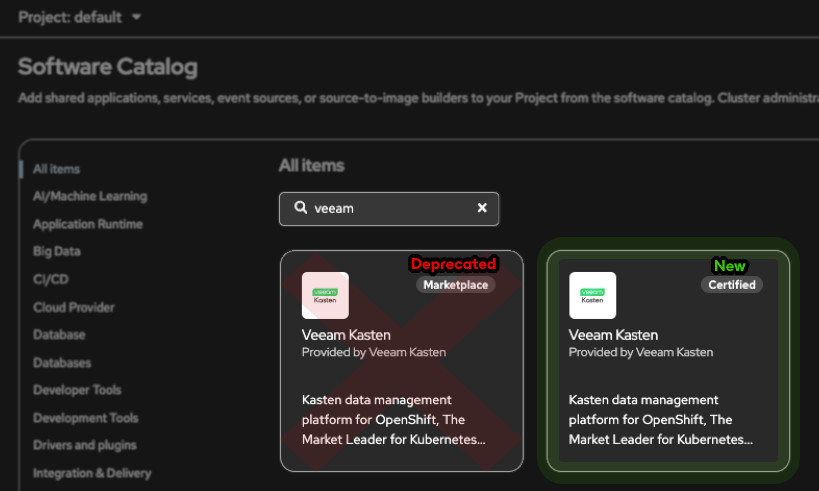
- Two Veeam Kasten operators appear in the OpenShift Software Catalog when searching for "veeam": one displays a "Marketplace" badge, and the other a "Certified" badge.
Cause
The Red Hat Operator Marketplace was deprecated in April 2025. As a result, the Veeam Kasten operator is no longer published or updated through that catalog.
All Veeam Kasten OpenShift deployments must transition to the Veeam Kasten operator (k10-kasten-operator-rhmp) available within the Red Hat Certified Operators catalog. This affects:
- Customers who installed the Veeam Kasten operator from the Marketplace catalog and are unable to upgrade further.
- Customers who previously installed the deprecated Veeam Kasten (Enterprise - Term) (
kasten-k10-operator-term-rhmp-bundle) or Veeam Kasten (Enterprise - PAYGO) (kasten-k10-operator-paygo-rhmp-bundle) offerings, which are no longer listed in the Red Hat Operator Hub.
Solution
The Veeam Kasten operator installed from the Red Hat Operator Marketplace catalog (or the deprecated Veeam Kasten Enterprise - Term/PAYGO offerings) can safely be deleted and replaced with the Veeam Kasten operator from the Red Hat Certified Operators catalog, while preserving the Kasten instance itself.
GUI Method
- Export the
k10-configmap as a backup. - Ensure Kasten Disaster Recovery is configured, and you have recorded the cluster ID and DR passphrase. This allows you to recover Kasten and its persistent data should something not work as planned during the operator replacement operation.
- Uninstall the existing Veeam Kasten operator, while leaving the
k10operand and all resources in thekasten-ionamespace intact.- Via the OpenShift UI, navigate to Operators > Installed Operators > Veeam Kasten ≡ menu > Uninstall Operator
- Ensure that the option "Delete all operand instances for this operator" is unselected.


- Install the new Veeam Kasten operator from the Red Hat Certified Operators catalog.
- Confirm the
k10operand is visible in the Veeam Kasten Operator menu.
Note that the single Veeam Kasten operator is fully featured, and there will be no reduction in features, capabilities, or functionality when an enterprise license is applied.
Programmatic Method
Update the source field in the ConfigurationPolicy from redhat-marketplace to certified-operators:
  - objectDefinition:
      apiVersion: policy.open-cluster-management.io/v1
      kind: ConfigurationPolicy
      metadata:
        name: policy-kasten-operator
      spec:
        object-templates:
        - complianceType: musthave
          objectDefinition:
            apiVersion: operators.coreos.com/v1
            kind: OperatorGroup
            metadata:
              annotations:
                olm.providedAPIs: K10.v1alpha1.apik10.kasten.io,K10restore.v1alpha1.apik10.kasten.io
              name: k10-kasten-operator-rhmp
              namespace: kasten-io
            spec:
              targetNamespaces:
              - kasten-io
              upgradeStrategy: Default
        - complianceType: musthave
          objectDefinition:
            apiVersion: operators.coreos.com/v1alpha1
            kind: Subscription
            metadata:
              name: k10-kasten-operator-rhmp
              namespace: kasten-io
            spec:
              name: k10-kasten-operator-rhmp
              channel: stable
              installPlanApproval: Automatic
              source: certified-operators
              sourceNamespace: openshift-marketplace
        remediationAction: enforce
        severity: high
More Information
If this KB article did not resolve your issue or you need further assistance with Veeam software, please create a Veeam Support Case.
To submit feedback regarding this article, please click this link: Send Article Feedback
To report a typo on this page, highlight the typo with your mouse and press CTRL + Enter.
Spelling error in text

KB Feedback/Suggestion
This form is only for KB Feedback/Suggestions, if you need help with the software open a support case