- Veeam Support Knowledge Base
- Tape Jobs fail with I/O errors or (SCSI) Bus resets
Tape Jobs fail with I/O errors or (SCSI) Bus resets
| KB ID: | 1887 |
| Product: | Veeam Backup & Replication |
| Version: | All |
| Published: | 2014-05-13 |
| Last Modified: | 2025-06-20 |

Cheers for trusting us with the spot in your mailbox!
Now you’re less likely to miss what’s been brewing in our knowledge base with this weekly digest

Oops! Something went wrong.
Please, try again later.
Challenge
Failures occur during the File to tape or Backup to tape jobs. The jobname.log shows error messages similar to:
error: The request could not be performed because of an I/O device error
error: Tape fatal error.\nThe I/O bus was reset
Cause
Solution
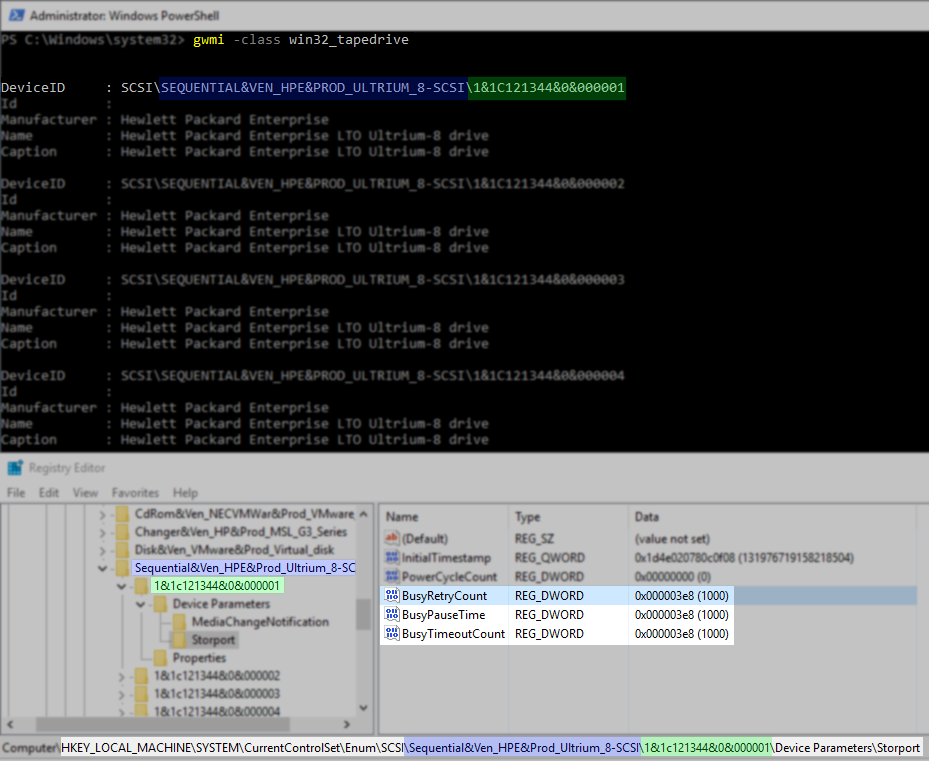
You can get DEVICEID & INSTANCE with the following PowerShell command:
gwmi -class win32_tapedriveThe Registry Values to be created/adjusted are found in the following key:
HKLM\System\CurrentControlSet\Enum\SCSI\DEVICEID\INSTANCE\Device Parameters\StorPort\
Value Name: BusyRetryCount
Value Type: DWORD (32-Bit) Value
Value Data: 1000 (DEC)
Value Name: BusyPauseTime
Value Type: DWORD (32-Bit) Value
Value Data: 1000 (DEC)
Value Name: BusyTimeoutCount
Value Type: DWORD (32-Bit) Value
Value Data: 1000 (DEC)
Reboot the tape server to apply the settings.
Example:
If this KB article did not resolve your issue or you need further assistance with Veeam software, please create a Veeam Support Case.
To submit feedback regarding this article, please click this link: Send Article Feedback
To report a typo on this page, highlight the typo with your mouse and press CTRL + Enter.
Spelling error in text

Thank you!
Your feedback has been received and will be reviewed.
Oops! Something went wrong.
Please, try again later.
You have selected too large block!
Please try select less.
KB Feedback/Suggestion
This form is only for KB Feedback/Suggestions, if you need help with the software open a support case
Thank you!
Your feedback has been received and will be reviewed.
Oops! Something went wrong.
Please, try again later.