- Veeam Support Knowledge Base
- Update to Microsoft Entra Connect causes SQL VSS issues
Update to Microsoft Entra Connect causes SQL VSS issues
| KB ID: | 2326 |
| Product: | Veeam Backup & Replication |
| Published: | 2017-07-31 |
| Last Modified: | 2025-08-12 |

Cheers for trusting us with the spot in your mailbox!
Now you’re less likely to miss what’s been brewing in our knowledge base with this weekly digest

Oops! Something went wrong.
Please, try again later.
Challenge
You receive the following error during the guest processing:
Unable to release guest. Error: Unfreeze error (over VIX): [Backup job failed. Cannot create a shadow copy of the volumes containing writer's data.
A VSS critical writer has failed. Writer name: [SqlServerWriter]. Class ID: [{a65faa63-5ea8-4ebc-9dbd-a0c4db26912a}]. Instance ID: [{6323fe10-0205-47df-b015-4a5ff60c31e2}].
Writer's state: [VSS_WS_FAILED_AT_PREPARE_SNAPSHOT]. Error code: [0x800423f4].]
Solution
If an update to Azure AD Connect or Microsoft Entra Connect was recently installed, a repair of the SQL installation should fix the issue.
Note: Even if a recent update wasn't installed, it may be worthwhile to attempt the repair.
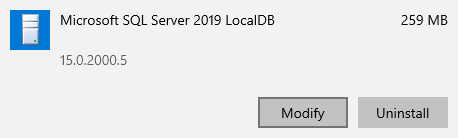
- Open the list of installed applications.
- Find and select the Microsoft SQL Server 20XX Express LocalDB entry.
- Click Modify.
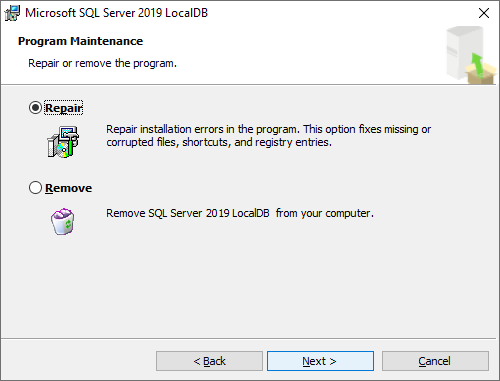
- Within the installer wizard, select the option for Repair.
Note: In some scenarios, a reboot may be required.
If this KB article did not resolve your issue or you need further assistance with Veeam software, please create a Veeam Support Case.
To submit feedback regarding this article, please click this link: Send Article Feedback
To report a typo on this page, highlight the typo with your mouse and press CTRL + Enter.
Spelling error in text

Thank you!
Your feedback has been received and will be reviewed.
Oops! Something went wrong.
Please, try again later.
You have selected too large block!
Please try select less.
KB Feedback/Suggestion
This form is only for KB Feedback/Suggestions, if you need help with the software open a support case
Thank you!
Your feedback has been received and will be reviewed.
Oops! Something went wrong.
Please, try again later.