SureBackup VM Power On fails with: "Failed to extend swap file" or "Error: Insufficient resources."
| KB ID: | 4301 |
| Product: | Veeam Backup & Replication | 10 | 11 | 12 | 12.1 | 12.2 | 12.3 | 12.3.1 | 12.3.2 | 13 | 13.1 |
| Published: | 2022-04-20 |
| Last Modified: | 2022-08-09 |

Get weekly article updates

Challenge
A SureBackup job, for a VMware environment, fails during the VM Power On step with either of the following errors:
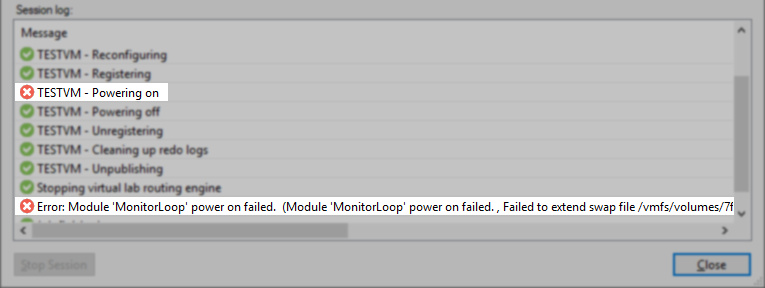
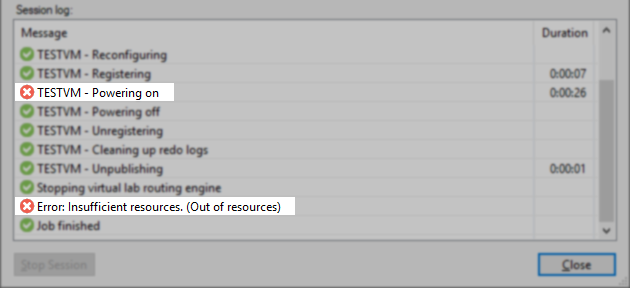
An error with the same message can be observed within the vSphere Client:

Cause
This issue occurs when the Instant recovery write cache folder has insufficient space.
Solution
Determine which Repository contains the backup files for the VM that is failing to power on. Edit that Repository, and on the Mount Server tab, you will find the assigned Mount Server and Instant recovery cache folder path. Now you may either:
- Connect to the Mount Server and ensure sufficient free space on the drive where the Instant recovery cache is located.
or - Assign a different Mount Server and Instant recovery write cache location with sufficient free space.
More Information
It is strongly advised to enable the "Redirect write cache" option within the Virtual Lab settings. Enabling this option will allow the SureBackup job to store the redo logs for each VM on the specified datastore instead of the Mount Server. Some files will still be stored in the Mount Server's Instant Recovery cache, but the space needs are significantly reduced. Additionally, redirecting the write cache to a datastore improves SureBackup performance.
If this KB article did not resolve your issue or you need further assistance with Veeam software, please create a Veeam Support Case.
To submit feedback regarding this article, please click this link: Send Article Feedback
To report a typo on this page, highlight the typo with your mouse and press CTRL + Enter.
Spelling error in text

KB Feedback/Suggestion
This form is only for KB Feedback/Suggestions, if you need help with the software open a support case