Uninstall or Upgrade of Veeam Agent for Microsoft Windows Fails Due to Missing MSI
| KB ID: | 4507 |
| Product: | Veeam Agent for Microsoft Windows | 5.0 | 6.0 | 6.1 | 6.2 | 6.3 | 6.3.1 | 6.3.2 | 6.3.3 | 13 | 13.1 |
| Published: | 2023-10-31 |
| Last Modified: | 2023-10-31 |


Challenge
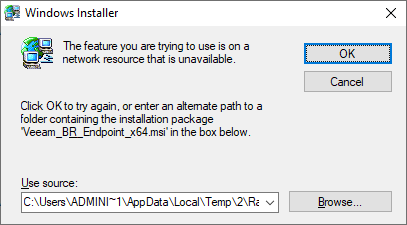
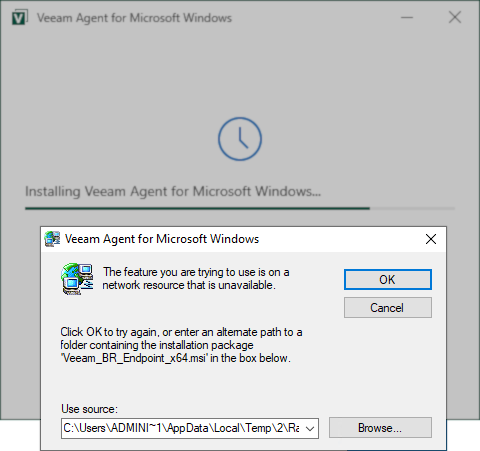
When attempting to uninstall or upgrade Veeam Agent for Microsoft Windows, the Windows dialog box appears stating:
The feature you are trying to use is on a
network resource that is unavailable.
Click OK to try again, or enter an alternate path to a
folder containing the installation package
"Veeam_BR_Endpoint_x64.msi" in the box below.
Cause
Solution
To resolve this issue, the Veeam_B&R_Endpoint_x64.msi that matches the installed version of Veeam Agent for Microsoft Windows must be supplied to complete the uninstall.
Note: The installed build number can be found by opening the About page within the Main Menu (≡) of the Veeam Agent for Microsoft Windows console.
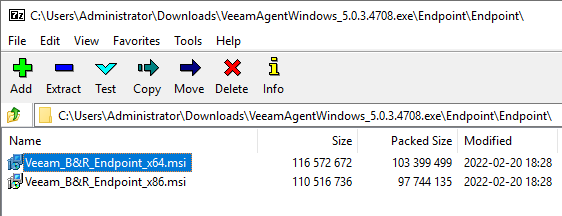
- If you still possess the original VeamAgentWindows_x.x.x.x.exe installer that matches the installed version of Veeam Agent for Microsoft Windows, you can extract the Veeam_B&R_Endpoint_x64.msi from that exe using 7zip. (See example below.)
- If you don't have a copy of the original exe-based installer, check the Veeam Downloads page to see if the installer for the version installed is available for download. If it is, download it and extract the Veeam_B&R_Endpoint_x64.msi from the exe-installer using 7zip.
- If you do not have the original exe-installer, and it cannot be downloaded from the Veeam Downloads page, please create a support case. Be sure to reference 'KB4507' and include the installed Veeam Agent for Microsoft Windows build number as shown in About page of the software or as list in Apps & Features. The Veeam Support team will check our version archives and extract the needed Veeam_B&R_Endpoint_x64.msi for your installed version.
More Information
If this KB article did not resolve your issue or you need further assistance with Veeam software, please create a Veeam Support Case.
To submit feedback regarding this article, please click this link: Send Article Feedback
To report a typo on this page, highlight the typo with your mouse and press CTRL + Enter.
Spelling error in text

KB Feedback/Suggestion
This form is only for KB Feedback/Suggestions, if you need help with the software open a support case