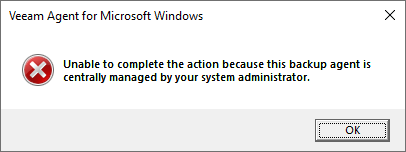
Unable to complete the action because this backup agent is centrally managed by your system administrator.
| KB ID: | 4565 |
| Product: | Veeam Agent for Microsoft Windows | 2.0 | 2.1 | 2.2 | 3.0.2 | 4.0 | 5.0 | 6.0 | 6.1 | 6.2 | 6.3 | 6.3.1 | 6.3.2 | 6.3.3 | 13 | 13.1 |
| Published: | 2024-03-26 |
| Last Modified: | 2024-03-26 |

Get weekly article updates

Challenge
Upon logging into Windows, a pop-up dialog box displays the error:
Unable to complete the action because this backup agent is centrally managed by your system administrator.
Cause
This occurs when Veeam Agent for Microsoft Windows is initially installed on a Windows machine in Standalone operation mode and then the machine gets added to a Protection Group, which switches it to Managed operation mode. Even after the switch to Managed mode, the autorun registry entry to start the Veeam Endpoint Tray persists, causing the OS to attempt to launch the agent after user login. However, Veeam Agent for Microsoft Windows cannot be controlled directly from the Windows machine while operating in Managed mode.

Solution
To prevent this from occuring, remove the registry value named Veeam.EndPoint.Tray.exe from: HKLM\SOFTWARE\Microsoft\Windows\CurrentVersion\Run\
The following PowerShell command can be used to remove the registry value:
If this KB article did not resolve your issue or you need further assistance with Veeam software, please create a Veeam Support Case.
To submit feedback regarding this article, please click this link: Send Article Feedback
To report a typo on this page, highlight the typo with your mouse and press CTRL + Enter.
Spelling error in text

KB Feedback/Suggestion
This form is only for KB Feedback/Suggestions, if you need help with the software open a support case