How to Reset Account Lockout for 'Managed Hardened Repository ISO by Veeam'
| KB ID: | 4663 |
| Product: | Veeam Backup & Replication | 12.2 |
| Published: | 2024-09-16 |
| Last Modified: | 2024-11-04 |


Purpose
This article documents how to unlock the accounts used with the Managed Hardened Repository ISO by Veeam, veeamsvc or vhradmin, when they become locked out.
The Managed Hardened Repository ISO by Veeam deploys Rocky Linux with the DISA STIG security profile, which utilizes faillock to lock user accounts after 3 incorrect password attempts. For security reasons the root account is disabled, which means the only way reset the faillock state is to boot the appliance into single user mode.
Solution
Note: Unlocking requires console access and an appliance reboot.
- Disable all jobs to the repository, if any.
- Connect to the host with the console.
- With the console open and visible so you can watch it boot, reboot the appliance.
- When the GRUB boot menu appears, use the arrow keys to highlight the first item and press 'e' to edit the entry.
- At the end of the line that starts with linux add the following:
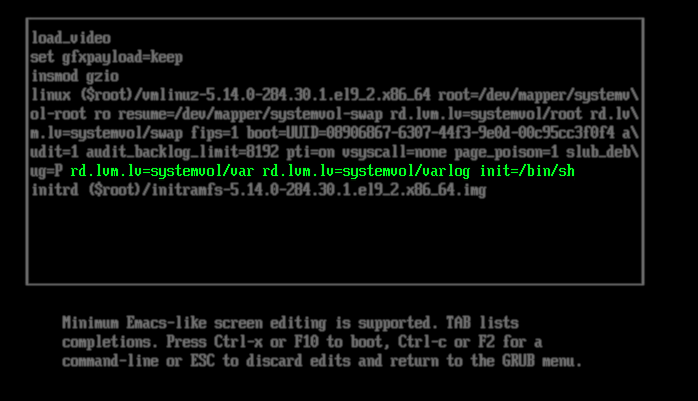
- Press Ctrl+x to boot with the specified parameters.
- After booting, mount the necessary partitions:
- Delete from the faillock folder the file named after the user.
- Reboot the appliance:
- The system will boot and the account will no longer be locked out.
If this KB article did not resolve your issue or you need further assistance with Veeam software, please create a Veeam Support Case.
To submit feedback regarding this article, please click this link: Send Article Feedback
To report a typo on this page, highlight the typo with your mouse and press CTRL + Enter.
Spelling error in text

KB Feedback/Suggestion
This form is only for KB Feedback/Suggestions, if you need help with the software open a support case