Console Connection to Veeam Software Appliance Unstable When IPv6 is Disabled
| KB ID: | 4755 |
| Product: | Veeam Backup & Replication | 13 |
| Published: | 2025-09-03 |
| Last Modified: | 2025-09-03 |

Get weekly article updates

Challenge
When IPv6 has been disabled in the Veeam Host Management Console settings, actions within the Veeam Backup & Replication Console on a remote machine may be slow to initiate or fail if IPv6 has not also been disabled in the Console settings.
Cause
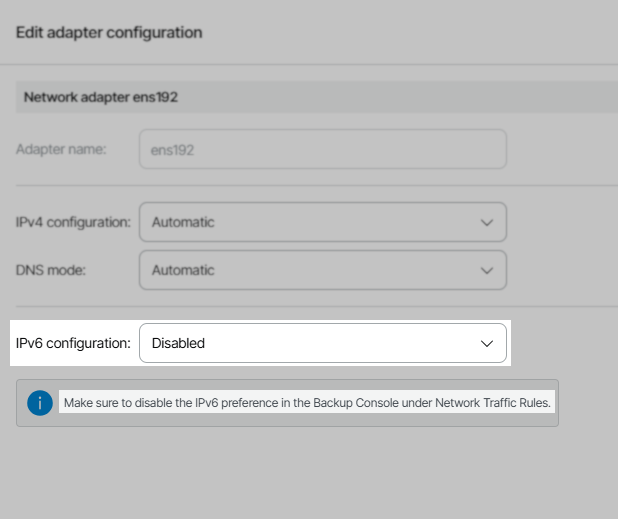
This issue occurs when the IPv6 configuration has been set to Disabled within the Veeam Host Management Console, and the IPv6 setting is not disabled within the remote Veeam Backup & Replication Console.
As noted in the Host Management Console UI:
"Make sure to disable IPv6 preference in the Backup Console under Network Traffic Rules."
Solution
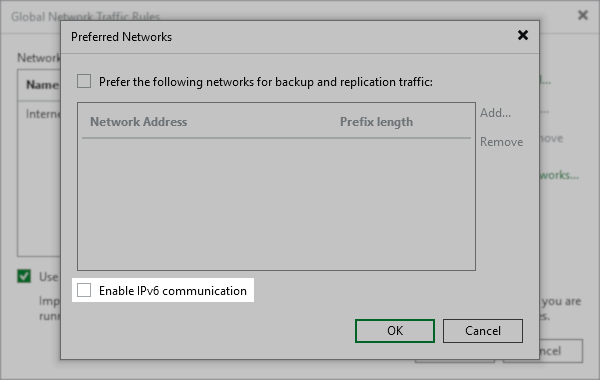
If the IPv6 configuration has been set to Disabled within the Veeam Host Management Console, you must ensure that all remote Veeam Backup & Replication Console's are also configured to have IPv6 disabled.
If this KB article did not resolve your issue or you need further assistance with Veeam software, please create a Veeam Support Case.
To submit feedback regarding this article, please click this link: Send Article Feedback
To report a typo on this page, highlight the typo with your mouse and press CTRL + Enter.
Spelling error in text

KB Feedback/Suggestion
This form is only for KB Feedback/Suggestions, if you need help with the software open a support case