Failed to process site: {}. Failed to resolve personal site owner.
| KB ID: | 4756 |
| Product: | Veeam Backup for Microsoft 365 | 8.1 |
| Published: | 2025-09-15 |
| Last Modified: | 2025-09-15 |


Challenge
Backup job of a personal site fails with:
Failed to process site: {0}. Failed to resolve personal site owner. For more details, see KB4756.
Cause
This error indicates that Veeam Backup for Microsoft 365 was unable to correlate a Personal Site to a specific user because the owner of the site could not be resolved.
This issue can occur in backup jobs that are configured to protect the Entire Organization or specific Groups, Sites, Personal Sites, Teams, or Organizations. In these cases, Veeam checks each Personal Site's properties to identify the owner (User), and if the metadata (such as the author property) is invalid or missing, the user cannot be correlated to the Personal Site, resulting in this error.
However, when a backup job is configured to protect a specific User, Veeam is able to identify and protect the personal site(s) associated with that user, even if the site’s ownership properties are incomplete.
Solution
To work around this issue, perform the following to create a dedicated backup job for the affected personal site and exclude the site from the original job.
Part 1: Create a Dedicated Backup Job for the Site
Make sure that the backup job is configured to protect a User entity with "Site" selected in processing options.
- Create a new backup job.
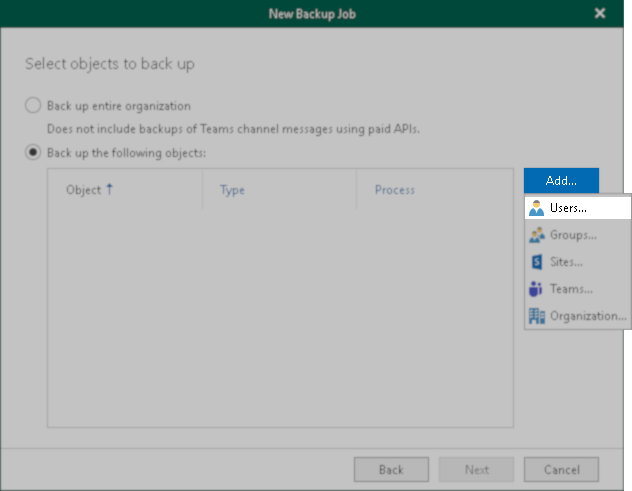
- On the second step of job creation, select the option Back up the following objects:
- Click the Add... button and select Users... from the menu.
- Add the user associated with the personal site that failed to be backed up.
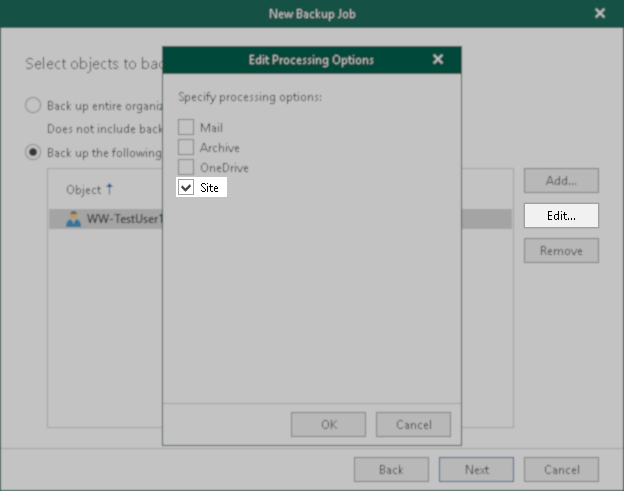
- Select that user in the Back up the following objects list.
- Click Edit...
- In the Edit Processing Options dialog box that opens, select the Site option.
- Proceed with the remaining job configuration.
Part 2: Exclude the Site from the Original Job
- Edit the original job that had the error message.
- Add the personal site that failed to the exclusion list.
If this KB article did not resolve your issue or you need further assistance with Veeam software, please create a Veeam Support Case.
To submit feedback regarding this article, please click this link: Send Article Feedback
To report a typo on this page, highlight the typo with your mouse and press CTRL + Enter.
Spelling error in text

KB Feedback/Suggestion
This form is only for KB Feedback/Suggestions, if you need help with the software open a support case