Veeam Agent for Microsoft Windows 6.3.2.1302 Private Fix Deployment Information
| KB ID: | 4778 |
| Product: | Veeam Agent for Microsoft Windows | 6.3.2 |
| Published: | 2025-10-14 |
| Last Modified: | 2026-01-14 |


Deployment Information
Please review the deployment scenarios for Veeam Agent for Microsoft Windows provided below for relevant deployment details.
For Individual, CSV, Cloud, or AD type Protection Groups
This includes all Veeam Agent for Microsoft Windows deployments that are directly managed by a Protection Group in Veeam Backup & Replication, where the machines were added as Individual computers, Microsoft Active Directory objects, or Computers from a CSV file.
- During the Veeam Backup & Replication 12.3.2.4165 patch installation, the private fix for Veeam Agent for Microsoft Windows will be placed in the automatic hotfix deployment folder, as described in the Deploying Hotfix on Protected Computers section of the Agement Management user guide.
- If Install backup agent automatically and Auto-update backup agent check boxes are selected in the Options page of the Protection Group settings, the private fix will be installed automatically during a rescan of the Protection Group.
- The private fix will be automatically applied to new machines added to the protection group(s).
- The private fix will not update the build number displayed in the software, it will still list 6.3.2.1205. For information about validating the deployment of the private fix, please see the Deployment Validation section below.
For "Pre-installed" type Protection Groups
Since the Veeam Agent for Microsoft Windows deployments in a "Computers with pre-installed backup agents" type Protection Group are not updated by the Veeam Backup & Replication server, the patch must be deployed on each machine manually or by using an automated software distribution solution.
- After installing Veeam Backup & Replication 12.3.2.4165 Patch, aquire the Private Fix installer from either:
- the following folder on the Veeam Backup Server:
C:\Program Files\Veeam\Veeam Distribution Service\Fixes\vaw\kb.1076569
- Download directly from the Veeam website:
- the following folder on the Veeam Backup Server:
- Copy the private fix installer to each of the machines in a Pre-Installed Backup Agents Protection Group, and install the package.
For silent installation, run the exe with the/silentswitch.
Note:
- The private fix will not update the build number displayed in the software, it will still list 6.3.2.1205. For information about validating the deployment of the private fix, please see the Deployment Validation section below.
- For new machines, deploy Veeam Agent for Microsoft Windows using the generated setup files as usual, and then install the private fix manually.
Agents Managed by Veeam Service Provider Console
For Veeam Agent for Microsoft Windows deployments managed by Veeam Cloud Service Providers, the upgrade can be performed from within the Veeam Service Provider Console. Please review:
Standalone Agents
For standalone Veeam Agent for Microsoft Windows deployments, those deployments that operate entirely without management by Veeam Backup & Replication or Veeam Service Provider Console, the currently installed version should be uninstalled and the updated build should be installed.
Note: Please note that while the private fix can be applied to standalone deployments, the application's auto-update feature will still prompt you to install the latest build when it becomes available. Therefore, it is recommended to perform a full uninstall and reinstall rather than use the private fix.
- Existing Installations: Download the updated build Veeam Agent for Microsoft Windows 6.3.2.1302 installer from the Veeam website and install it manually by uninstalling the existing version first and installing the new one.
- New Installations: Download the updated Veeam Agent for Microsoft Windows 6.3.2.1302 installer from the Veeam website and use it directly.
Deployment Validation
If the private fix is deployed, it will not update the build number in Veeam Agent for Microsoft Windows, the build number only changes for standalone deployments where the software is uninstalled and reinstalled.
For situations where the private fix was used to patch the Veeam Agent for Microsoft Windows deployment, review the following options for validating that the private fix is installed:
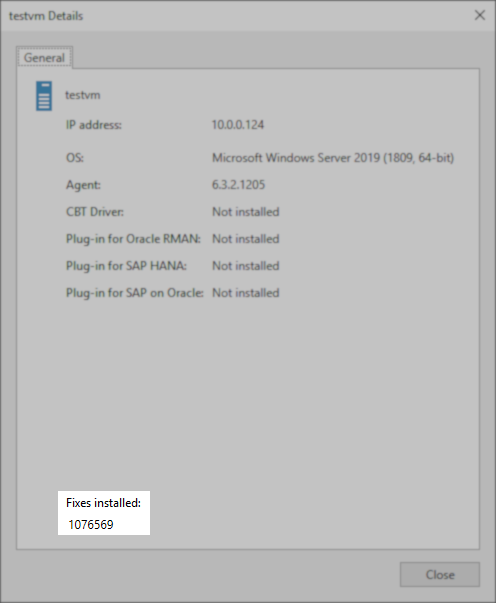
- Checking the properties of the machine within the Protection Group. The properties should list "Fixes installed: 1076569".
Note: This will not be updated for machines in a "Pre-installed" type Protection Group, as the "fixes installed" note is only added by Veeam Backup & Replication when it deploys the fix. Since the patch must be deployed manually on a machine in a "Pre-installed" type Protection Group, verification must be done via the registry, as documented in the next bullet point.
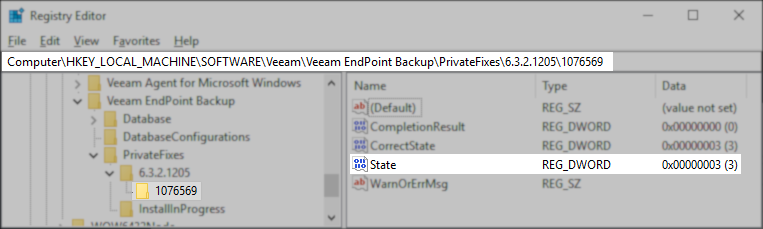
- Checking the registry on the machine directly. Using Registry Editor (regedit), navigate to the following key:
HKLM\SOFTWARE\Veeam\Veeam EndPoint Backup\PrivateFixes\6.3.2.1205\1076569
The registry value named State should show the value 3 if the patch is installed.
Note: If the registry key is absent, the patch has not been installed. If the State value is present but does not have the value 3, wait 5-10 minutes for it to finish installing.
Veeam CBT Driver FAQ
- Will uninstalling and reinstalling the VAW Redistributable component from Veeam Backup & Replication (VBR) impact Veeam services or running backups?
The VAW redistributable is safe to reinstall. However, ensure that no rescans are performed during the process to avoid any potential issues. - Is it advisable to enable Perform reboot automatically if required for a Protection Group containing many production machines?
Enabling auto reboot in a production environment is not recommended, as it can disrupt applications running on those servers. For large environments, the best practice is to reboot each server manually during the upgrade process. - Why does the upgrade process require multiple reboots when installing a new agent version and updating the Veeam CBT driver?
When a new agent version is installed, the old driver is uninstalled, and a reboot is needed to unload it safely. After installing the new driver, another reboot is required to complete the installation. This ensures the driver is properly loaded and functional. - Can we skip upgrading the Veeam CBT driver?
No, you cannot skip the CBT driver upgrade if it is already installed. The CBT driver must be reinstalled to ensure proper functionality. - What happens if we do not reboot the client after upgrading the CBT driver? Will backups continue to run?
If you do not reboot after the CBT upgrade, agent jobs will still run, but they will not utilize the Veeam CBT Driver, and you will see the warning:Warning: Failed to obtain changed block tracking map for volume.
It is, therefore, not recommended to perform any backups in this intermediate state.
If this KB article did not resolve your issue or you need further assistance with Veeam software, please create a Veeam Support Case.
To submit feedback regarding this article, please click this link: Send Article Feedback
To report a typo on this page, highlight the typo with your mouse and press CTRL + Enter.
Spelling error in text

KB Feedback/Suggestion
This form is only for KB Feedback/Suggestions, if you need help with the software open a support case