Support Statement — Microsoft 365 Changes to Throttling Enforcement
| KB ID: | 4821 |
| Product: |
Veeam Data Cloud
for Microsoft 365 Veeam Backup for Microsoft 365 |
| Published: | 2026-02-24 |
| Last Modified: | 2026-04-14 |


Support Statement
What's changing?
Microsoft has announced that, starting on March 1st, 2026, it will update its approach to application throttling enforcement for SharePoint Online and OneDrive. Teams may also be affected, as some of its data resides there.
What's behind this change?
Microsoft imposes connection limits per application within a tenant, based on the number of licenses. Functionally, each application registration has its own threshold before throttling kicks in. Once that limit is reached, Microsoft services such as SharePoint Online will return HTTP status code 429 ("Too many requests") or 503 ("Server Too Busy"), and the requests will fail. When this occurs, the application must wait before new requests can be made, slowing backups. To work around this and improve backup performance, many backup vendors have suggested deploying multiple applications.
However, according to Microsoft's terms of use and product documentation, creating separate application registrations when those applications essentially perform the same operations, such as backup, is not permitted. As of March 1st, 2026, Microsoft will enforce those terms of use for everyone who has configured multiple application registrations. It is important to note that this is not specific to Veeam's products; it affects all third-party backup vendors that use multiple application registrations to optimize backup performance.
What action should Veeam customers take?
There is no need for immediate action, as Microsoft will enforce throttling as documented. App registration limits are applied based on their usage terms, so only one application should be deployed per use case, and multiple applications running on the same tenant share the same resource bucket. However, if your environment uses multiple backup application registrations, backups may take longer to complete.
Which tenants/organizations are impacted?
Note: Only a small portion of Veeam Backup for Microsoft 365 and Veeam Data Cloud for Microsoft 365 customers use multiple application registrations. If you are not using multiple application registrations, you will not be impacted.
While terms of use apply to all customers, those who use multiple backup application registrations for Veeam’s backup solutions for Microsoft 365 may experience throttling, as Microsoft now throttles connections across similar applications within an organization.
How can I identify if my organization has multiple application registrations?
Check if your instance uses additional application registrations:
- Veeam Backup for Microsoft 365
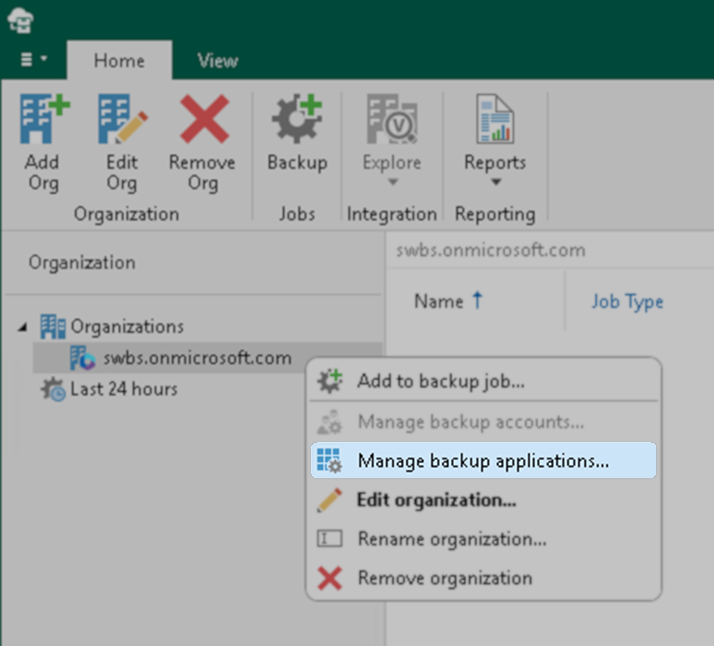
- Additional backup applications can be found by right-clicking on the organization within Veeam Backup for Microsoft 365 and selecting "Manage backup applications." The Backup Applications Manager window will display any additional backup applications.
- You can remove additional backup applications, as they will no longer improve performance.
Note: Removing a backup application from Veeam Backup for Microsoft 365 does not delete it from Entra ID. Any backup application registrations that are not used by Veeam Backup for Microsoft 365 must be removed manually from Entra ID by the user.
- Veeam Data Cloud
for Microsoft 365
Generally speaking, having multiple backup applications was a highly uncommon configuration for Veeam Data Cloud customers, and for those who had them, those extra backup applications will be automatically removed.
Note: The automatic removal of extra backup applications from Veeam Data Cloud for Microsoft 365 does not remove them from Entra ID. Any backup application registrations that are not used by Veeam Data Cloud for Microsoft 365 must be manually removed from Entra ID.
How is Veeam addressing this change?
- Veeam is making improvements to reduce the number of API calls required for backups, which will help improve backup performance.
- For customers operating self-managed backups using Veeam Backup for Microsoft 365, we strongly encourage installing the latest version. Each new release includes improvements that enhance backup performance.
A new Veeam Backup for Microsoft 365 version will be released soon, and all customers are encouraged to update as soon as it is released. - For Veeam Data Cloud for Microsoft 365 users, the latest updates are always automatically deployed as soon as they are available.
If this KB article did not resolve your issue or you need further assistance with Veeam software, please create a Veeam Support Case.
To submit feedback regarding this article, please click this link: Send Article Feedback
To report a typo on this page, highlight the typo with your mouse and press CTRL + Enter.
Spelling error in text

KB Feedback/Suggestion
This form is only for KB Feedback/Suggestions, if you need help with the software open a support case