Guest processing fails for Nutanix AHV, Proxmox VE, Scale Computing HyperCore
| KB ID: | 4842 |
| Product: |
Veeam Backup & Replication | 13 Veeam Backup for Nutanix AHV | 9 Veeam Plug-In for Proxmox VE | 3 |
| Published: | 2026-03-31 |
| Last Modified: | 2026-06-11 |

Get weekly article updates

Challenge
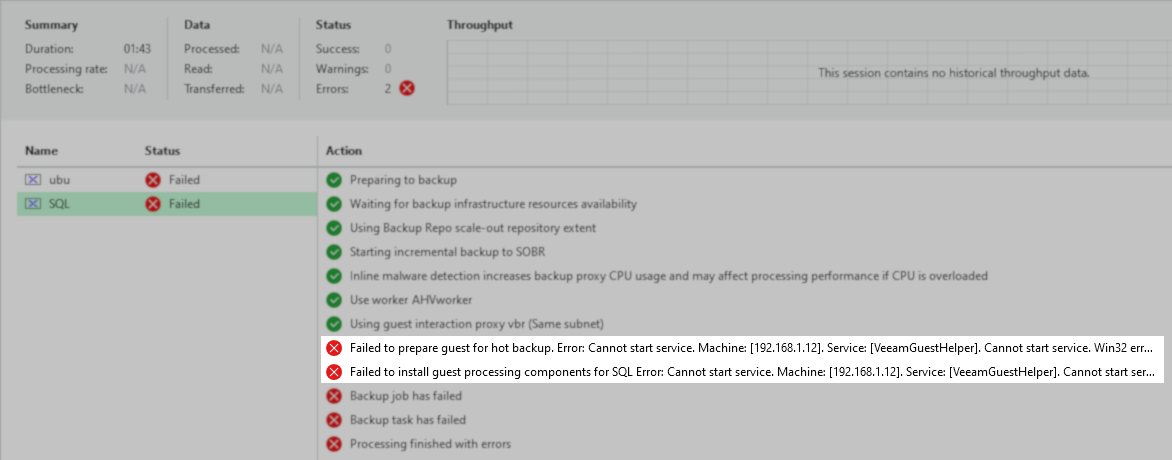
When running backup or replication jobs for Windows virtual machines hosted on Nutanix AHV, Proxmox VE, or Scale Computing HyperCore with Veeam Backup & Replication 13.0.1 Patch 2, guest processing fails with one of the following errors:
Failed to install guest processing components for [VM name]. Error: Failed to connect to the guest OS.
or
Failed to prepare guest for hot backup. Error: Cannot start service. Machine: [IP address]. Service: [VeeamGuestHelper]. Cannot start service. Win32 error: The service did not respond to the start or control request in a timely fashion. Code: 1053
Cause
This issue occurs due to an in-guest processing component that may be assigned an invalid port value, preventing it from initializing.
Solution
This issue was fixed in Veeam Backup & Replication 13.0.2 (build 13.0.2.29).
If this KB article did not resolve your issue or you need further assistance with Veeam software, please create a Veeam Support Case.
To submit feedback regarding this article, please click this link: Send Article Feedback
To report a typo on this page, highlight the typo with your mouse and press CTRL + Enter.
Spelling error in text

KB Feedback/Suggestion
This form is only for KB Feedback/Suggestions, if you need help with the software open a support case