Unstructured Data Backup from Google Cloud Storage fails with a Bad Request error
| KB ID: | 4844 |
| Product: | Veeam Backup & Replication | 13 |
| Published: | 2026-05-08 |
| Last Modified: | 2026-05-08 |


Challenge
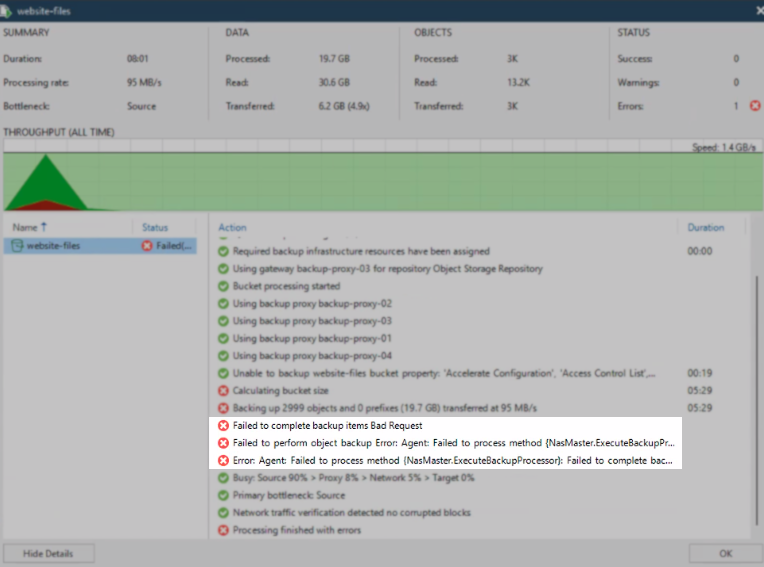
An Unstructured Data Backup of data from Google Cloud Storage added to Veeam Backup & Replication as an S3-Compatible Object Storage data source fails with the following error:
Failed to perform object backup Error: Agent: Failed to process method {NasMaster.ExecuteBackupProcessor}: Failed to complete backup items
Cause
This issue is caused by a Google Cloud Storage feature called Decompressive Transcoding, which automatically decompresses gzip-encoded objects during download. This behavior is not part of the S3 specification and is not supported when Google Cloud Storage is added as an S3-Compatible Object Storage to the inventory of the backup server. When decompressive transcoding is triggered, the backup session fails with a Bad Request error.
The issue can occur in two scenarios:
- A file in the bucket is a valid gzip file, and Google Cloud Storage decompresses it transparently during the backup read, producing an unexpected response.
- A file was uploaded with
Content-Encoding: gzipin its metadata even though the file itself is not gzip-compressed, causing Google Cloud Storage to attempt decompressive transcoding on a file that does not require it.
Solution
Identify the affected file
The error includes an ObjectPath: value that identifies the specific file triggering the issue. This value is recorded in the Master Agent log on the cache repository assigned to the source. To locate the log:
- In the Veeam Backup & Replication console, navigate to Inventory and locate the Google Cloud Storage source under Unstructured Data.
- Open the properties of the Google Cloud Storage and check the cache repository selected for object storage processing.
- Navigate to Backup Infrastructure > Repositories and identify the host assigned to the cache repository.
- Connect to the host used as a cache repository.
- Open the Master Agent log file. The default location is:
C:\ProgramData\Veeam\Backup\<jobname>\Agent.<jobname>.Master.log
- In the log, find the error entry with the
ObjectPath:value. This value contains information on the specific file in the bucket causing the issue.
Example:nasbackup| WARN|Failed to complete backup items nasbackup| >> |Bad Request nasbackup| >> |--tr:Failed to download file part. [StorageName: [S3], Bucket: [], Delimiter: /], ObjectPath: [], VersionId: [], Offset: [0], Count: [1114610] nasbackup| >> |--tr:Failed to read S3 object. Object: [[CS3DataReadStream]. ObjectPath: [Path: [], Delimiter: /, Type: [EObject (1)]], ObjectSize: [1114610], Validator: [Path: [Path [|], Nodes: [[]], Nodes count: 1, RootId [0000000000000000]], Size: [1114610], Modification time: [2019-08-31 20:19:23.000 (132117563630000000)]], VersionId: [undefined], KeepVersionId: [true]], Offset: [0], Data size: [8388608], Stream validator:: [Path: [Path [|], Nodes: [[]], Nodes count: 1, RootId [0000000000000000]], Size: [1114610], Modification time: [2019-08-31 20:19:23.000 (132117563630000000)]] nasbackup| >> |--tr:Failed to read from block stream. Requested offset: [0], Requested size: [131072], BlockIo read stream: [BlockIoFs read stream. Current offset: [0], Preloaded data size: [0], Was EOF: [false]] nasbackup| >> |--tr:Failed to initialize primary stream ([EFileContent:0]) nasbackup| >> |--tr:Rethrowing remote exception nasbackup| ERR |Register critical error. Stop further processing. Error info: [Error [0]: nasbackup| >> |Failed to complete backup items
Determine whether a workaround is applicable
- If the file is a valid gzip file, this behavior is expected. Support for this scenario is planned for a future release of Veeam Backup & Replication. No workaround is available at this time.
- If the file has a non-gzip extension, it was likely uploaded with an incorrect
Content-Encoding: gzipmetadata tag. The method described in the next section can be used to download and re-upload the file.
Re-upload the non-gzip file without the incorrect metadata
-
Install the Google Cloud CLI on a Linux or Windows machine with access to the bucket.
-
Download the file without decompression:
-
Re-upload the file to replace the original:
-
Re-run the Unstructured Data Backup job.
If this KB article did not resolve your issue or you need further assistance with Veeam software, please create a Veeam Support Case.
To submit feedback regarding this article, please click this link: Send Article Feedback
To report a typo on this page, highlight the typo with your mouse and press CTRL + Enter.
Spelling error in text

KB Feedback/Suggestion
This form is only for KB Feedback/Suggestions, if you need help with the software open a support case