- Veeam Support Knowledge Base
- Your service provider has implemented backup files protection against deletion by an insider for this cloud repository.
Your service provider has implemented backup files protection against deletion by an insider for this cloud repository.
| KB ID: | 2439 |
| Product: | Veeam Backup & Replication | 10 | 11 | 12 | 12.1 | 12.2 | 12.3 | 12.3.1 | 12.3.2 | 13 | 13.1 |
| Published: | 2018-02-02 |
| Last Modified: | 2023-01-23 |

Cheers for trusting us with the spot in your mailbox!
Now you’re less likely to miss what’s been brewing in our knowledge base with this weekly digest

Oops! Something went wrong.
Please, try again later.
Challenge
A tenant's backup copy job with GFS disabled displays the following warning when targeting a Cloud Repository provided by a Veeam Cloud Service Provider:
Your service provider has implemented backup files protection against deletion by an insider for this cloud repository. To protect against advanced attack vectors, we recommend that you configure your cloud backup jobs to keep multiple full backups on disk (as opposed to forever-incremental chain with a single full backup).

Cause
Solution
Option 1: Encourage the Tenant to Enable GFS
Discuss with your tenant the benefits of Insider Protection and explain that to gain those benefits, they must at least enable one weekly GFS within their backup copy job(s) that targets the Cloud Repository.
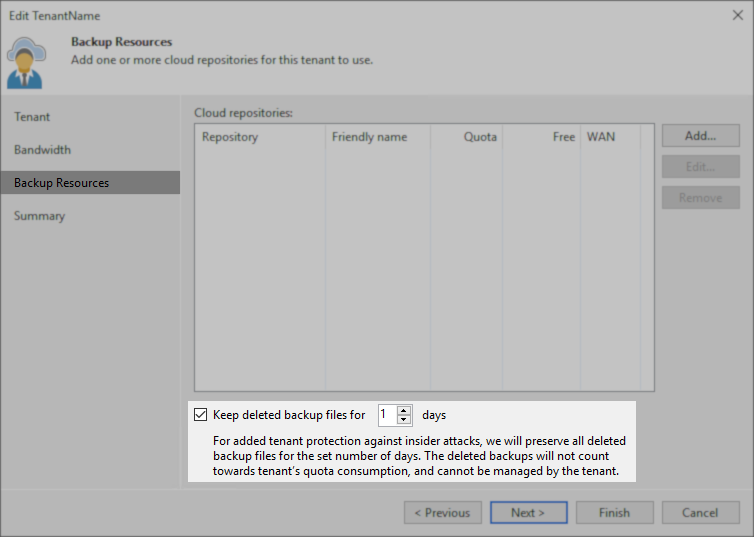
Option 2: Disable Insider Protection for the Tenant
If your tenant has no interest in Insider Protection, the option can disabled for that tenant and the warning will stop occuring.
Option 3: Disable the Warning for the Tenant
If your tenant understands how jobs must be configured to take advantage of Insider Protection and would like the warning not to be displayed, configure the following registry value on their Veeam Backup Server:
Key Location: HKLM\SOFTWARE\Veeam\Veeam Backup and Replication\
Value Name: CloudConnectBinGfsNotificationSeverity
Value Type: DWORD (32-Bit) Value
Value Data (Default): 2
PowerShell Script:
New-ItemProperty -Path 'HKLM:\SOFTWARE\Veeam\Veeam Backup and Replication\' -Name 'CloudConnectBinGfsNotificationSeverity' -Value "1" -PropertyType DWORD -Force
| Value Data | Result |
| 0 | Disable the message entirely. |
| 1 | Display the message as an Informational Notice — (Green ✅) This is the recommended alternate setting because it allows the tenant to see that Insider Protection will not protect the job. |
| 2 |
Display the message as a Warning Message — (Yellow ⚠️) This is the software's default setting. |
| 3 |
Display the message as an Error Message — (Red ❌) The backup copy job will complete and report "Failed" but the files will have been copied. |
| 4 |
Force jobs that do not to meet Insider Protection requirements to fail. The backup copy job will outright fail and refuse to move any data. |
More Information
Note:
- The registry value CloudConnectBinGfsNotificationSeverity can be set on the Veeam Cloud Connect server. However, doing so will affect all tenants.
- The registry value on the tenant's Veeam Backup Server and service provider's Cloud Connect Server operate independently.
For example, if the value is set to 1 on the Cloud Connect server, and the value on the tenant's Veeam Backup Server is set to 2, the tenant will receive a warning. - We strongly encourage Service Providers not to set this registry value on their Cloud Connect server and instead only set it on the tenant's Veeam Backup Server as needed.
- It is critical that tenants be notified when a feature they may expect will protect them is not functioning due to a misconfiguration of the job.
If this KB article did not resolve your issue or you need further assistance with Veeam software, please create a Veeam Support Case.
To submit feedback regarding this article, please click this link: Send Article Feedback
To report a typo on this page, highlight the typo with your mouse and press CTRL + Enter.
Spelling error in text

Thank you!
Your feedback has been received and will be reviewed.
Oops! Something went wrong.
Please, try again later.
You have selected too large block!
Please try select less.
KB Feedback/Suggestion
This form is only for KB Feedback/Suggestions, if you need help with the software open a support case
Thank you!
Your feedback has been received and will be reviewed.
Oops! Something went wrong.
Please, try again later.