- Veeam Support Knowledge Base
- ERROR_NO_DEVICE_ID is thrown while trying to load a driver using Veeam Agent Recovery Media
ERROR_NO_DEVICE_ID is thrown while trying to load a driver using Veeam Agent Recovery Media
| KB ID: | 2856 |
| Product: | Veeam Agent for Microsoft Windows | 2.0 | 2.1 | 2.2 | 3.0.2 | 4.0 | 5.0 | 6.0 | 6.1 | 6.2 | 6.3 | 6.3.1 | 6.3.2 | 6.3.3 | 13 | 13.1 |
| Published: | 2018-12-31 |
| Last Modified: | 2025-08-11 |

Cheers for trusting us with the spot in your mailbox!
Now you’re less likely to miss what’s been brewing in our knowledge base with this weekly digest

Oops! Something went wrong.
Please, try again later.
Challenge
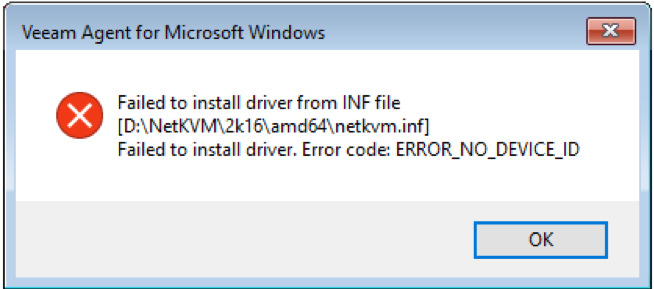
When performing a Bare Metal Recovery, storage or network devices are not visible in the system, and when attempting to load device drivers, the following error occurs:
Failed to install driver from INF file
Failed to install driver. Error code: ERROR_NO_DEVICE_ID
Solution
Verify Correct Driver
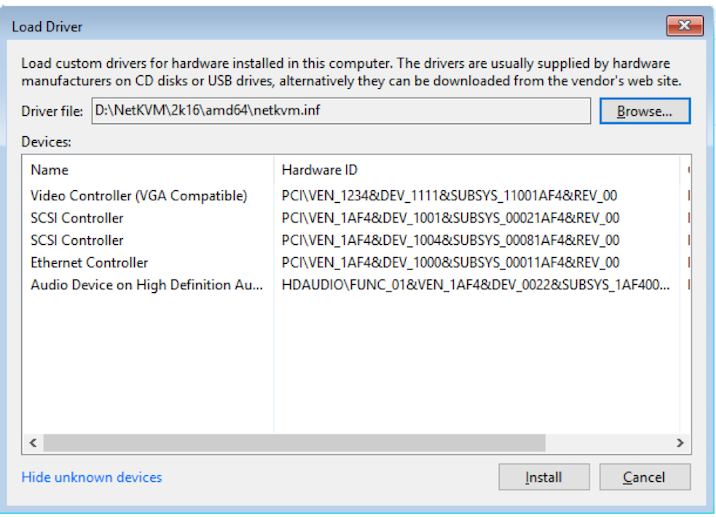
Ensure that the *.inf driver file is correct and contains DEVICE_ID entries that match your device.
- Select the Tools option in the Recover Media environment.
- Select Load Driver.
- Within the Load Driver dialog box, click “Show unknown devices.”
- Review the list of DEVICE_IDs.
Manually Load Driver
- Close the Load Driver window.
- Click the Command Prompt option.
- Use the following command to load the driver:
drvload X:\path\to\\driver\file.inf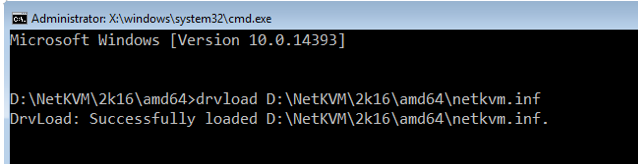
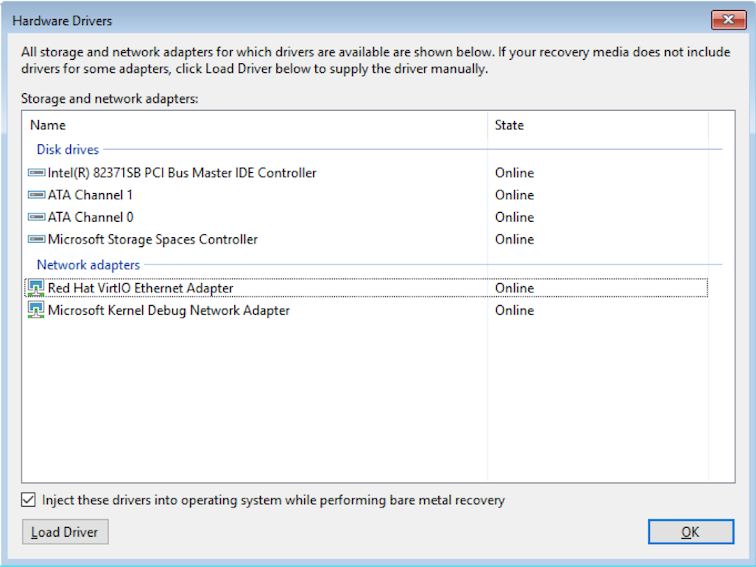
Verify That Drivers Load and Devices are Available
After loading the drivers, the storage or network devices should now be available, as shown in the example below:
If this KB article did not resolve your issue or you need further assistance with Veeam software, please create a Veeam Support Case.
To submit feedback regarding this article, please click this link: Send Article Feedback
To report a typo on this page, highlight the typo with your mouse and press CTRL + Enter.
Spelling error in text

Thank you!
Your feedback has been received and will be reviewed.
Oops! Something went wrong.
Please, try again later.
You have selected too large block!
Please try select less.
KB Feedback/Suggestion
This form is only for KB Feedback/Suggestions, if you need help with the software open a support case
Thank you!
Your feedback has been received and will be reviewed.
Oops! Something went wrong.
Please, try again later.