- Veeam Support Knowledge Base
- USB Device is Not Backed Up by Veeam Agent for Microsoft Windows
USB Device is Not Backed Up by Veeam Agent for Microsoft Windows
| KB ID: | 3009 |
| Product: | Veeam Agent for Microsoft Windows | 5.0 | 6.0 | 6.1 | 6.2 | 6.3 | 6.3.1 | 6.3.2 | 6.3.3 | 13 | 13.1 |
| Published: | 2019-09-24 |
| Last Modified: | 2025-08-05 |

Cheers for trusting us with the spot in your mailbox!
Now you’re less likely to miss what’s been brewing in our knowledge base with this weekly digest

Oops! Something went wrong.
Please, try again later.
Challenge
Cause
Due to limitations within the Microsoft VSS functionality, creating a shadow copy of a removable device, such as a USB stick or a memory card, is not supported.
This limitation is documented in the Veeam Agent for Microsoft Windows User Guide:
USB sticks and SD cards are not supported [as a backup source].
Solution
Behavior by Design (based on OS limitation)
This is behavior by design, based on the Microsoft VSS limitation discussed in the Cause section.
Verify Drive Type
To verify the drive's type, use the following command:
Get-WmiObject -Class Win32_LogicalDisk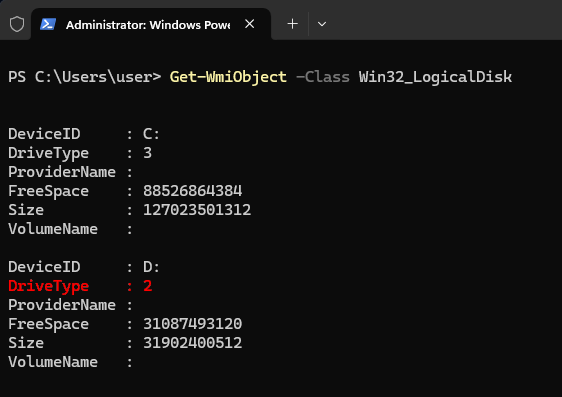
More Information
Remember that a successful backup is not guaranteed even if a memory card or flash drive is recognized as an external drive.
DriveType Values
| Name | Value | Description |
| Unknown | 0 |
The type of drive is unknown. |
| NoRootDirectory | 1 |
The drive does not have a root directory. |
| Removable | 2 |
The drive is a removable storage device, such as a USB flash drive. |
| Fixed | 3 |
The drive is a fixed disk. |
| Network | 4 |
The drive is a network drive. |
| CDRom | 5 |
The drive is an optical disc device, such as a CD or DVD-ROM. |
| Ram | 6 |
The drive is a RAM disk. |
If this KB article did not resolve your issue or you need further assistance with Veeam software, please create a Veeam Support Case.
To submit feedback regarding this article, please click this link: Send Article Feedback
To report a typo on this page, highlight the typo with your mouse and press CTRL + Enter.
Spelling error in text

Thank you!
Your feedback has been received and will be reviewed.
Oops! Something went wrong.
Please, try again later.
You have selected too large block!
Please try select less.
KB Feedback/Suggestion
This form is only for KB Feedback/Suggestions, if you need help with the software open a support case
Thank you!
Your feedback has been received and will be reviewed.
Oops! Something went wrong.
Please, try again later.