- Veeam Support Knowledge Base
- Veeam Explorer for Microsoft Exchange Error: "Incompatible Veeam Backup for Office 365 server version"
Veeam Explorer for Microsoft Exchange Error:
"Incompatible Veeam Backup for Office 365 server version"
| KB ID: | 3028 |
| Product: |
Veeam Backup & Replication | 10 | 11 | 12 | 12.1 | 12.2 | 12.3 | 12.3.1 | 12.3.2 | 13 | 13.1 Veeam Backup for Microsoft 365 | 6.0 | 7.0 | 7a | 8 | 8.1 | 8.2 | 8.3 | 8.4 | 8.5 | 8.6 Veeam Backup for Microsoft Office 365 | 4.0 | 5.0 |
| Published: | 2019-10-22 |
| Last Modified: | 2026-08-14 |

Cheers for trusting us with the spot in your mailbox!
Now you’re less likely to miss what’s been brewing in our knowledge base with this weekly digest

Oops! Something went wrong.
Please, try again later.
Challenge
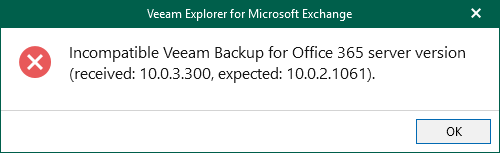
When attempting to restore data using Veeam Explorer for Microsoft Exchange, SharePoint, OneDrive for Business, or Teams, the following error occurs:
Incompatible Veeam Backup for Office 365 server version (received: X.X.X.XXX, expected: Y.Y.Y.YYY).
Cause
This issue occurs because the version of the installed Veeam Explorer application is not compatible with the version of Veeam Backup for Microsoft 365 that it connects to.
Possible scenarios:
- Veeam Backup for Microsoft 365 and Veeam Backup & Replication are installed on the same server.
As documented in KB4325, Veeam Backup for Microsoft 365 and Veeam Backup & Replication each deploy their own version of the Veeam Explorers, so installing incompatible versions of the two products on a single server leaves the Veeam Explorers unable to connect to Veeam Backup for Microsoft 365. - A tenant attempts to restore data from backups hosted by a service provider.
In this scenario, the Veeam Explorers installed on the tenant's Veeam Backup Server connect through Veeam Cloud Connect to the Veeam Backup for Microsoft 365 server on the service provider side. The Veeam Explorers on the tenant side were deployed from a different release of Veeam Backup for Microsoft 365 than the release running on the service provider side. Build differences within the same release do not cause this issue.
This most often occurs after a service provider has upgraded Veeam Backup for Microsoft 365 to a new release and the tenants are still running the Veeam Explorers deployed from the previous release.
Solution
Shared Server Deployment Scenario
Check Compatibility
Review KB4325 and ensure that only compatible versions of Veeam Backup for Microsoft 365 and Veeam Backup & Replication are installed on the same server.
Solution: Upgrade Veeam Backup for Microsoft 365
If Veeam Backup & Replication was upgraded and KB4325 lists a compatible version of Veeam Backup for Microsoft 365 as available:
- Upgrade Veeam Backup for Microsoft 365 to the version listed as compatible with the installed version of Veeam Backup & Replication.
Workaround: Install Compatible Veeam Explorers on Another Server
If Veeam Backup & Replication was upgraded and KB4325 does not list a compatible version of Veeam Backup for Microsoft 365 as available:
- On a different machine, install the same version of Veeam Backup for Microsoft 365 that is already installed.
- On that remote machine, launch the Veeam Explorer that is needed to perform the restore.
- From within the Veeam Explorer application, connect to the original Veeam Backup for Microsoft 365 server.
- Veeam Explorer for Microsoft Exchange > Adding Veeam Backup for Microsoft 365 Server
- Veeam Explorer for Microsoft SharePoint > Adding Veeam Backup for Microsoft 365 Server
- Veeam Explorer for Microsoft OneDrive for Business > Adding Veeam Backup for Microsoft 365 Server
- Veeam Explorer for Microsoft Teams > Adding Veeam Backup for Microsoft 365 Server
Tenant Restore from Service Provider Scenario
Solution: Update the Veeam Explorers on the Tenant Server
If the error occurs when data is restored from backups hosted by a service provider through Veeam Cloud Connect:
- Identify the release of Veeam Backup for Microsoft 365 that is running on the service provider side.
- In the error message, the
receivedvalue is the build reported by the service provider's Veeam Backup for Microsoft 365 server, and theexpectedvalue is the build of the Veeam Explorers currently installed on the tenant server. - Because the build is reported as it appears in logs, use the Build in Logs column in KB4106 to identify the corresponding release. The service provider can also confirm the exact build.
- In the error message, the
- Review KB4325 to confirm that the version of Veeam Backup & Replication installed on the tenant server supports the Veeam Explorers from that release of Veeam Backup for Microsoft 365. If it does not, Veeam Backup & Replication must be upgraded on the tenant server first.
- On the tenant server, install the Veeam Explorers from the same release of Veeam Backup for Microsoft 365 that the service provider is running. The Veeam Explorers can be installed from the Veeam Backup for Microsoft 365 ISO for that release, as described in Installing Veeam Explorers, or from the individual .msi packages provided by the service provider.
If this KB article did not resolve your issue or you need further assistance with Veeam software, please create a Veeam Support Case.
To submit feedback regarding this article, please click this link: Send Article Feedback
To report a typo on this page, highlight the typo with your mouse and press CTRL + Enter.
