Veeam Backup & Replication server does not have Virtual Machine Manager Administrator Console installed.
| KB ID: | 4351 |
| Product: | Veeam Backup & Replication |
| Published: | 2022-09-12 |
| Last Modified: | 2022-09-13 |

Get weekly article updates

Challenge
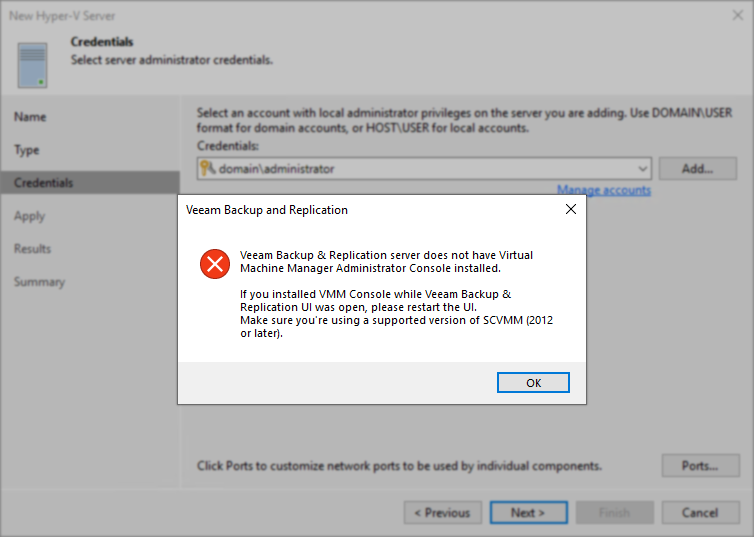
When attempting to add Microsoft Hyper-V Servers to Veeam Backup & Replication the following error is displayed:
Veeam Backup & Replication server does not have Virtual Machine Manager Administrator Console installed.
If you installed VMM Console while Veeam Backup & Replication UI was open, please restart the UI.
Make sure you're using a supported version of SCVMM (2012 or later).
Cause
This error occurs for either of the following reasons:
- Prerequisite software necessary for adding a System Center Virtual Machine Manager (SCVMM) server to Veeam Backup & Replication is not installed on the Veeam Backup Server.
or
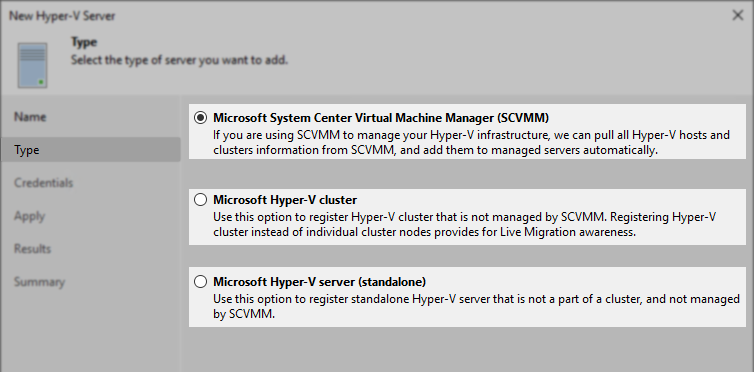
- The wrong server type was selected on the 'Type' tab.
Solution
If adding an actual System Center Virtual Machine Manager (SCVMM) server
- SCVMM Admin UI must be installed on the backup server. Otherwise, you will not be able to add SCVMM servers to the backup infrastructure.
- SCVMM console version must match the management server version.
- Check firewall configuration to ensure traffic from the Veeam Backup & Replication server can reach the SCVMM server.
Review: Used Ports
If there is no System Center Virtual Machine Manager (SCVMM) server in the environment
- Return to the Type tab of the New Hyper-V Server wizard and select either Hyper-V Cluster or Hyper-V Standalone.
More Information
- When adding a Hyper-V server, the server type Microsoft System Center Virtual Machine Manager is selected by default on the Type tab. The correct server type must be chosen.
- It is optional to add SCVMM servers to Veeam Backup & Replication; Hyper-V hosts or clusters that SCVMM manages may be added directly to Veeam Backup & Replication.
If this KB article did not resolve your issue or you need further assistance with Veeam software, please create a Veeam Support Case.
To submit feedback regarding this article, please click this link: Send Article Feedback
To report a typo on this page, highlight the typo with your mouse and press CTRL + Enter.
Spelling error in text

KB Feedback/Suggestion
This form is only for KB Feedback/Suggestions, if you need help with the software open a support case